Mobile-first web app · Field data collection
RAR-AI
A risk-analysis report filled in on a phone during the site visit, with the draft saved on the device, even without signal, and a rules engine that computes the risk level automatically
Private project — no public link
- Client
- Institutional security · public sector
- Role
- Full-stack Software Engineer
- Year
- 2026
- Technologies
- Next.js 16
- React 19
- TypeScript
- Tailwind CSS 4
- Zustand
- Zod
- IndexedDB
- Web Speech API


Context
Mobile-first web app for institutional-security analysts to record site visits and produce the Risk Analysis Report of Areas and Facilities (RAR-AI) in the official template — the “AI” in the name comes from the Portuguese for Areas and Facilities (Áreas e Instalações), not from artificial intelligence. Data is collected on a phone, in the field, in places with an unstable connection. Behind the form sits a substantial body of domain logic, kept confidential: the analysis methodology and business rules are not described here, and the screens show a fictitious report.
Challenge
Turn a long official template — several analysis axes, mandatory checklists and a risk calculation — into a flow that is fast to fill in on a phone, with no data loss when the connection drops and without analysts having to calculate separately or retype what they have already recorded.
Results
- steps from header to review, navigable in any order
- 11
- of field data (drafts, photos and audio) kept on the device, with no server
- 100%
- touch targets on the main controls of the custom design system
- 44 px
Key deliverables
- 01Built a mobile-first 11-step form with Next.js 16, React 19 and TypeScript, with free navigation, per-step progress and open-items list, and a report generated in the official template, ready to print or save as PDF.
- 02Implemented a deterministic, confidential rules engine in TypeScript: it computes the risk level automatically, builds the mandatory checklist based on the unit's profile and generates the conclusion draft from the recorded vulnerabilities and recommendations.
- 03Created a mobile-first design system in Tailwind CSS 4 — semantic color tokens, buttons, selection chips on native radios, a stepper and fields, with 44 px touch targets on the main controls — reused across all analysis axes.
- 04Integrated voice notes into every long text field with MediaRecorder and the Web Speech API: the audio is saved and, where the browser supports it, speech is transcribed into the field in Brazilian Portuguese.
- 05Implemented local persistence with Zustand (localStorage) and IndexedDB (idb-keyval) for drafts, photos and audio, plus JSON package export/import validated by Zod, so analysts keep working without signal, pick up where they left off and resume the report on another device, with no backend.
Screens and components
Field collection
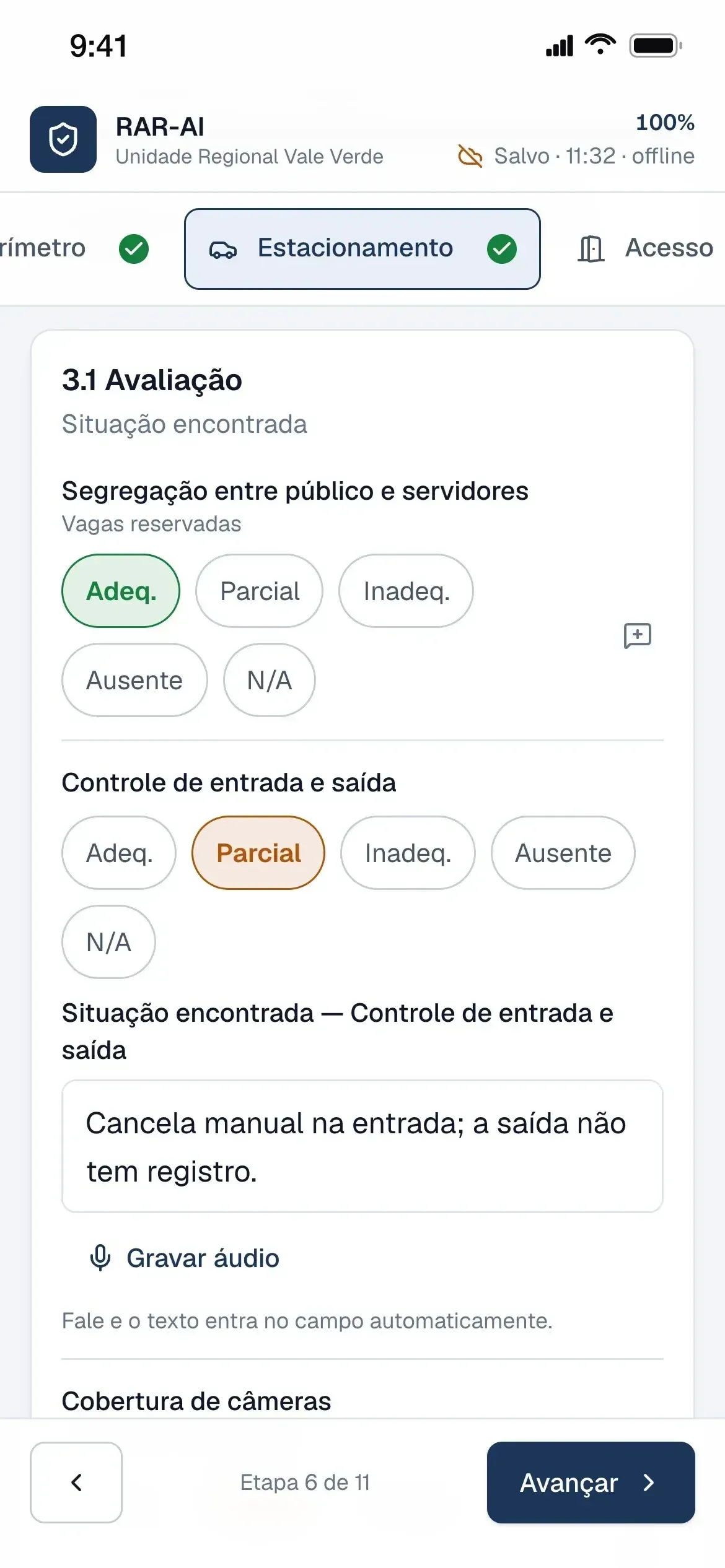
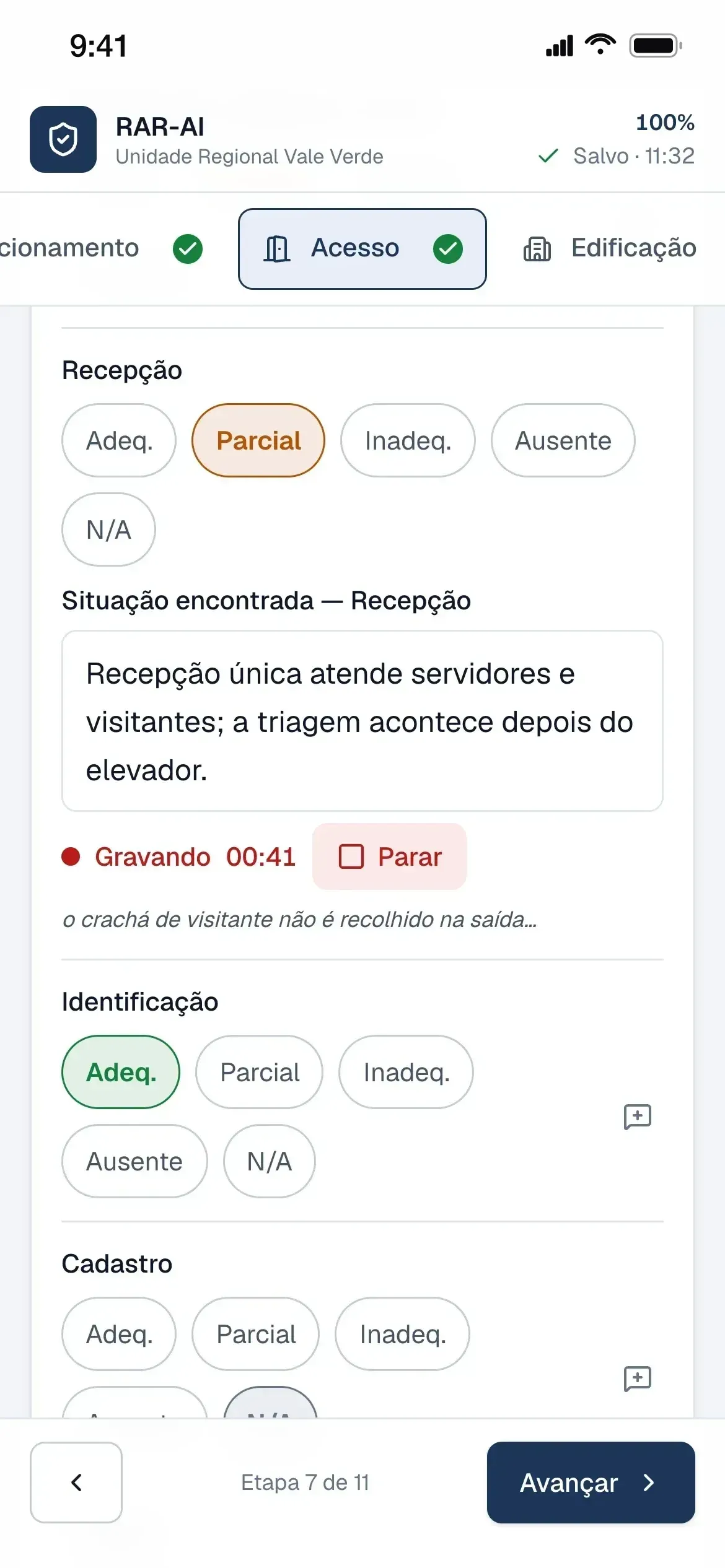
Without signal, the indicator switches to offline and filling in continues, with each item rated in a single tap. Each vulnerability gets numbered photos, and the voice note is kept as audio, with partial transcription where the browser supports it.
The same codebase on a computer
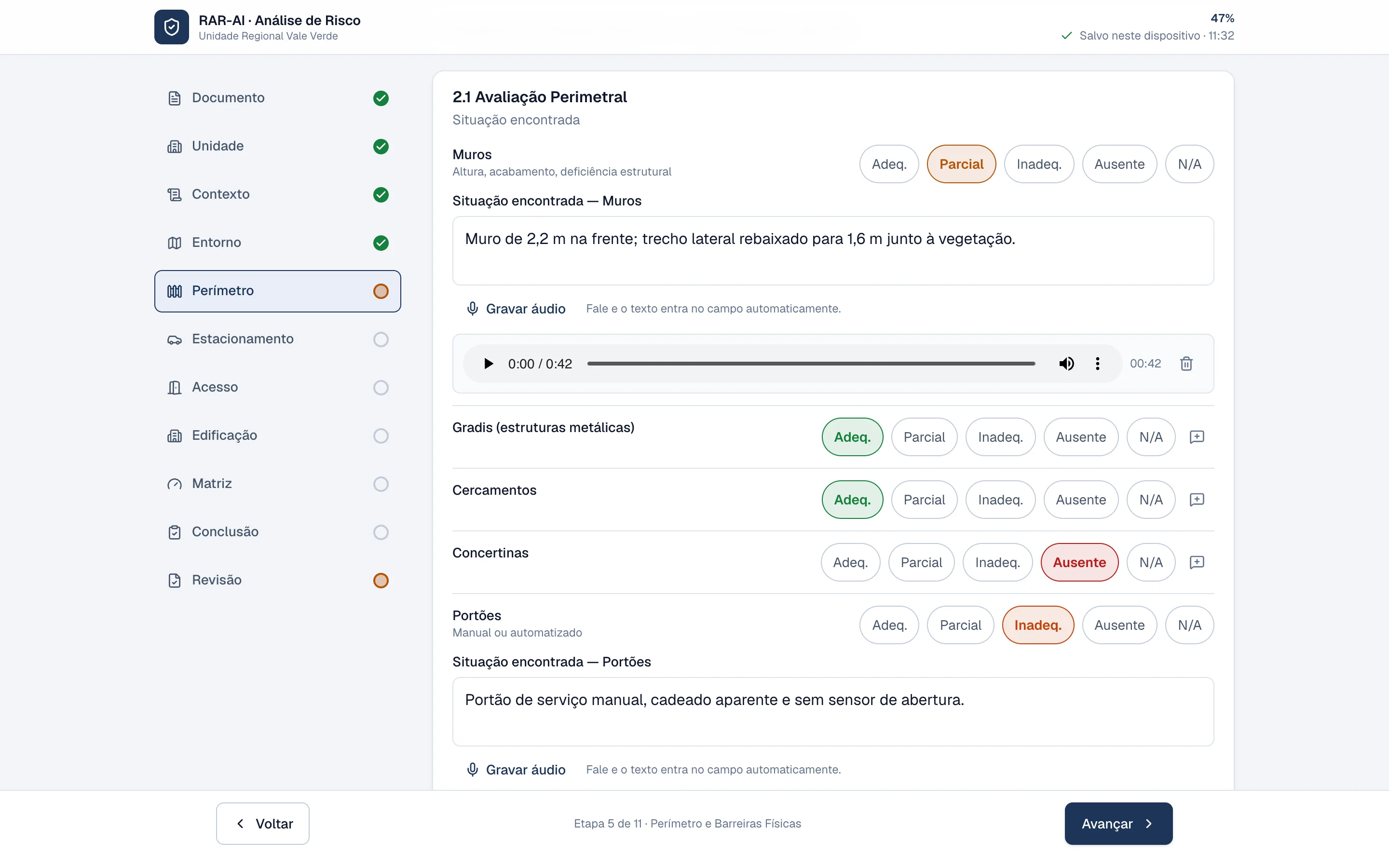
On a computer, the same codebase adds a sidebar with each step's status: complete, in progress or not started.
Review and transfer
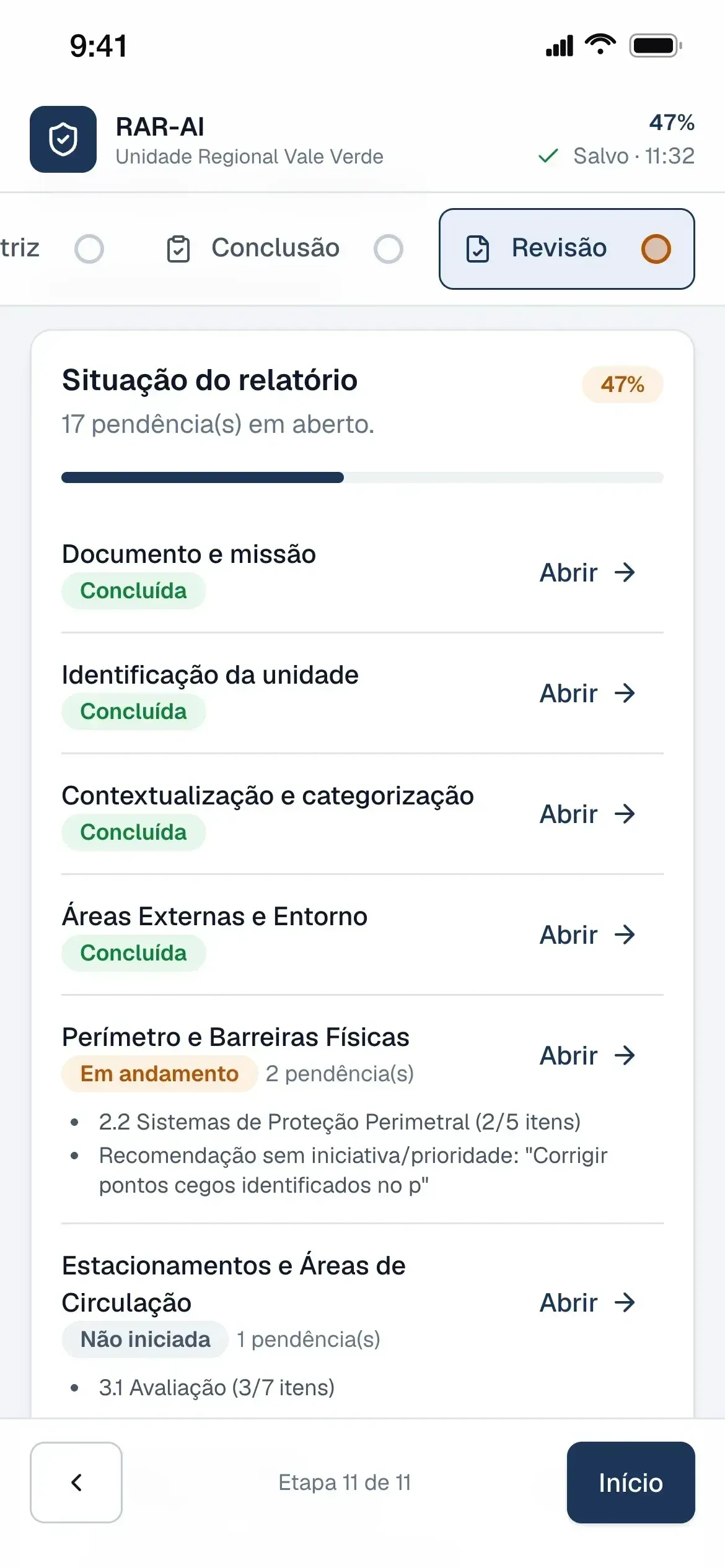
The review lists what is missing in each step, with a shortcut to open the step and finish it. With no server, the report travels between devices as a JSON package, with or without photos and audio.
Features and the pains they solve
Every feature was born from a real operational problem.
01
Offline saving on the device
- Pain
- Data is collected in places with an unstable connection. Any network dependency mid-inspection risks losing what has already been recorded.
- Solution
- Every change is written immediately: the report goes to localStorage and photos and audio go to IndexedDB, to stay clear of localStorage's ~5 MB limit. An indicator shows “Saved · time” and flags when the device is offline, without interrupting the work, and the report reopens where the analyst left off.
Impact: Saved on every change, no save button
02
Confidential rules engine
- Pain
- The report depends on extensive domain logic — risk level, mandatory checklists and a conclusion consistent with the findings — which, outside the app, required a separate calculation, the analyst's memory and retyping.
- Solution
- A deterministic TypeScript rules engine computes the risk level automatically, builds the mandatory checklist based on the unit's profile and generates the conclusion draft from the recorded vulnerabilities and recommendations. The methodology and rules are confidential and are not detailed here.
Impact: Risk calculation covered by automated tests
03
Steps with status and open items
- Pain
- Analysts walk the unit in the order the site dictates, not the template's, and in a report with dozens of fields it is easy to hand in something incomplete without noticing.
- Solution
- The template became 11 steps that open in any order, with a step bar showing each status and listing specific open items (e.g. “Vulnerability 02: description, impact and evidence”). The review gathers them all with a shortcut to each step and warns before the report is generated.
Impact: Review is marked complete only when the other 10 steps are
04
Voice notes with transcription
- Pain
- There are many long text fields, and typing on a phone during the visit is slow.
- Solution
- Every long text field has a recorder: the audio is kept as a note, with playback and “Insert into text”. Where the browser offers the Web Speech API and there is a connection, speech is transcribed into the field in Brazilian Portuguese.
Impact: Voice on every long text field, from the assessment to the conclusion
05
Numbered photo evidence
- Pain
- The template requires each vulnerability to point to its photo evidence, numbered in the report.
- Solution
- Photos come from the rear camera or the gallery, are compressed and numbered automatically (“Image 01”), and can be reused for another vulnerability. With no photo and no “evidence not applicable”, the vulnerability stays an open item.
06
Standardized assessment of the axes
- Pain
- The official template asks for a rating and observed situation for dozens of items; on a phone that means constant scrolling and lookups.
- Solution
- All axes follow the same pattern: observed situation per item and, for control items, a one-tap rating, with the assessment parameters at hand; then vulnerabilities recorded from the rated items themselves and recommendations picked from a predefined list.
07
Pre-drafted conclusion
- Pain
- The conclusion repeats vulnerabilities and measures already recorded in the axes, which forced analysts to retype the same content.
- Solution
- The conclusion fields that repeat what was recorded in the axes have a button that inserts an editable draft built by rules from that record. There is no AI involved: the text comes only from what the analyst recorded.
08
Official report as PDF
- Pain
- The final report combines tables, results and photo evidence that would otherwise come from separate notes and files.
- Solution
- The report page assembles the document following the official template's structure from what was filled in, with the rules engine's results and the photo evidence, plus a dedicated print style for Print → Save as PDF.
09
Transfer package (.json)
- Pain
- Analysts collect on the phone but review and finish on a computer, or hand the visit to a colleague. With no server, the draft would be stuck on the device where it started.
- Solution
- The report is exported as a JSON package, with or without embedded photos and audio, and imported on another device. Import is validated by the same Zod schema as the state and points to the incompatible field when a file doesn't fit.