Admissions and selection portal · Public sector / Education
Admissions Portal
Applications for selection processes and calls for applications across the State University of Bahia's 27+ campuses, brought into a single portal
- Client
- State University of Bahia
- Role
- Front-end Developer · Avansys Tecnologia (co-lead for the front end and integrations)
- Year
- 2022 – 2023
- Technologies
- Vue.js
- NestJS
- TypeScript
- FreeMarker (FTL)
Context
Public portal where the State University of Bahia, a multi-campus university with 27+ campuses, publishes calls for applications and selection processes — entrance exams, graduate programs, public service exams, scholarships and staff selections — and takes applications, with central sign-in on Keycloak. The system is maintained by the university's IT Department (GERINF); I worked on it from 2022 to 2023, through Avansys Tecnologia, as one of the technical leads. The screens and features on this page were taken from the live portal in September 2026 and may include changes made after my time on the project; my contribution is described under Key deliverables.
Challenge
The university's calls come from every campus and department and range from master's programs to student grants, from entrance exams to temporary hiring. The challenge was to bring applications from every campus into a single system: one address for applicants to find the call, follow deadlines and announcements and apply, with authentication through Keycloak.
Results
- of the university's campuses with selection and call applications in a single system
- 100%
- campuses served by the same admissions portal
- 27+
Key deliverables
- 01Unified admissions and selection applications for 100% of the university's campuses (27+) into a single system.
- 02Co-led the front-end and integrations as one of the system's technical leads.
- 03Built the front-end with Vue.js and Nuxt, integrated with the NestJS back-end (2022–2023).
- 04Created the Keycloak authentication flow screens with FTL (Apache FreeMarker Template Language) templates.
Screens and components
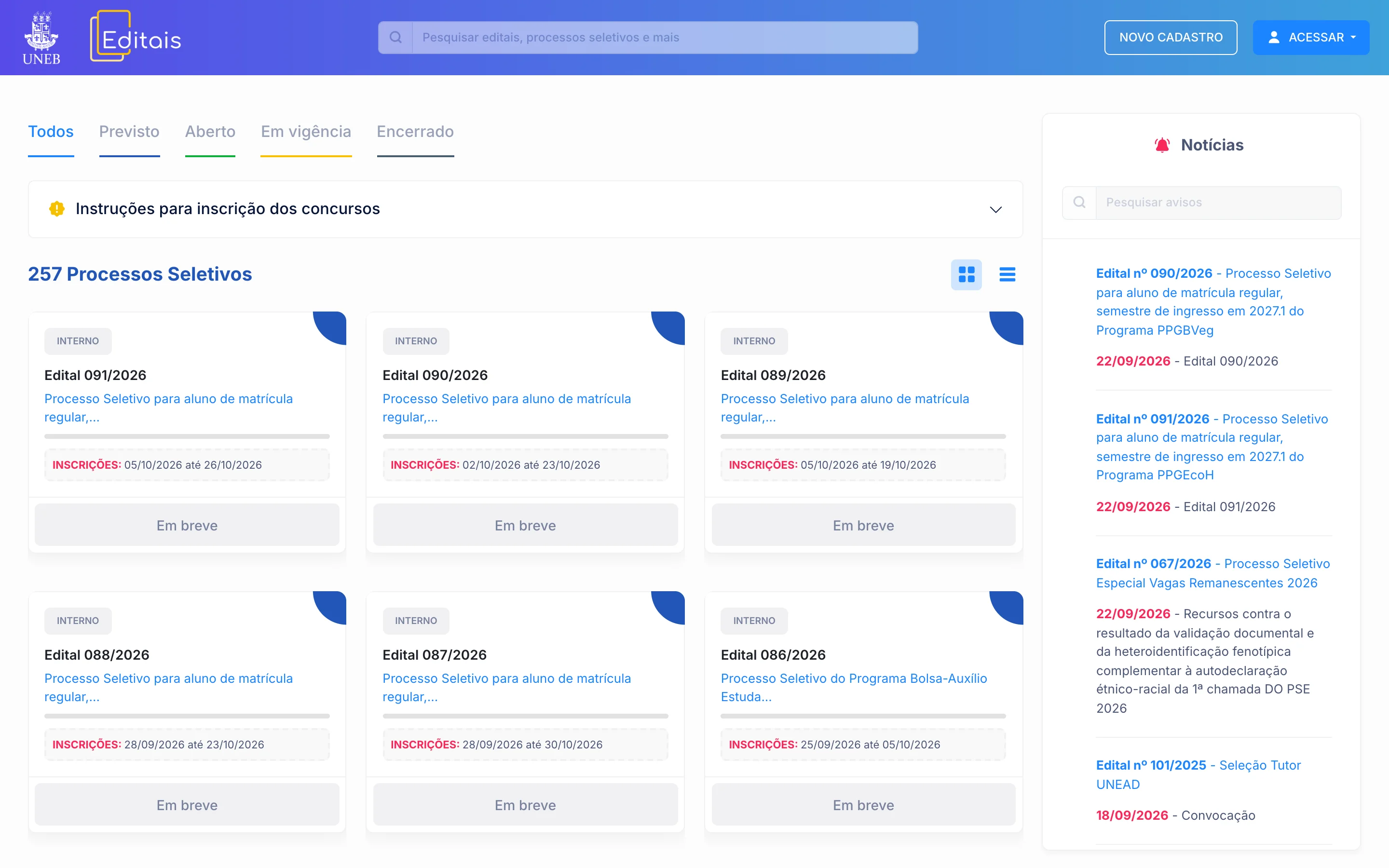
One portal for every campus
On the home page, selection processes from every campus sit in a single list, with status tabs and the news alongside.
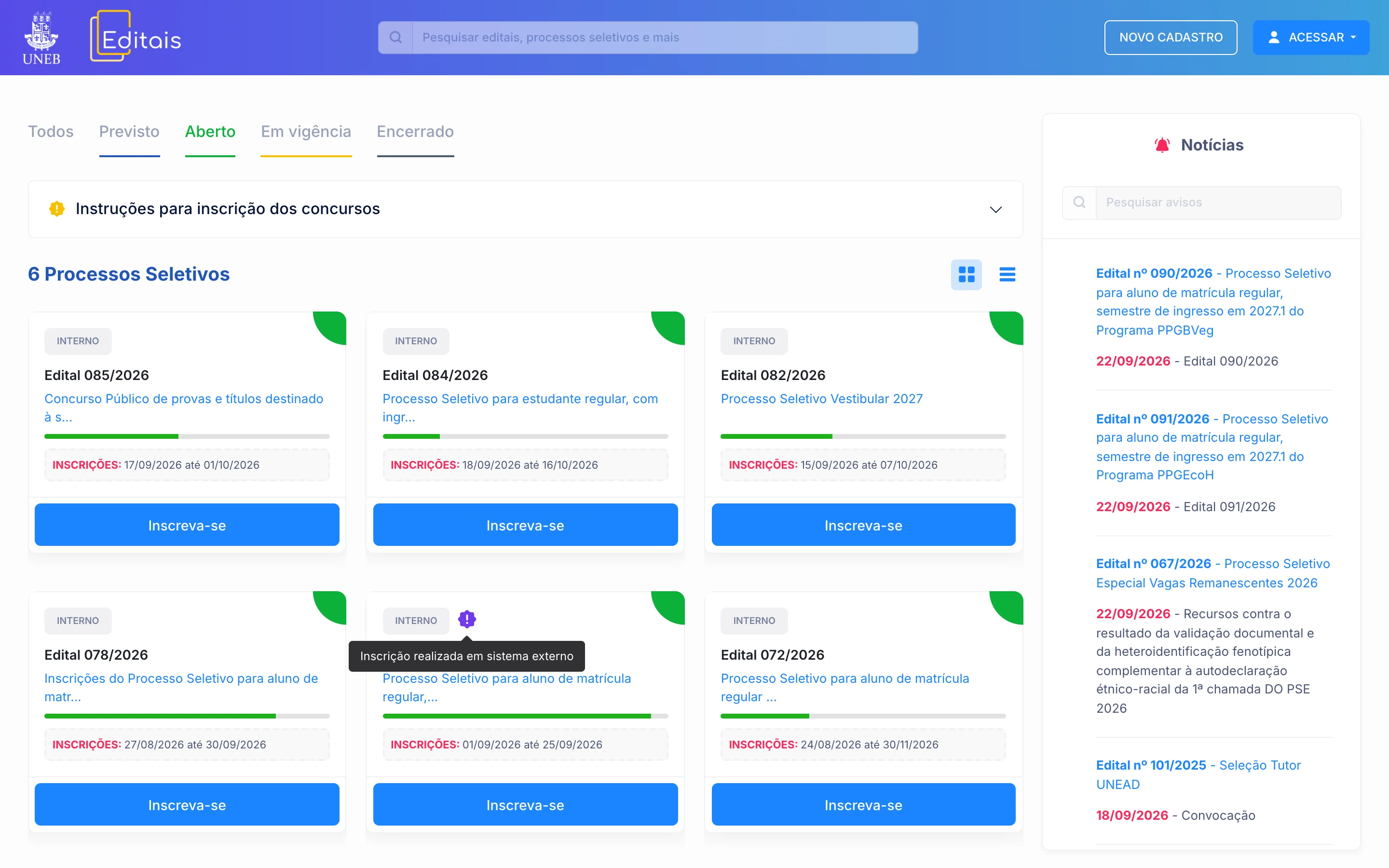
Deadline on the card
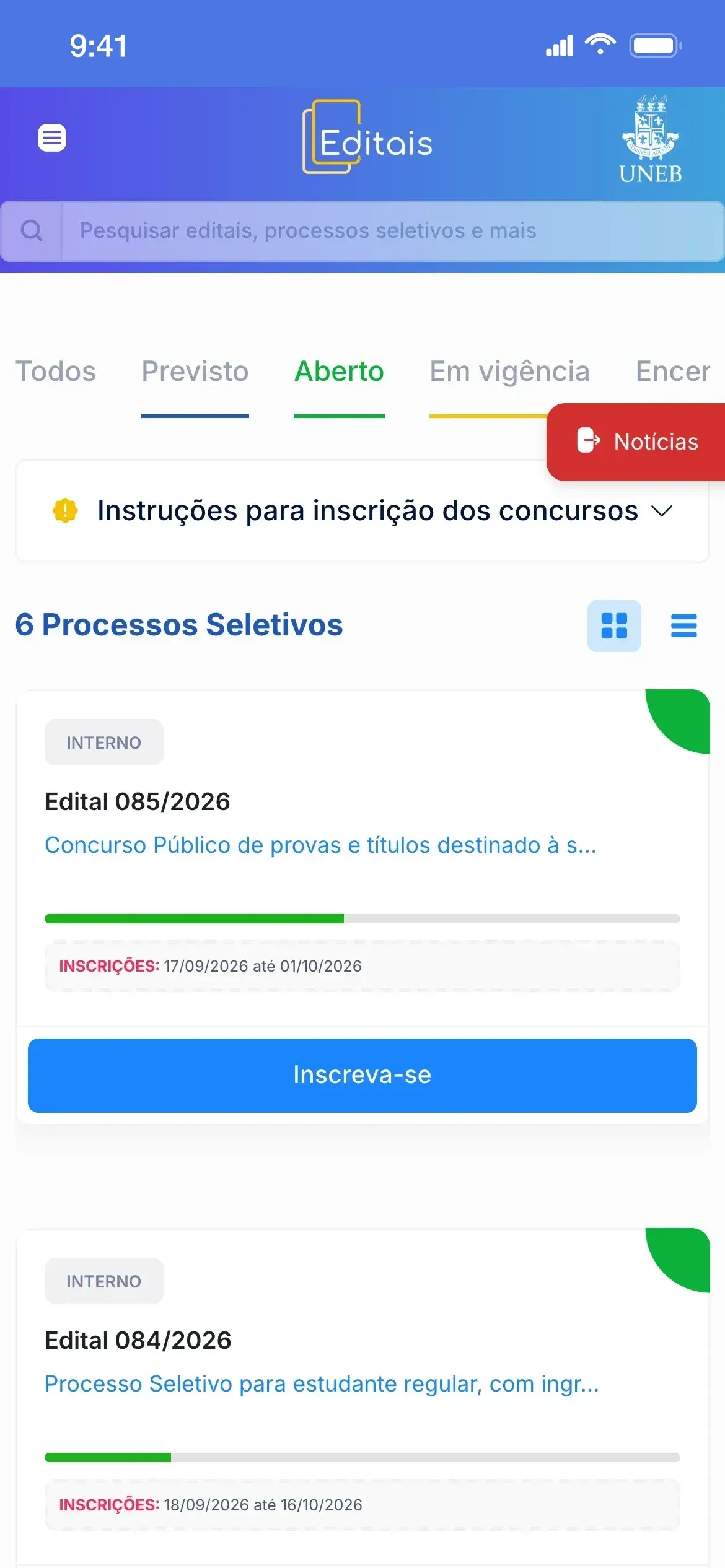
On the portal live today, the Open tab shows only what is accepting applications, with a deadline bar on each card and a notice when applications happen in another system.
The portal on phones
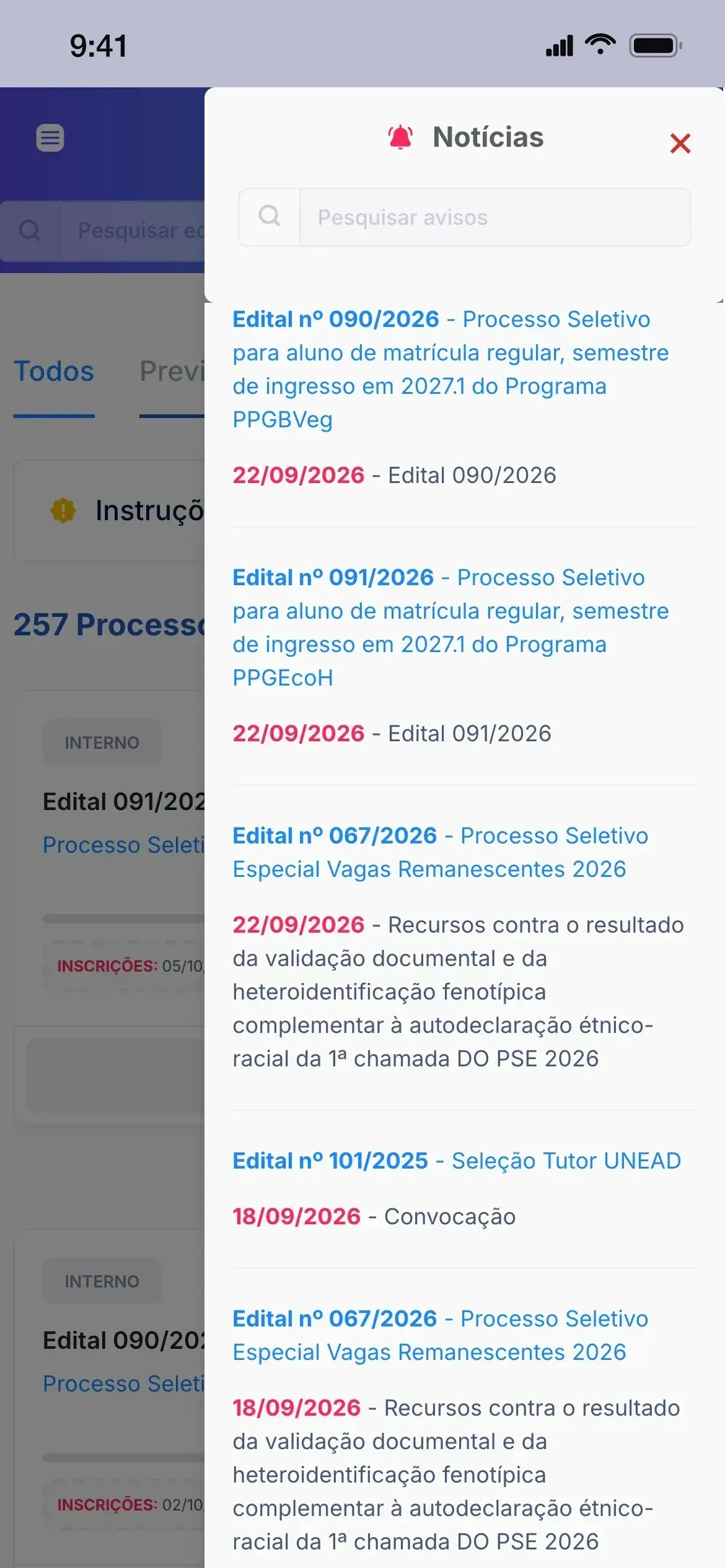
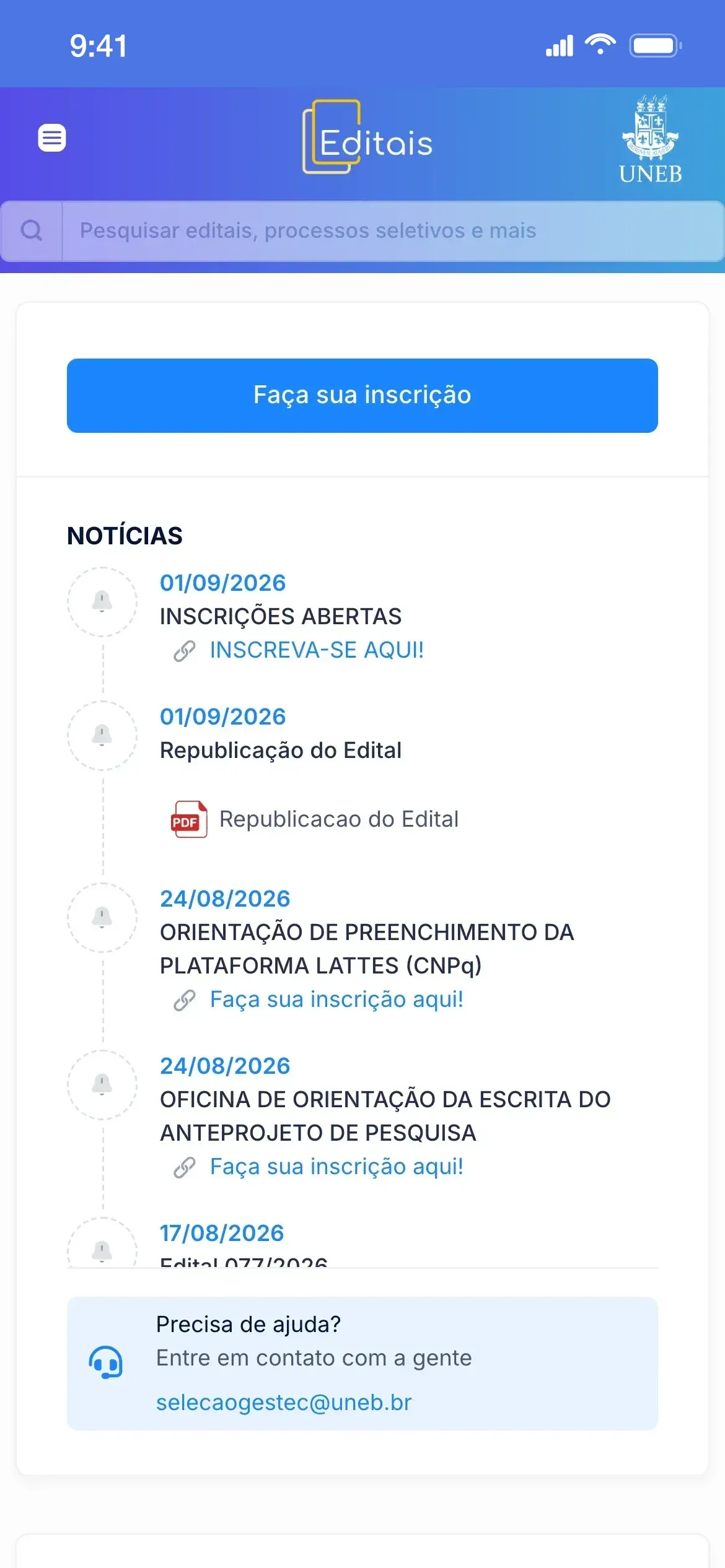
On phones, the status tabs scroll sideways and news from every call opens in a drawer with its own search, from a button pinned to the side. The call page opens with the application button and the news timeline.
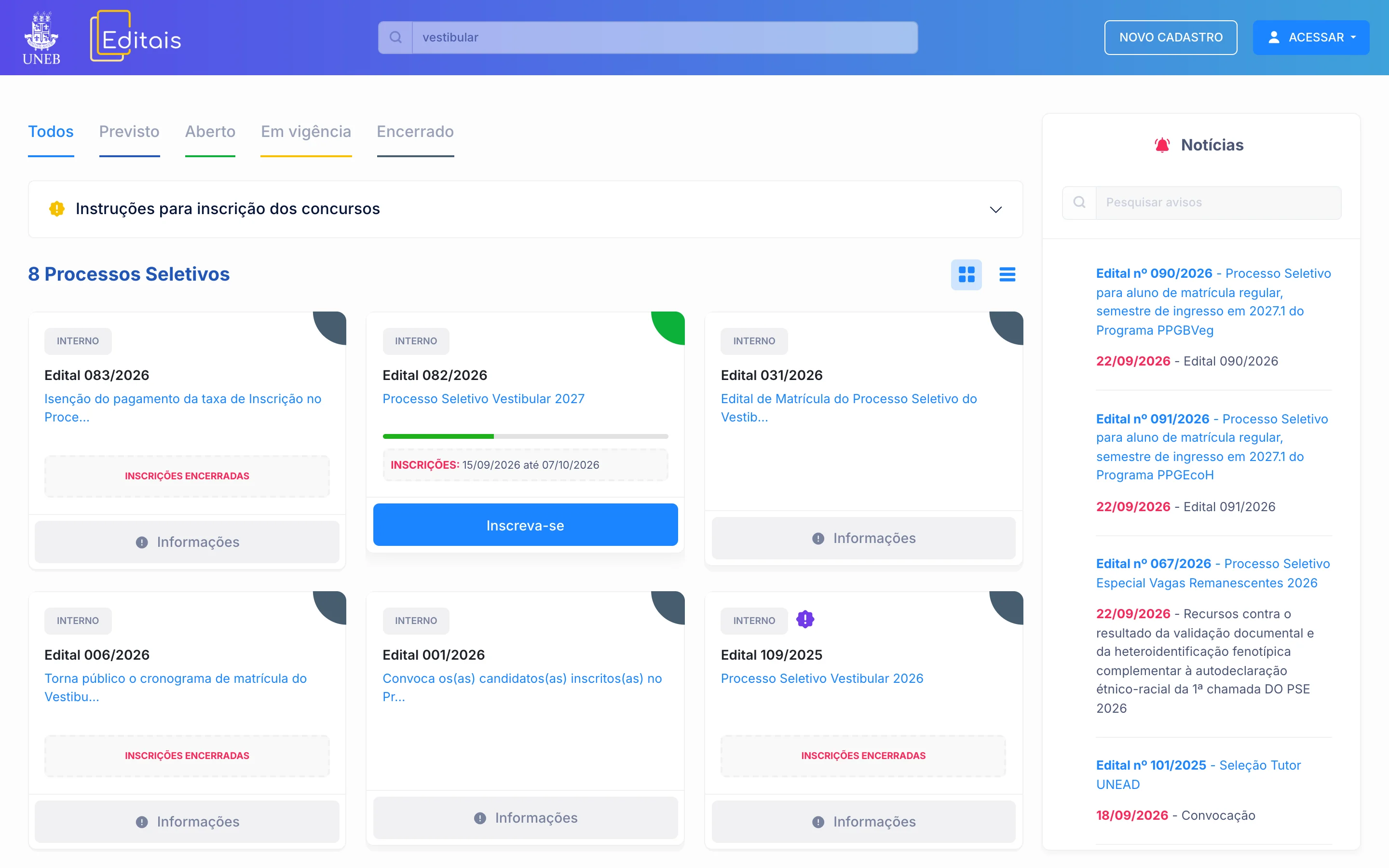
Search
On the All tab, search spans every status: the open entrance exam shows up alongside calls from previous years, each with the button for its stage.
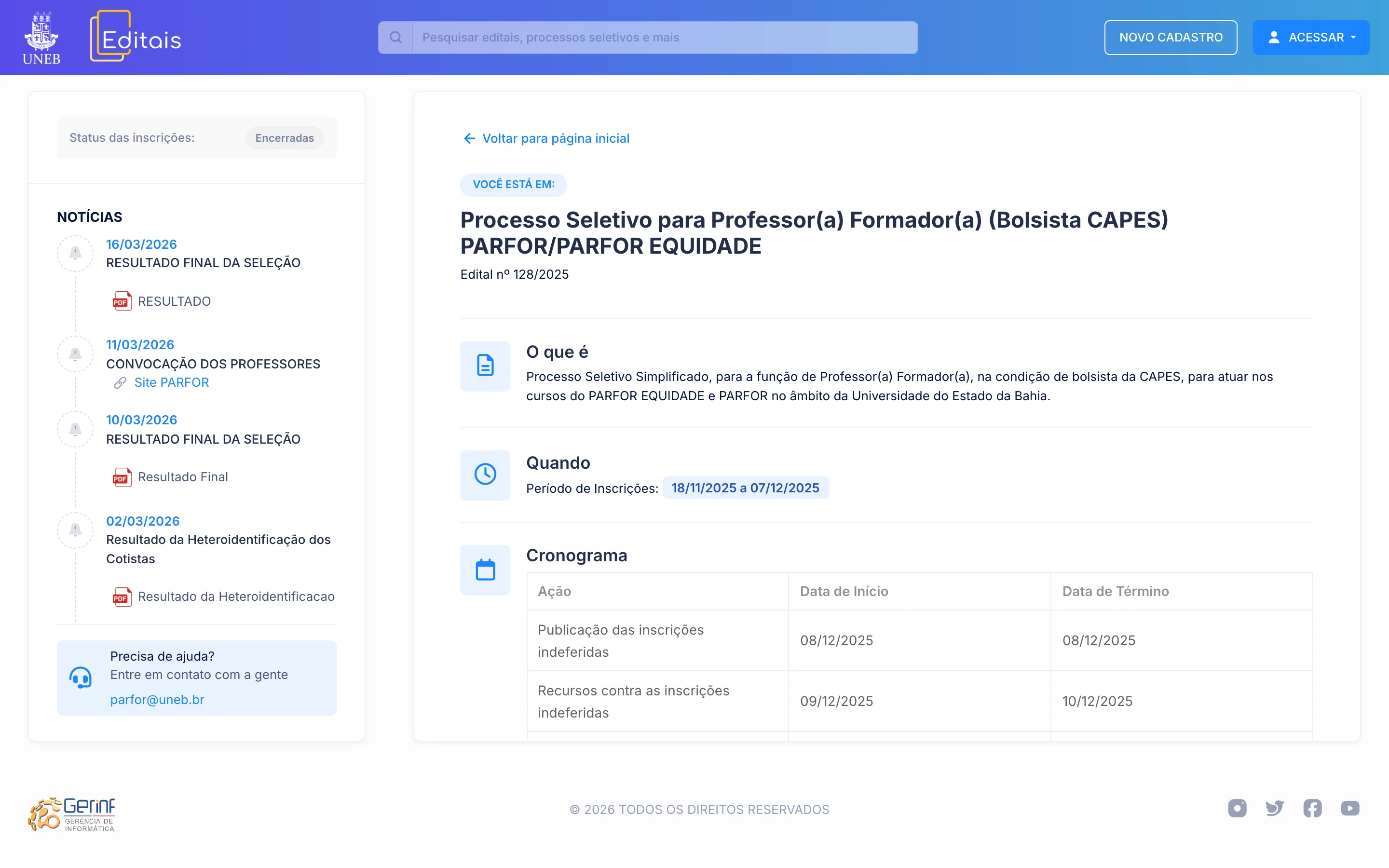
Call-for-applications page
Each call has its own page with description, period and the history of publications, from results to republished notices; this one also carries the schedule.
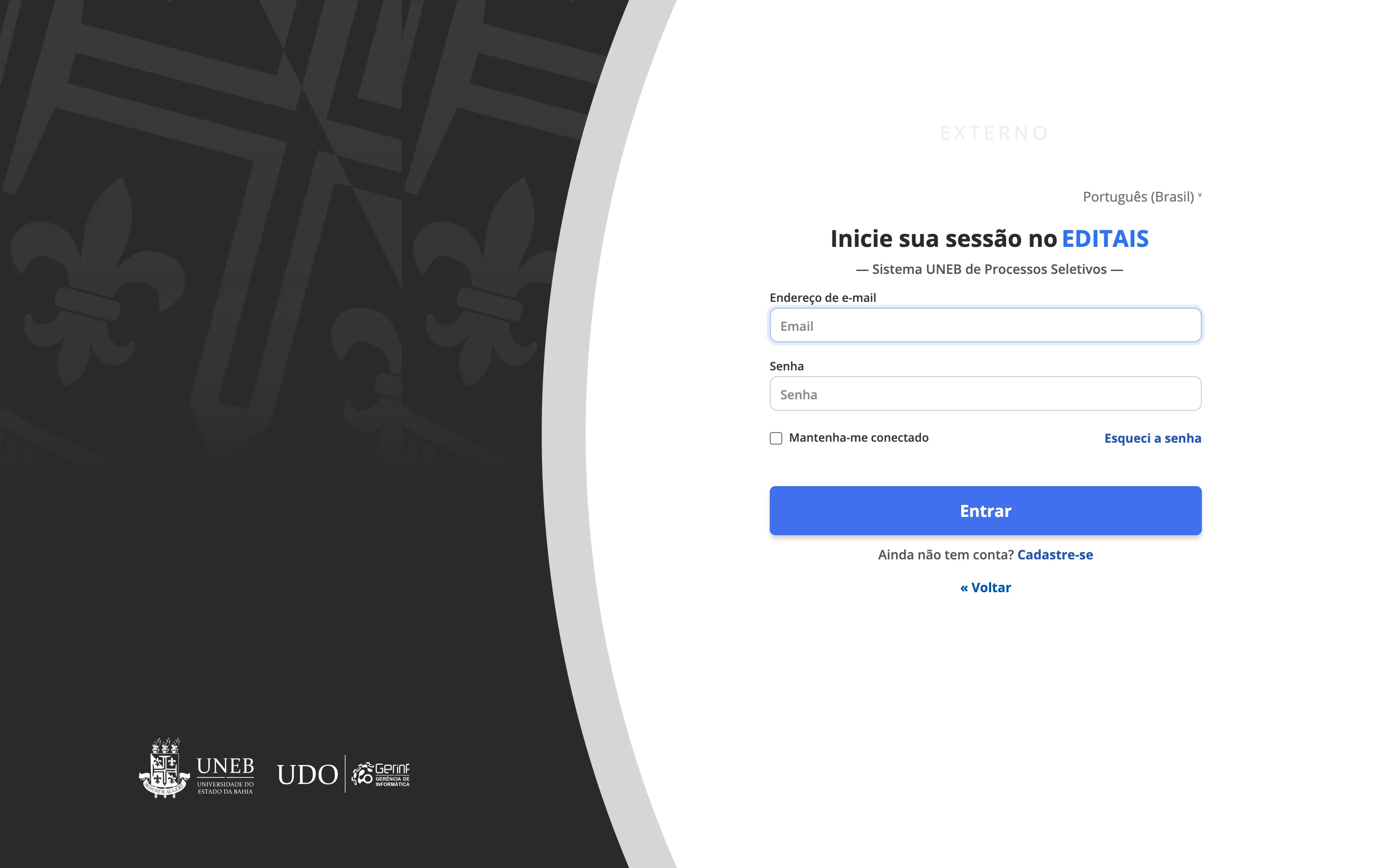
Applicant sign-in
Applicants sign in through Keycloak, on a screen with the university's branding; the Restricted Area has separate access.
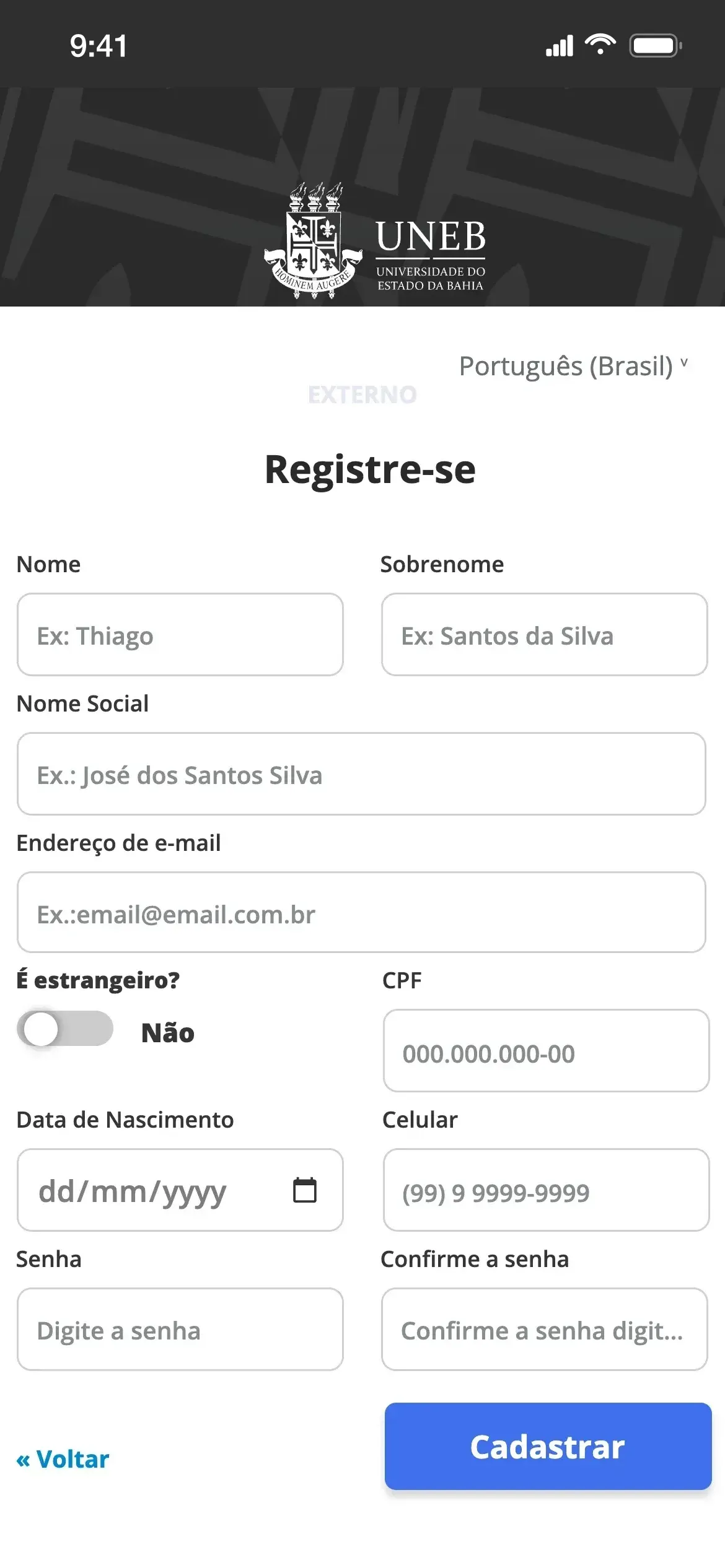
Applicant registration
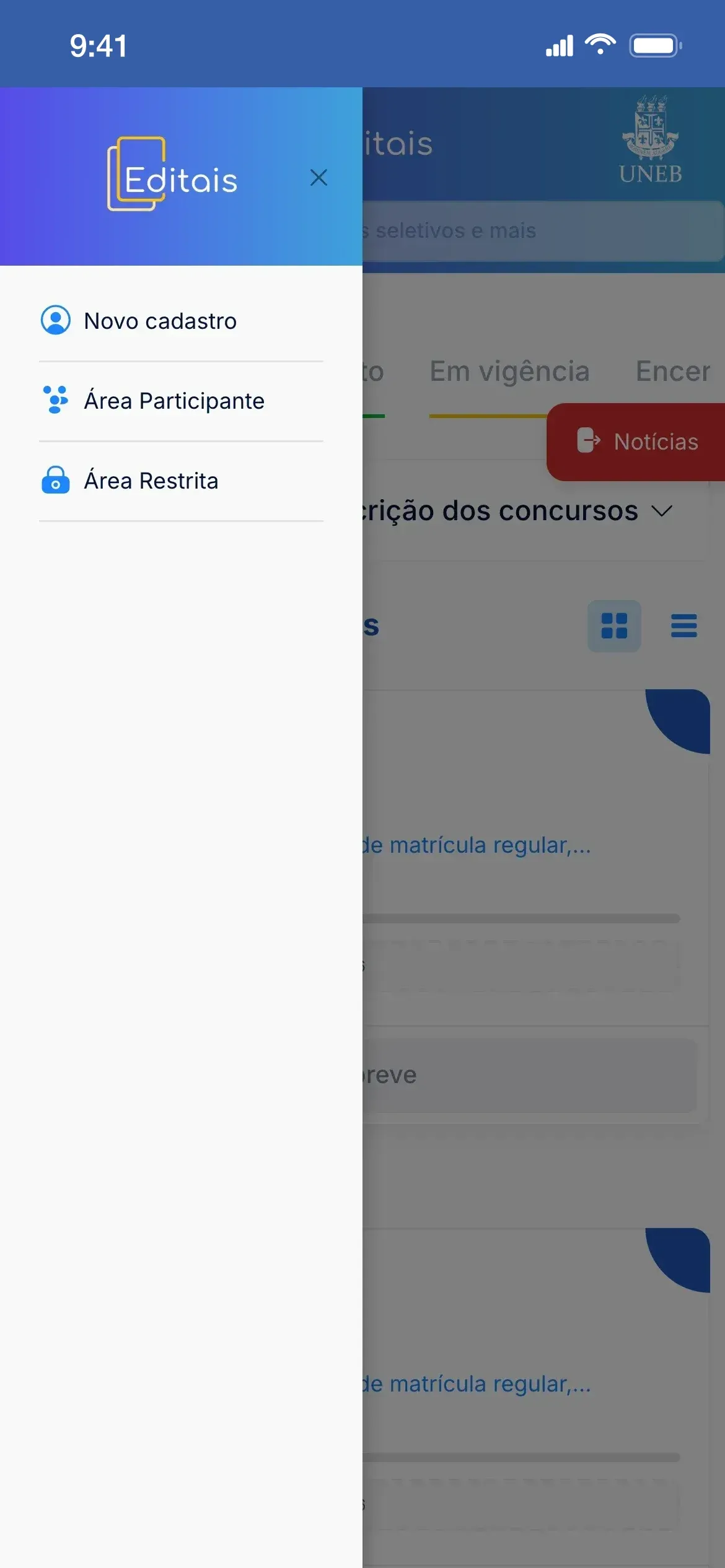
On phones, registration and both access areas live in the side menu. Registration asks for a social name and swaps the CPF field for a passport number when the foreign-national switch is on.
Features and the pains they solve
Features of the portal as it is live today (Sep 2026). The portal is maintained by GERINF and may have changed since my time (2022–2023); my contributions are listed under Key deliverables.
01
One portal for every campus
- Pain
- At a multi-campus university, departments on many campuses open their own selections. Without a shared address, applicants have to figure out which site or office published the call.
- Solution
- Calls from every campus and department go into the same public listing, with number, title, audience and application period. Calls opened by departments carry campus and department in their address, such as edital_c1_dedc_077_2026, from the Education Department on Campus I.
Impact: Calls from Campuses I, II, III and IV, among others, in the same list
02
Status tabs
- Pain
- With hundreds of published calls, what still takes applications gets mixed with what has closed, and applicants waste time opening calls past their deadline.
- Solution
- The Scheduled, Open, In force and Closed tabs filter the list, each with a color repeated on the corner of the cards, and the All tab shows everything. The card button follows the stage: Coming soon, Sign up or Information.
03
Deadline on the card
- Pain
- To know how long applications stay open, applicants would have to open the call and look for the period in the PDF.
- Solution
- Cards for upcoming, open and in-force calls show the application period and a bar that fills as time passes, so it is clear at a glance which calls just opened and which are about to close.
04
Search
- Pain
- Anyone looking for a specific process, such as the entrance exam, would have to page through more than a dozen list pages.
- Solution
- The header search filters the processes in the selected tab by the text typed (across every status on the All tab), and the news panel has its own field to search notices.
05
Call-for-applications page
- Pain
- Results, republished notices and summons come out over months; without a per-call history, applicants can miss a stage or an appeal deadline.
- Solution
- Each call has its own page with What it is, When, the news timeline with attached PDFs and links and the selection's contact email; when applications go through the portal itself, the page also shows the application status and may carry the schedule table (action, start and end).
06
Apply on the portal or in an external system
- Pain
- Some selections take applications in program or department systems; without a notice, applicants don't know where they will apply.
- Solution
- An icon on the card, with the tooltip “Application handled in an external system”, flags when applications happen elsewhere, and the call page puts the Apply now button at the top, before the news.
07
News and notices
- Pain
- Notices about results, appeals and summons come out throughout each process, and anyone following several selections would have to open each one to catch them all.
- Solution
- A panel gathers the latest posts from every call, with date, source call and search, loading more as you scroll; on phones, it becomes a drawer opened by the News button.
08
Applicant sign-in and restricted area
- Pain
- Applicants from outside the university and staff use the same system, but not with the same credentials or for the same areas.
- Solution
- The Access menu splits the Participant Area and the Restricted Area, with central sign-in on Keycloak and separate credentials for each audience. The applicant screen offers Sign up, Forgot password and a language selector.
09
Applicant registration
- Pain
- Registration has to serve both Brazilian and foreign applicants, as well as people who use a social name.
- Solution
- The Keycloak Sign up screen asks for name, surname, social name, email, date of birth, mobile and password; the Are you a foreign national? switch swaps the CPF field for a passport number.
10
Application instructions
- Pain
- First-time applicants don't know the steps, nor that an application only counts within the call's period.
- Solution
- A collapsible block at the top of the list sums up the steps (choose the process, fill in and review the form, follow the process and check for pending items to appeal) and warns that applications are only accepted within the set period.
11
Grid, list and mobile
- Pain
- On a small screen, a grid of cards takes a lot of scrolling to compare calls and deadlines.
- Solution
- A toggle switches between the card grid and a compact list with status, number, audience and period. On phones, the header becomes a side menu (New registration, Participant Area and Restricted Area) and the tabs scroll sideways.