Clinic management system · AI-assisted CRM · High-fidelity prototype
Articula
Clinic management system and AI-assisted CRM for a clinic specializing in TMJ and neck (cervical spine) care: 52 clickable screens, 5 access profiles and a custom design system
Private project — no public link
- Client
- In Vita Clinic · Physiotherapy + Orthodontics
- Role
- Front-end Software Engineer · Product Designer
- Year
- 2026
- Technologies
- Next.js 16
- React 19
- TypeScript
- Tailwind CSS 4
- Zustand
- Radix UI
- Recharts
- dnd-kit
- Framer Motion
Context
Articula is the management system and CRM built for In Vita Clinic, which combines physiotherapy and orthodontics with a focus on TMJ disorders and the cervical spine. The two specialties bill differently: session packages in physiotherapy and a down payment plus monthly fees in orthodontics. The high-fidelity prototype in Next.js and React was built so the clinic could try and validate the workflow before development, and became the basis for the commercial proposal. The screens keep the clinic's white-label branding, label the sales module as Articula CRM and use fictitious data.
Challenge
Bring the front desk, physiotherapy, orthodontics, management and the patient into a single system, with role-based access control (RBAC) and dedicated navigation for each profile. The sales funnel had to turn WhatsApp and Meta Ads leads into patients without relying on manual replies, while keeping human review in pricing conversations.
Results
- clickable screens in the clinic system
- 52
- access profiles, each with its own navigation
- 5
- components in the design system
- 25
- screens in the sales CRM
- 12
Key deliverables
- 01Built a high-fidelity clickable prototype in Next.js 16, React 19 and TypeScript with 52 screens and 5 access profiles with role-based navigation (RBAC), using Zustand for global state
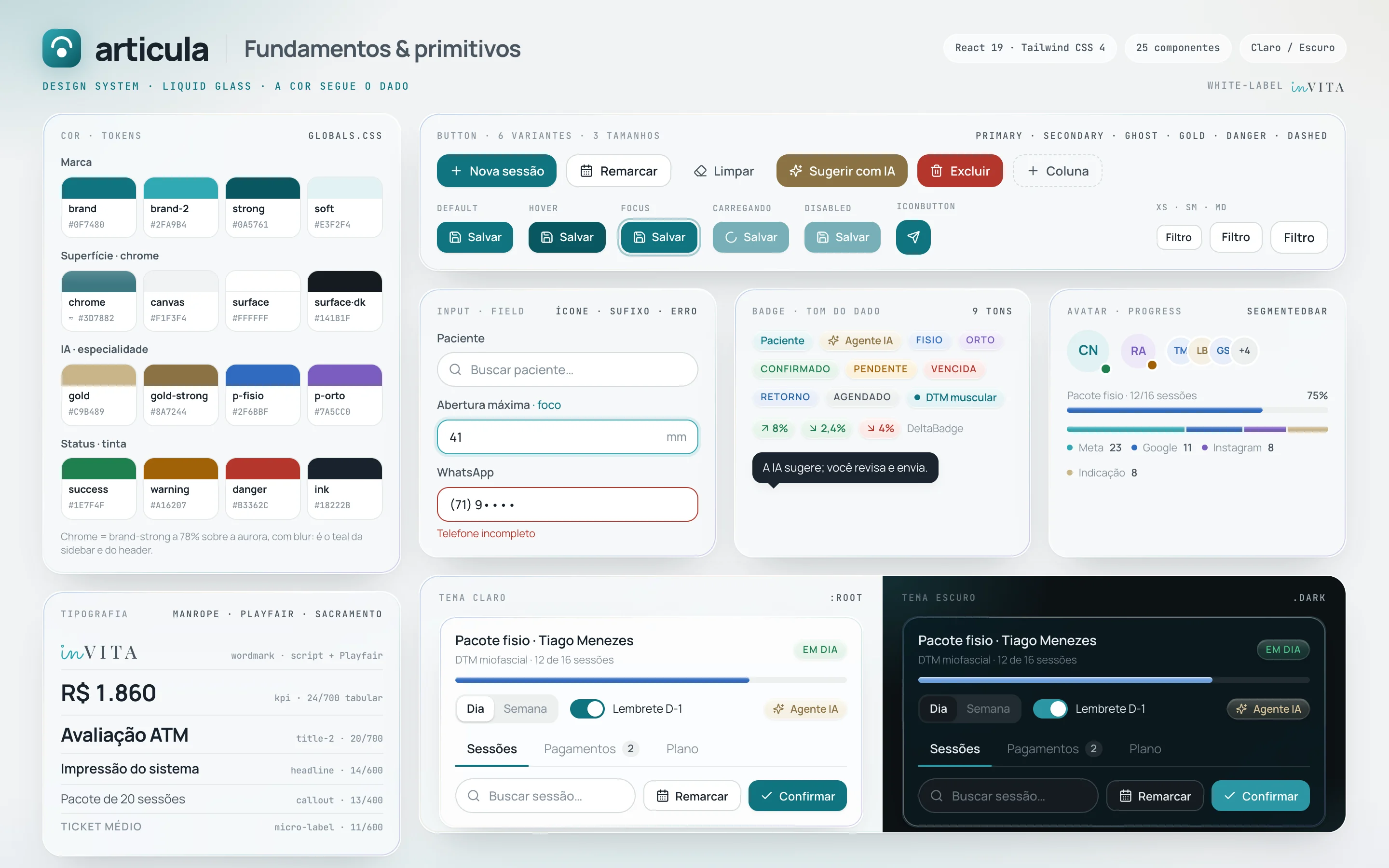
- 02Created a design system of 25 React components in Tailwind CSS 4, with the interactive ones (modal, select, popover, tooltip, switch) built on Radix UI: color and type tokens, a liquid glass material, light and dark themes and documented usage guidelines
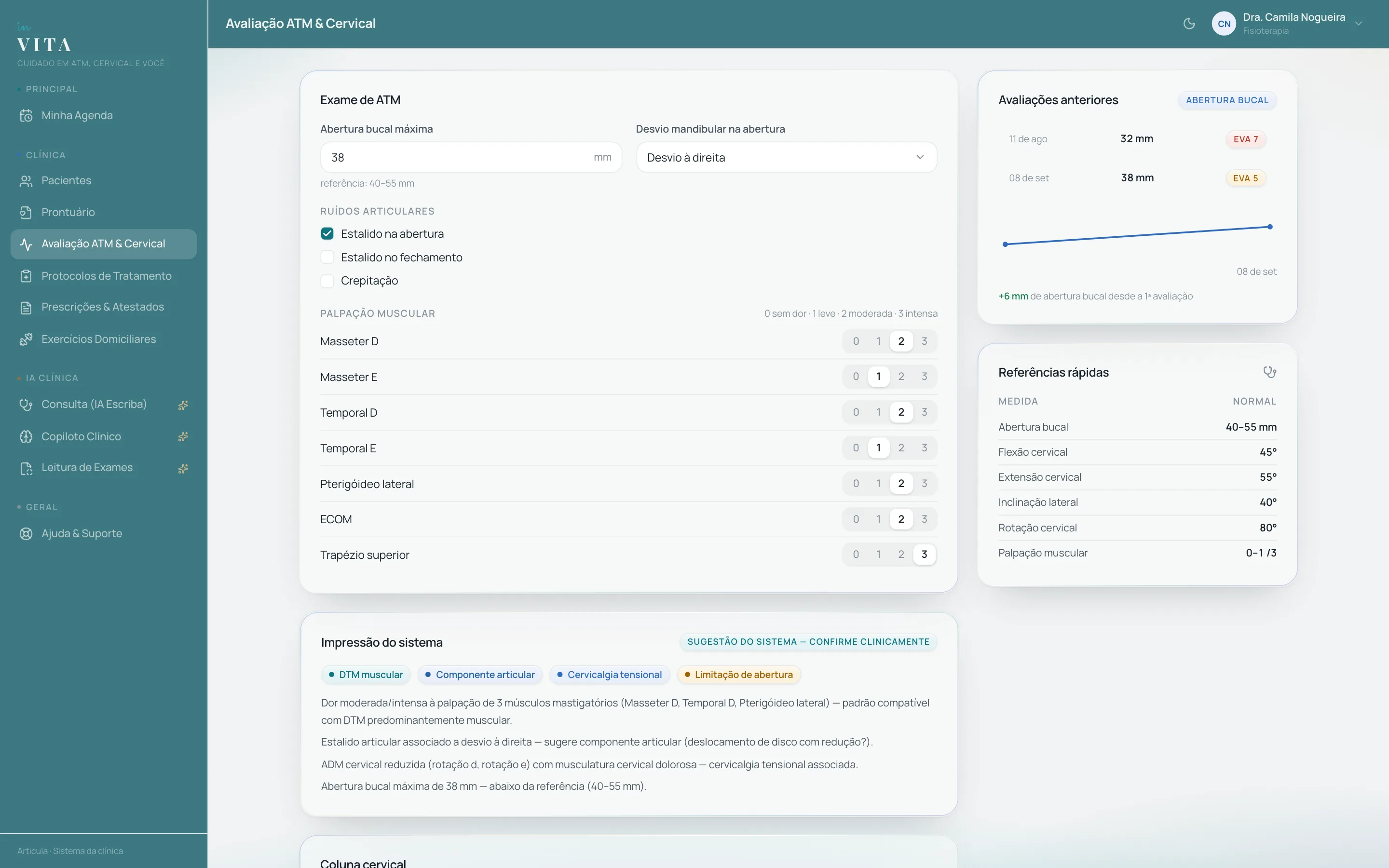
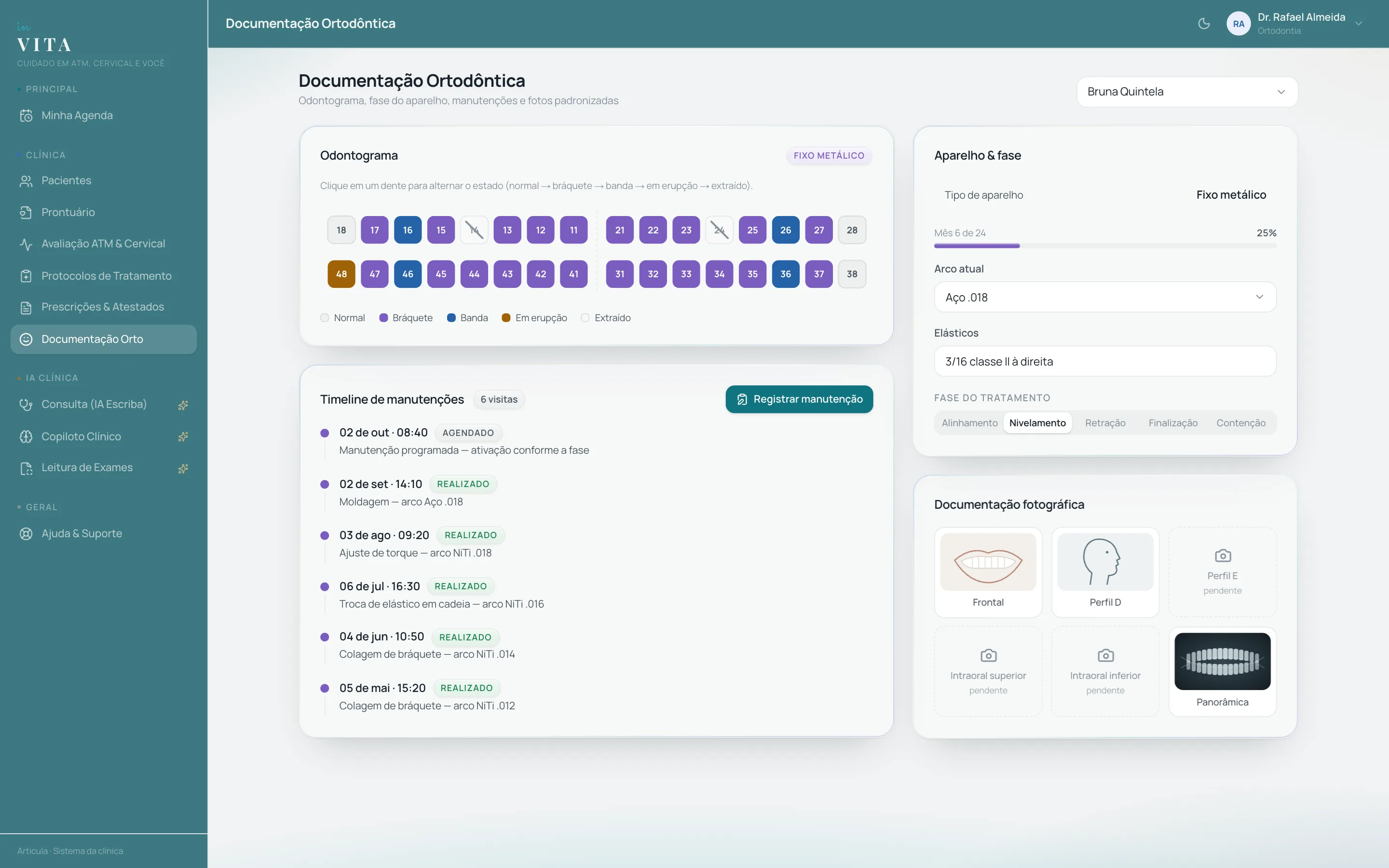
- 03Implemented the TMJ & Cervical assessment with a structured exam and a rule-based diagnostic impression recalculated on every field, plus an interactive SVG FDI dental chart
- 04Designed Articula CRM with a KPI War Room, a draggable kanban pipeline (dnd-kit) with editable columns and an automated D0 to D+90 cadence so no lead goes without follow-up
- 05Prototyped WhatsApp support in React and Zustand, with an AI agent that can be switched on per conversation, a copilot that suggests replies and an automatic handoff to the team on pricing topics, keeping negotiations under human review
- 06Developed a mobile-first patient portal with 8 screens, including pain progress in Recharts charts, booking, teleconsultation and payments
Screens and components
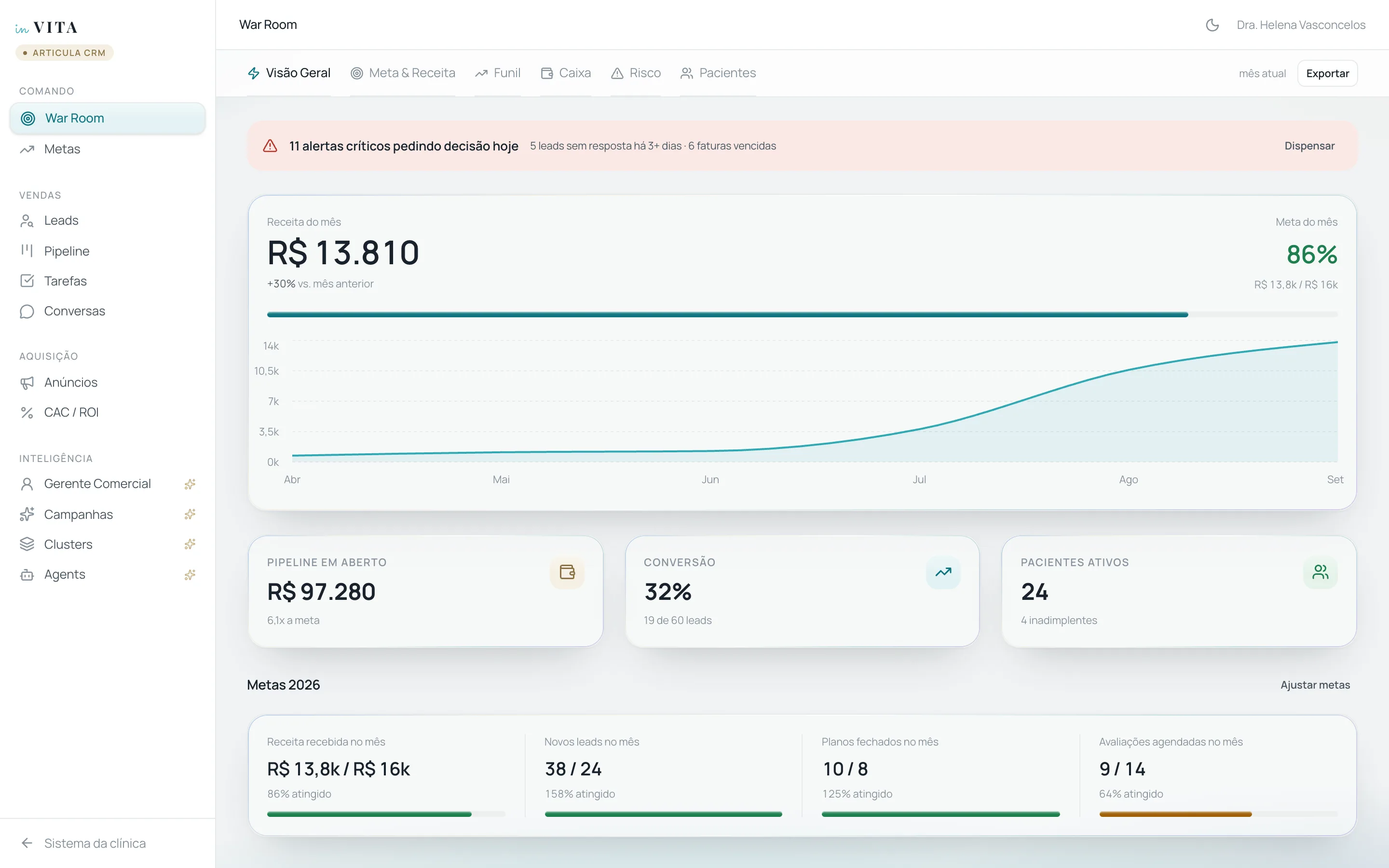
War Room
The War Room puts target, revenue, funnel and risk on one screen, with the day's pending decisions at the top. Figures are fictitious.
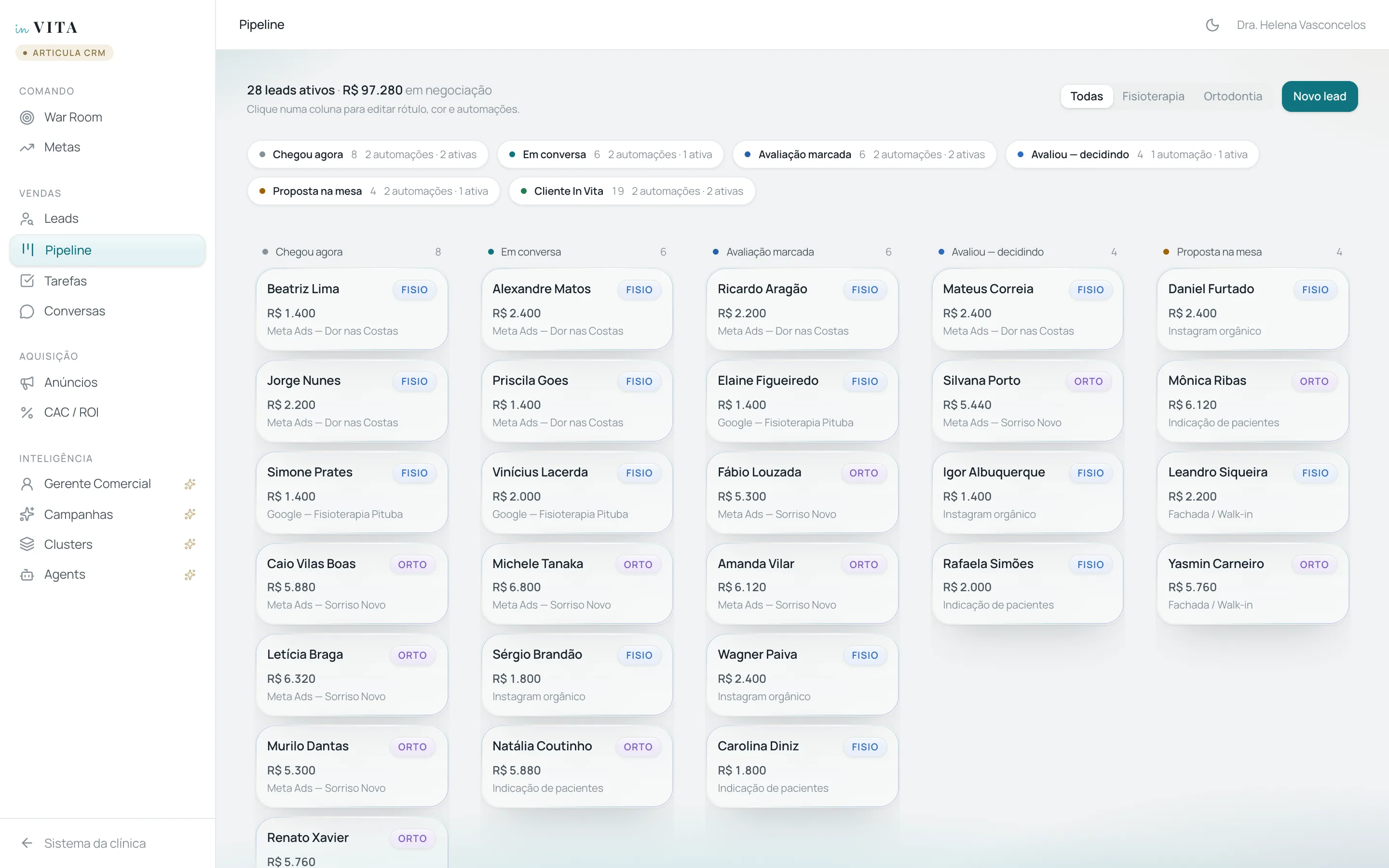
Editable pipeline
Each pipeline column has an editable label, color, automations and AI agents, while reports keep tracking the same stage. Figures are fictitious.
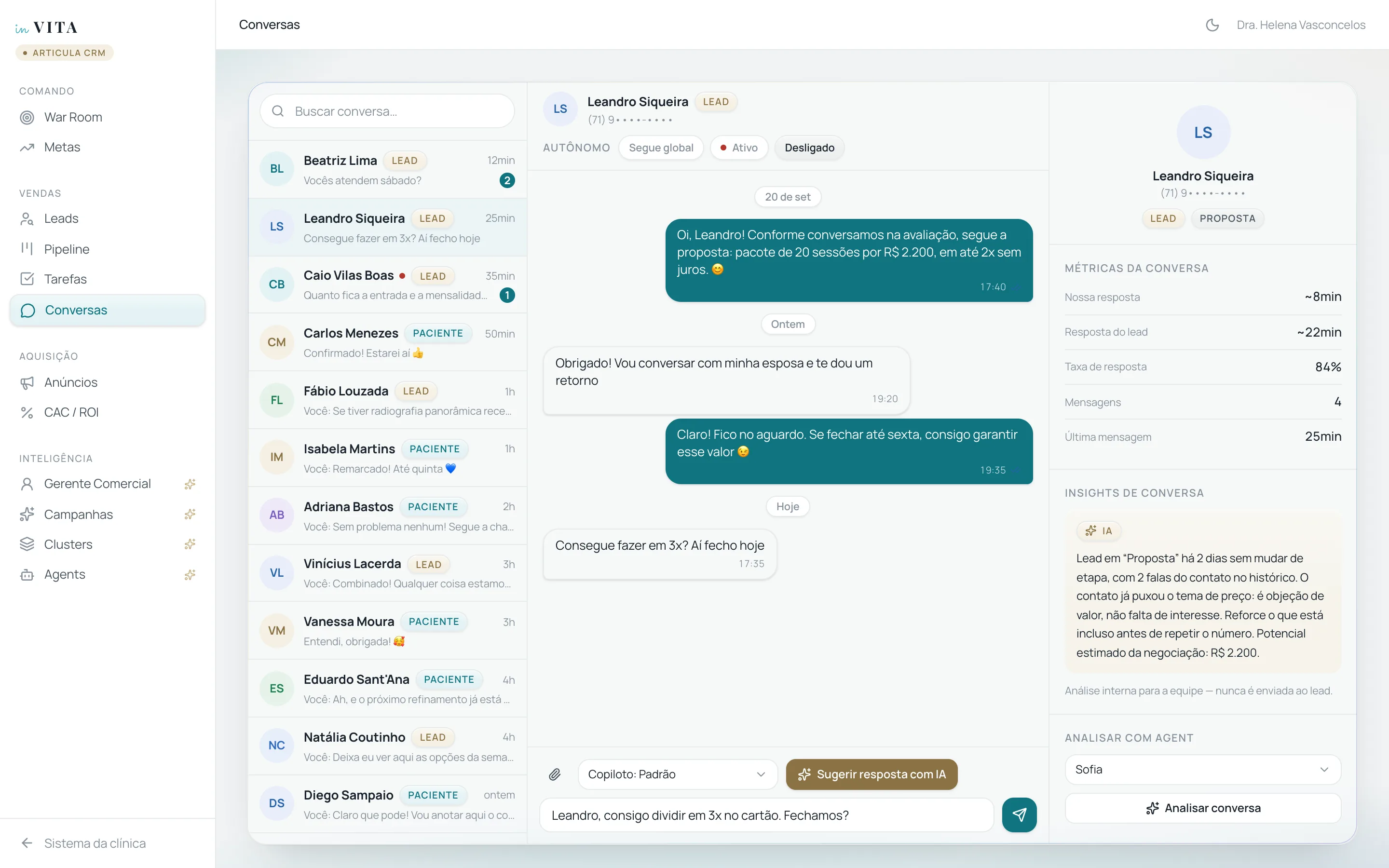
Conversations with AI
When the topic is price, the conversation stays with the team: the AI suggests a reply and diagnoses the objection, and a person decides what to send.
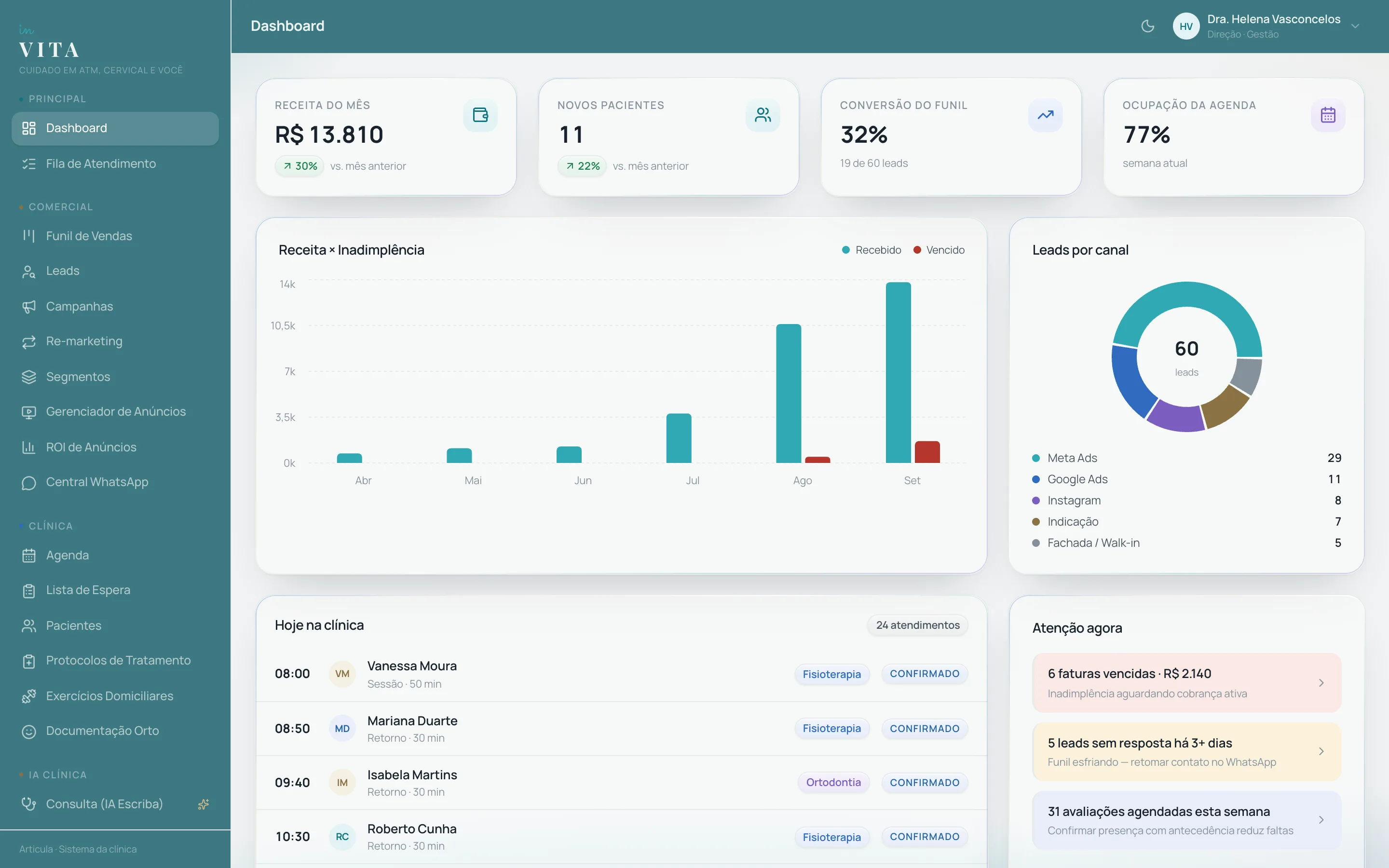
Management dashboard
The management dashboard brings together revenue, funnel, occupancy and today's schedule. Figures are fictitious.
TMJ assessment
The structured exam yields a rule-based diagnostic impression, recalculated on every field, for the physiotherapist to confirm.
Dental chart
In the interactive dental chart, one click changes each tooth's state, with the appliance phase right beside it.
Patient portal
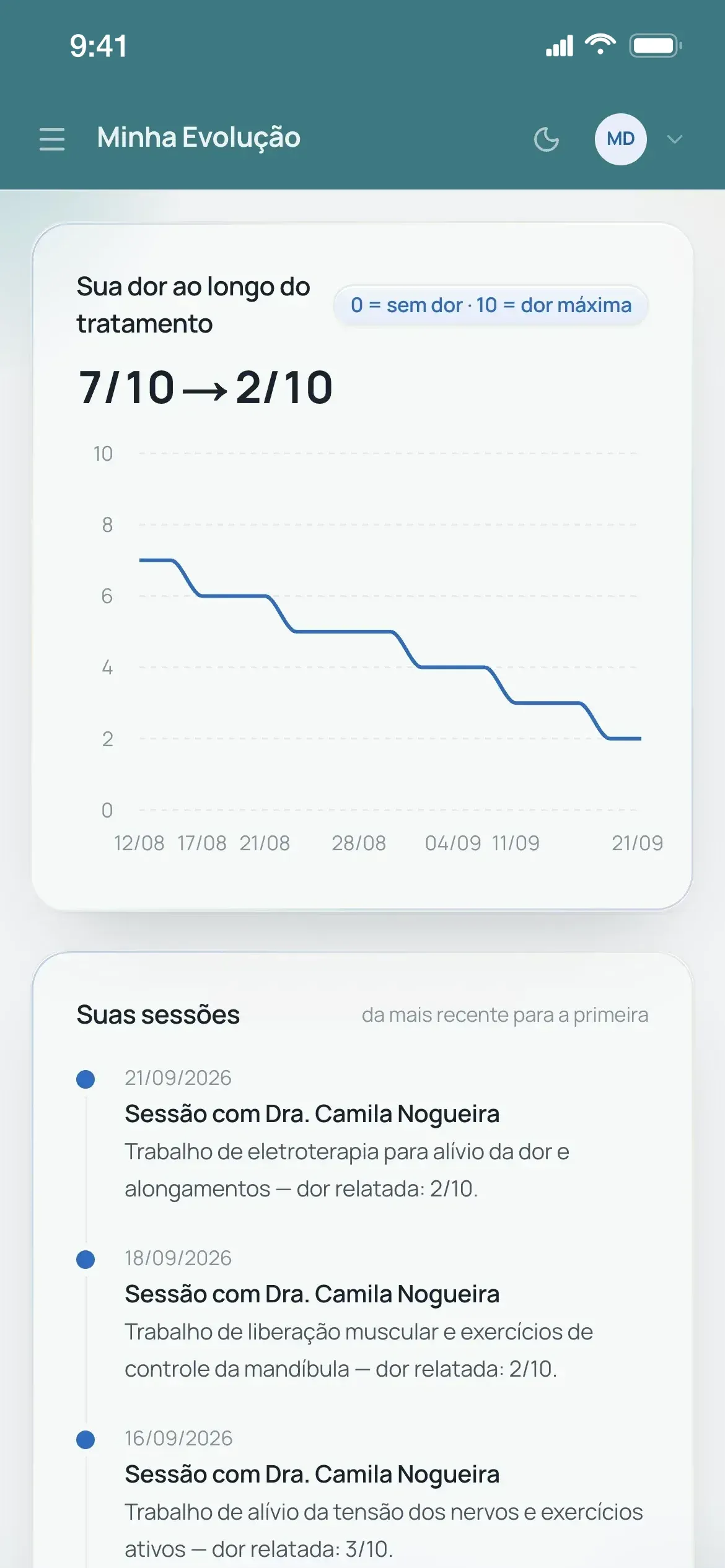
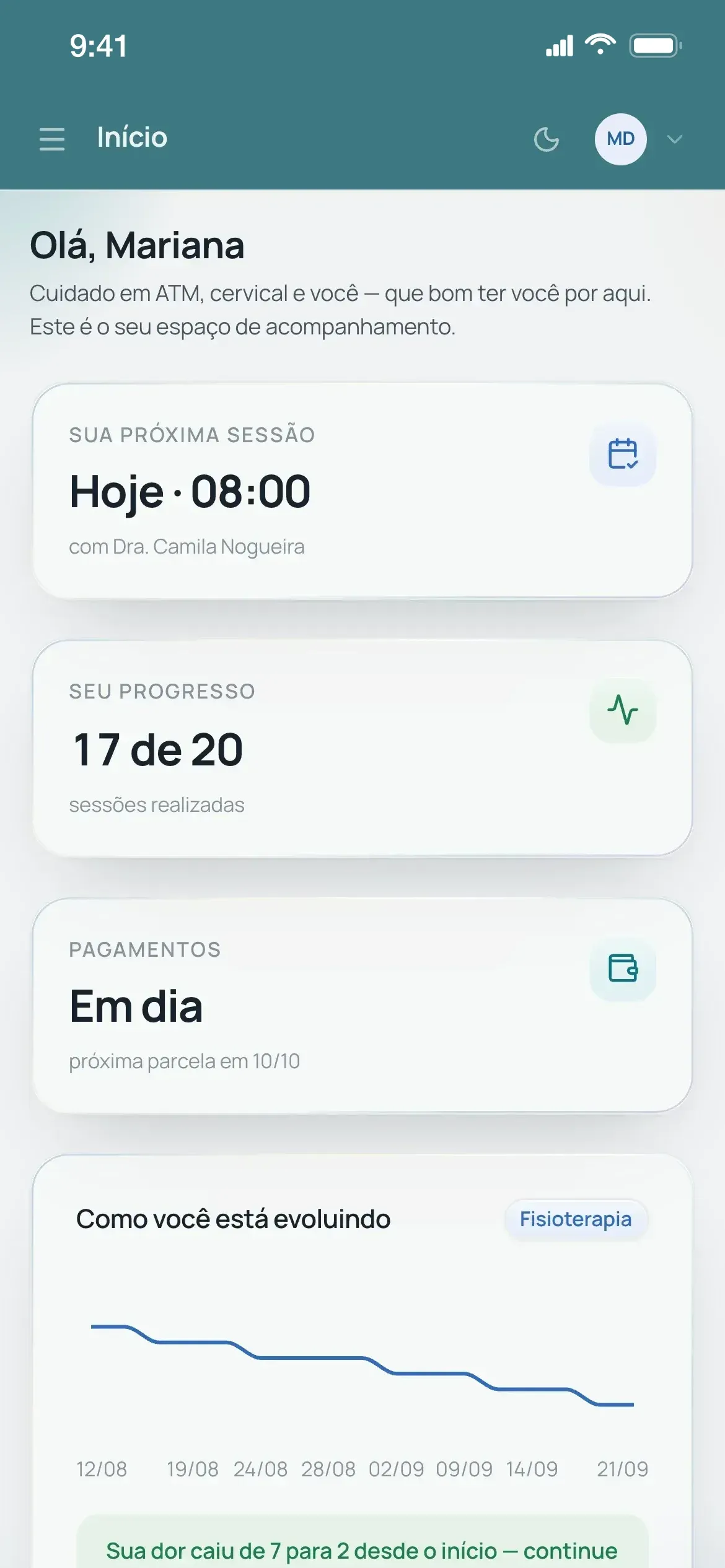
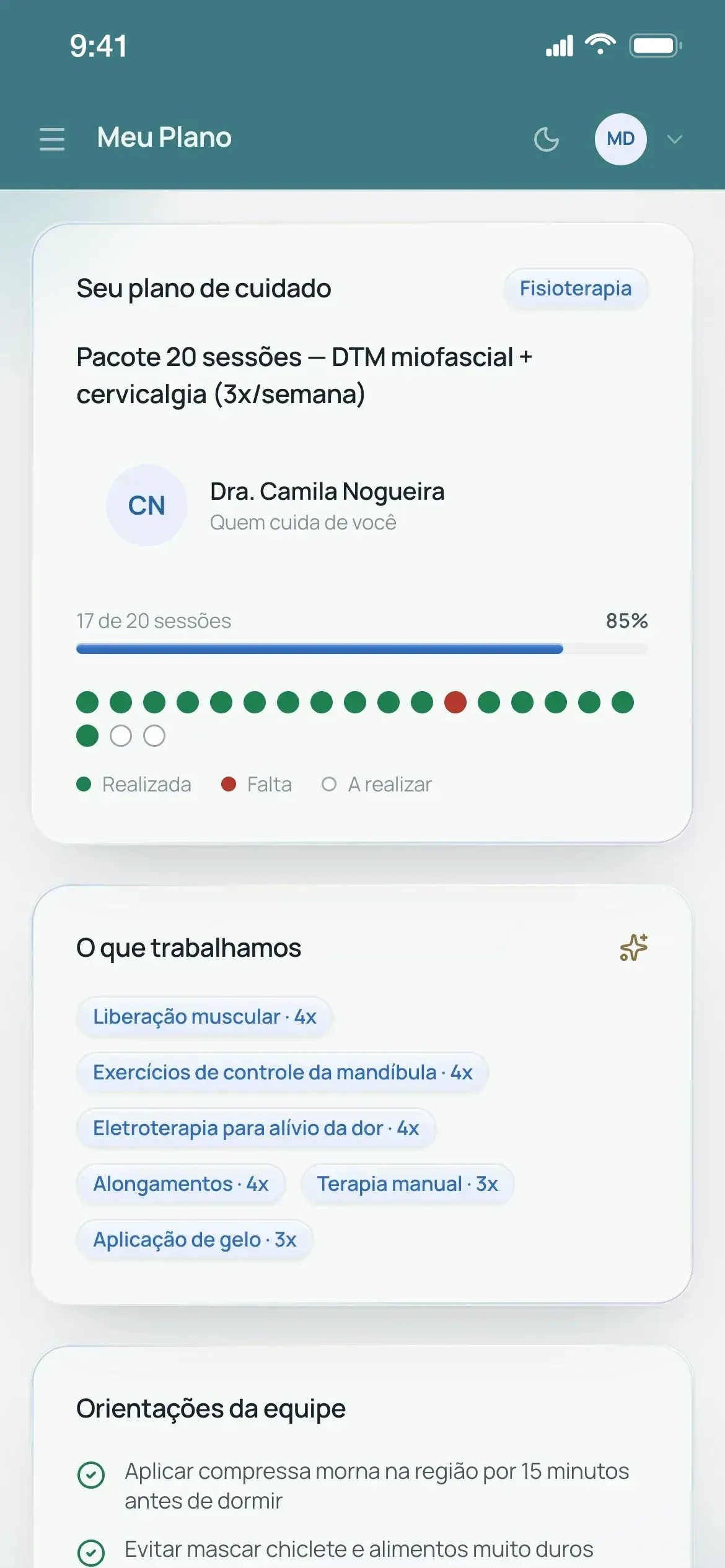
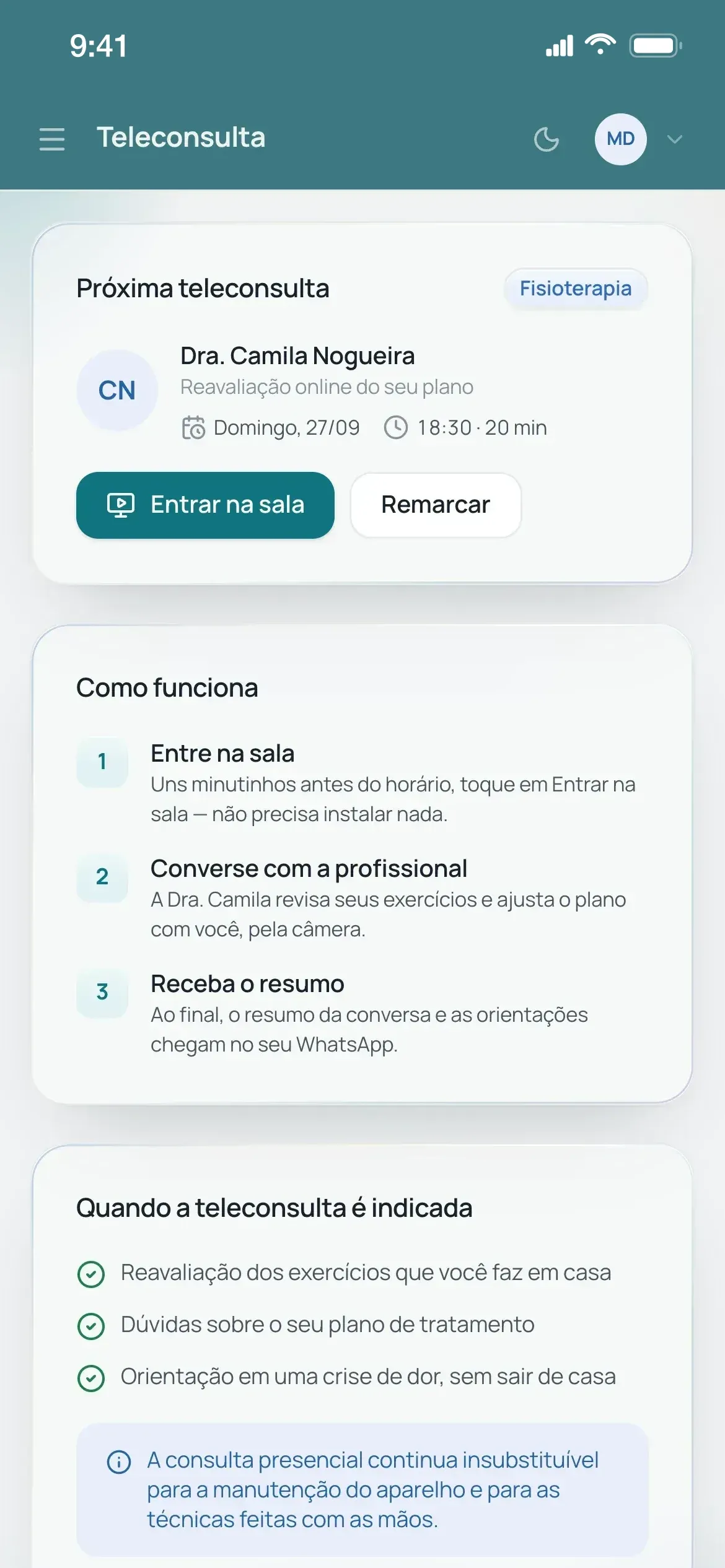
The portal home shows the next session, plan progress and payment status. Patients follow their pain dropping session by session, see completed sessions and the team's home-care guidance, and take the online reassessment in the browser, with nothing to install.
Design system
The sheet reproduces the design system's tokens and primitives from the prototype's source code, in light and dark themes.
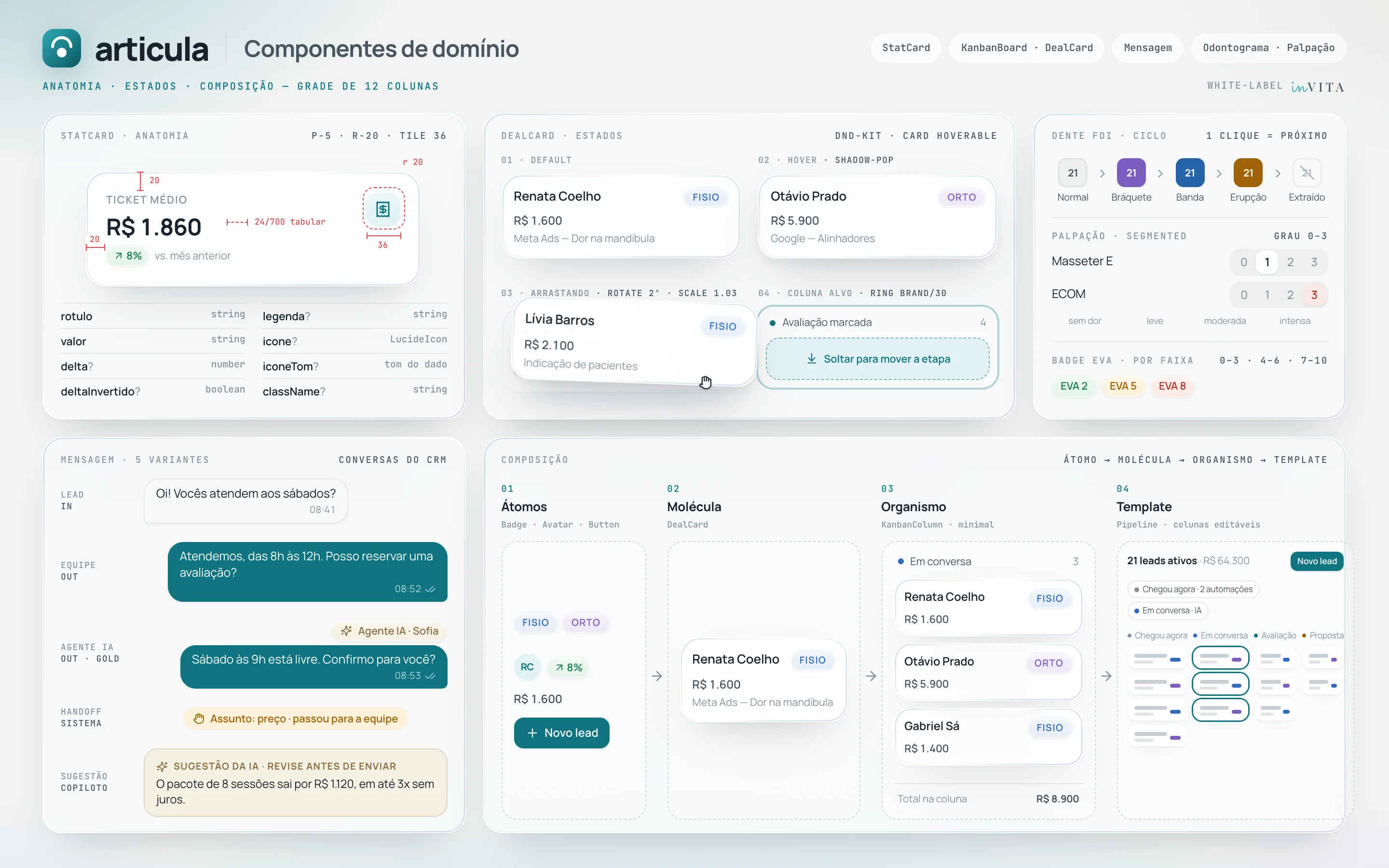
Domain components
The domain components are shown with their anatomy, states and the composition from atom to pipeline.
Features and the pains they solve
Every feature was born from a real operational problem.
01
Pipeline with a D0 → D+90 cadence
- Pain
- Ads generate WhatsApp contacts, but without a funnel nobody knows who replied, who booked and who dropped out along the way, and the D+1, D+3 and D+7 touchpoints depend on someone remembering to send them by hand.
- Solution
- A draggable kanban (dnd-kit) where each column has its own automations on entry and at D+N: a templated WhatsApp message, a task for the team, an alert to the front desk or triggering an AI agent. Each column's label and color are editable, while reports keep tracking the same stage.
Impact: 7 stages and 12 automations (9 active), from the welcome at D0 to a referral request 90 days after closing
02
Conversations with an AI agent
- Pain
- Leads who write at night or on weekends wait until the front desk opens to get a reply.
- Solution
- In the WhatsApp inbox, the autonomous agent is switched on one conversation at a time with a chosen persona (e.g. the SDR who qualifies leads and offers an assessment), and the copilot leaves a suggested reply for the team to review. As designed in the prototype, a global mode (Off, Shadow or Active) sets how far the AI can go, and pricing and negotiation, complaints, severe pain or a request for a person go back to the team.
Impact: Default safety rule: 4 topics go back to the team
03
Ad attribution and ROI
- Pain
- The clinic spends money on Meta and Google ads without knowing which campaign brings in the patient who actually signs up for treatment.
- Solution
- Every lead is created with its source recorded (campaign or channel; for Meta ads, via utm_id), and the patient record created at conversion keeps a link back to that lead. The Ads Manager matches this against ad spend to show CAC and ROI by campaign, with real leads for campaigns tied to the funnel and estimates for the rest, and audits each ad's UTMs.
Impact: Leads arriving without a utm_id are flagged as unattributable to a campaign
04
Cross-specialty cross-sell
- Pain
- Cross-specialty demand within the clinic's own patient base is invisible: TMD patients in physiotherapy may need an occlusion assessment, and patients wearing braces may develop jaw and neck tension.
- Solution
- The CRM groups the patient base into cross-sell segments between physiotherapy and orthodontics, each with its clinical rationale, and suggests campaigns with a projected outcome and the calculation laid out under “See the math”. The AI prepares the campaign and the team decides whether to send it.
Impact: Conservative–expected–optimistic projection (Wilson, 80%) on the modeled rate, with each rate's source
05
War Room and Goals
- Pain
- For management, no-shows and overdue installments only show up at month-end close, too late to act.
- Solution
- A command center in 6 tabs (Overview, Target & Revenue, Funnel, Cash, Risk and Patients), all derived from the same data as the other screens, with critical pending items at the top and patients with a late payment or a no-show in the last 30 days flagged. Goals edited on the Goals screen feed the live gauge.
Impact: 4 configurable monthly goals: revenue, new leads, closed plans and booked assessments
06
Plans, billing and overdue payments
- Pain
- With two ways of billing, overdue installments are found late, and manual collection is slow and awkward for the team.
- Solution
- One plan record covers both session packages and orthodontics (down payment + monthly fees), and each installment becomes an invoice. The overdue screen groups late payments by average and longest delay, and recording a payment shows up on the dashboard immediately; the automated D-3 to D+15 reminder sequence is left for the Automations phase.
Impact: 2 billing models (session package and down payment + monthly fees) in the same plan record
07
Schedule, waiting list and queue
- Pain
- With a paper-and-spreadsheet schedule, rescheduling and squeezing patients in mean manual rework, and a cancelled slot becomes a gap in the schedule.
- Solution
- The per-practitioner schedule only offers conflict-free times, taking each service's length into account, and the waiting list stores specialty and preferred time of day (morning or afternoon), so when a slot opens the front desk books straight from it. At the front desk, the day's queue shows who has arrived and how long they have been waiting.
Impact: Conflicting times never appear in the new-session dialog; waits over 20 min are flagged
08
TMJ & Cervical assessment
- Pain
- TMD assessments have no structured script: every record starts on a blank page.
- Solution
- A structured exam (mouth opening in mm, deviation, joint sounds, 0–3 palpation and cervical range of motion) produces a rule-based diagnostic impression, recalculated on every field, which the physiotherapist confirms and saves to the record, and mouth opening goes into a history across assessments.
Impact: 7 palpation sites, 6 cervical movements and 5 diagnostic impression rules
09
Orthodontic records
- Pain
- Orthodontic treatment runs through months of adjustment visits, and the orthodontist needs to see each tooth's state, the archwire used at each visit and the progress photos in one place.
- Solution
- An interactive SVG FDI dental chart where one click changes a tooth's state, next to the visit timeline with each visit's archwire, the appliance phases and the grid of standard records.
Impact: 32 teeth, 5 states per tooth, 5 treatment phases and 6 standard records (5 photos plus a panoramic X-ray)
10
Consultation with an AI scribe
- Pain
- Writing the clinical record after each appointment takes up the practitioner's time.
- Solution
- The appointment is transcribed live and the AI drafts the record in SOAP format (both simulated in the prototype), in sections the practitioner edits before saving them as the patient's progress note.
Impact: Record in 4 editable SOAP sections; nothing is saved without the practitioner confirming
11
Patient portal
- Pain
- Patients on a session package or braces want to follow their plan, next session and payments on their phone, without depending on the clinic for it.
- Solution
- A mobile-first portal with pain progress in a chart (Recharts) and in plain language, the plan with completed sessions, home-care guidance, booking, in-browser teleconsultation (simulated in the prototype), intake form and payments.
Impact: 8 screens; clinical record text is never shown to the patient, only a plain-language summary built from session data
12
Access profiles (RBAC)
- Pain
- Front desk, physiotherapy, orthodontics, management and patients do different jobs and need different screens.
- Solution
- Each profile's menu is built from a role matrix, and each profile lands directly on its own home page; the patient's menu holds only the portal.
Impact: 5 profiles with their own menu: Front desk 7 screens, Physiotherapy 11, Orthodontics 11, Management 37 and Patient 8