Clinic management (CRM) · Landing page · Design system
Pulso
A clinic management system prototype designed to show where revenue comes from, plus the clinic's live landing page, which turns visits into WhatsApp conversations
- Client
- INTEGRA · Clinic in Salvador, Brazil
- Role
- Front-end Software Engineer · Product Designer
- Year
- 2026
- Technologies
- React 19
- Next.js 16
- TypeScript
- Tailwind CSS 4
- Vite
- Radix UI
- Framer Motion
- Recharts
- dnd-kit
- Zustand
- Vercel
Context
INTEGRA is a clinic in Salvador, Brazil, with five service lines: Weight Loss & Aesthetics, Performance & Hypertrophy, Health & Longevity, Dermatology and Nutrition. The project had two deliverables: the lead-generation landing page, live at integratj.com.br, and the clickable prototype of Pulso, a clinic management system with demo data.
Challenge
Instagram lead generation ran with no measurement of which source produced patients and revenue, and the clinic had switched management systems several times without finding one that helped run the business. The goal was to measure where patients come in, where most of them come in and where more could come in.
Results
- Clickable screens in the Pulso prototype
- 40+
- Access roles with their own menu and permissions
- 6
- Service lines covered, from the P&L to the schedule
- 5
Key deliverables
- 01Built the landing page with React 19, Vite and Tailwind CSS 4, deployed on Vercel, with a video hero and CTAs that open WhatsApp with the booking message already filled in
- 02Implemented local technical SEO and performance optimization with JSON-LD structured data (MedicalClinic), sitemap, canonical tags, WebP images, self-hosted fonts and re-encoded videos, so the clinic is indexed for local search in Salvador and the page is lighter on phones
- 03Designed and prototyped Pulso with Next.js 16 and TypeScript: 40+ clickable screens and 6 access roles (front desk, medical director, performance, dermatology, management and a patient portal)
- 04Created the Pulso component library with React, Radix UI and Tailwind CSS 4, with color, typography and elevation tokens, a liquid-glass material and light and dark themes, standardizing all 40+ screens on the same tokens
- 05Built Recharts dashboards for lead attribution and CAC, ad performance, cash flow and a P&L per service line, matching each lead's source to its pipeline outcome
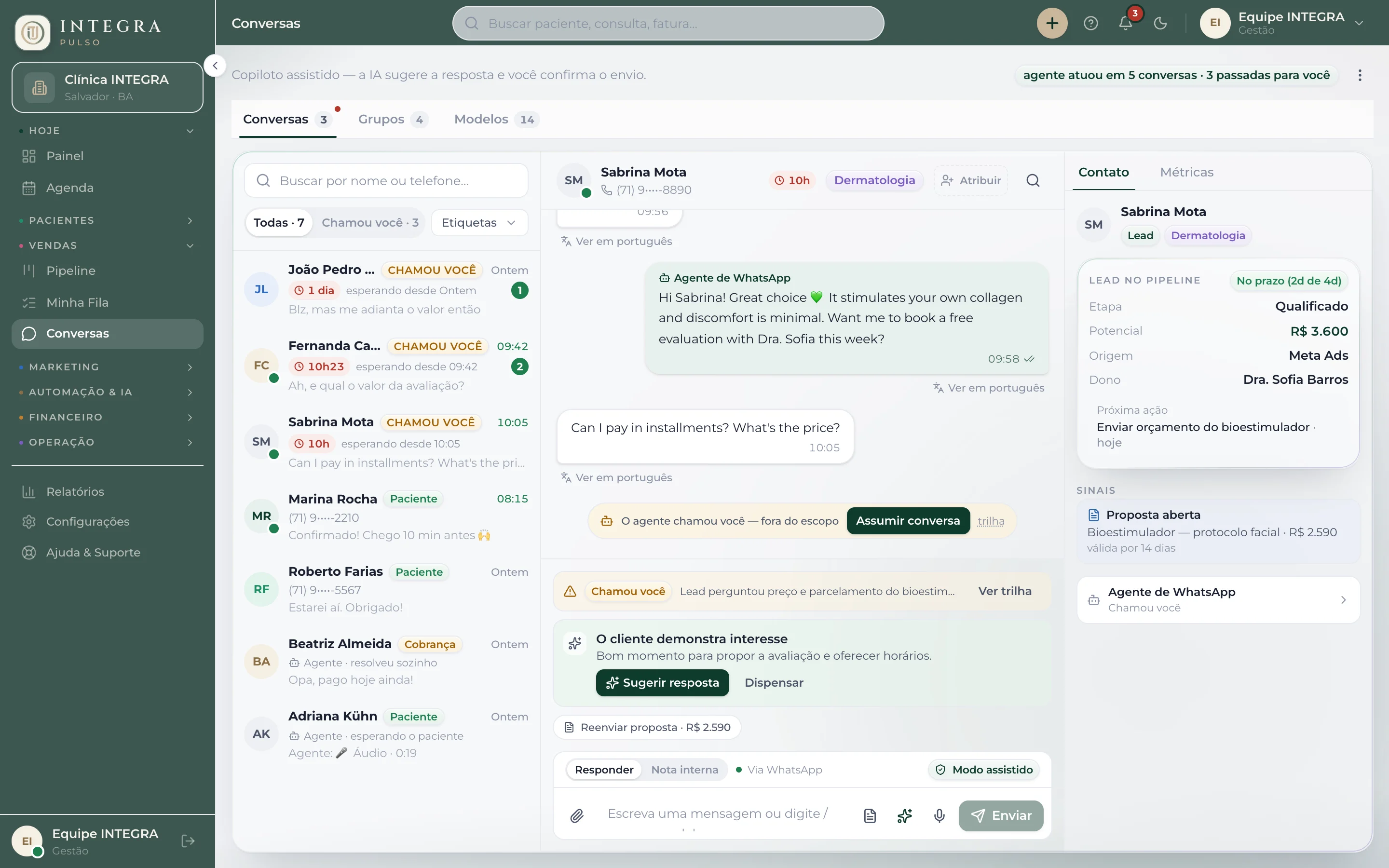
- 06Designed in React and TypeScript the WhatsApp inbox with an AI agent and an assisted copilot, the drag-and-drop kanban pipeline (dnd-kit) with weighted forecast, multi-practitioner scheduling and patient-journey automations, with the lead's pipeline card visible inside the conversation
Screens and components
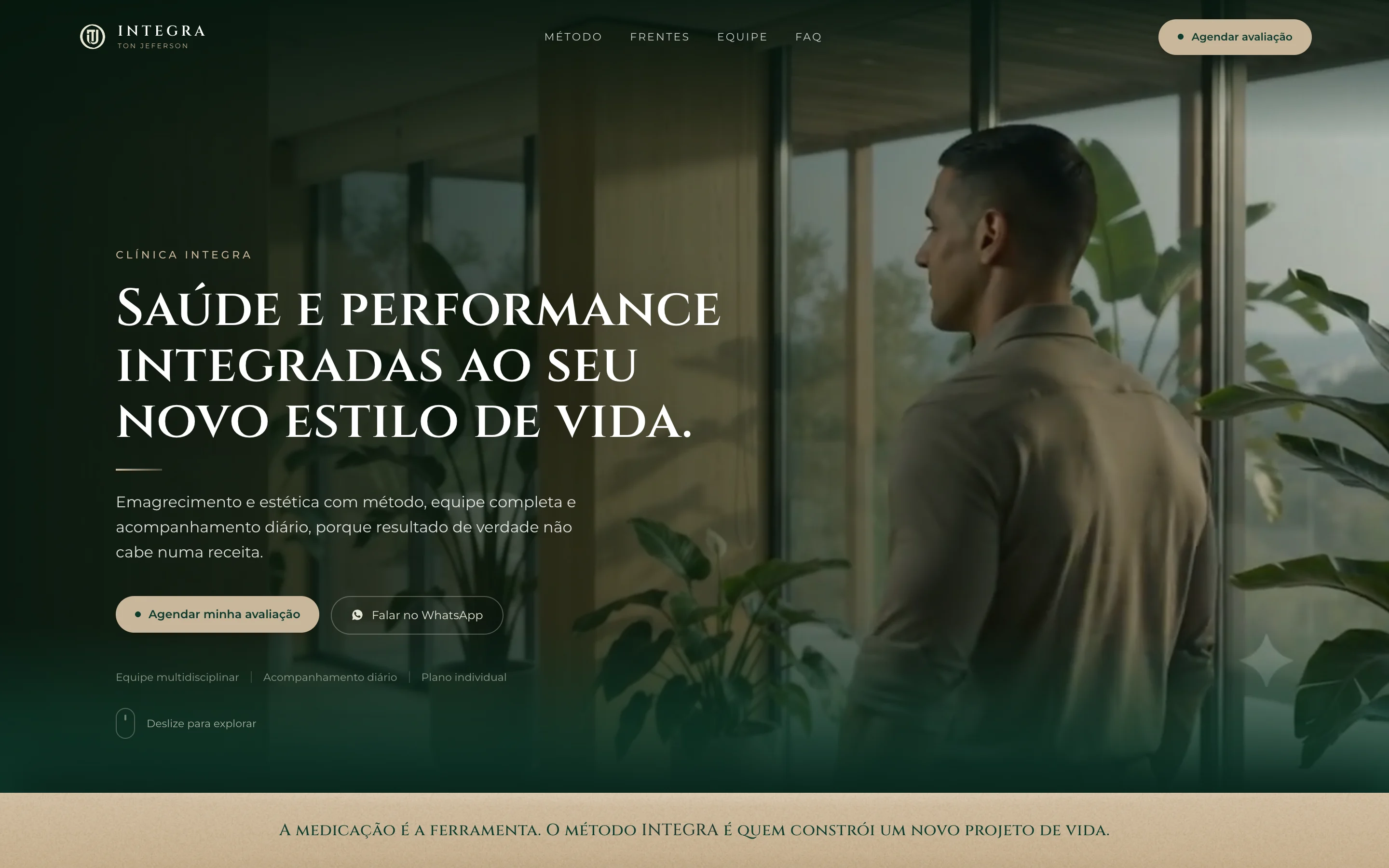
WhatsApp booking on the landing page
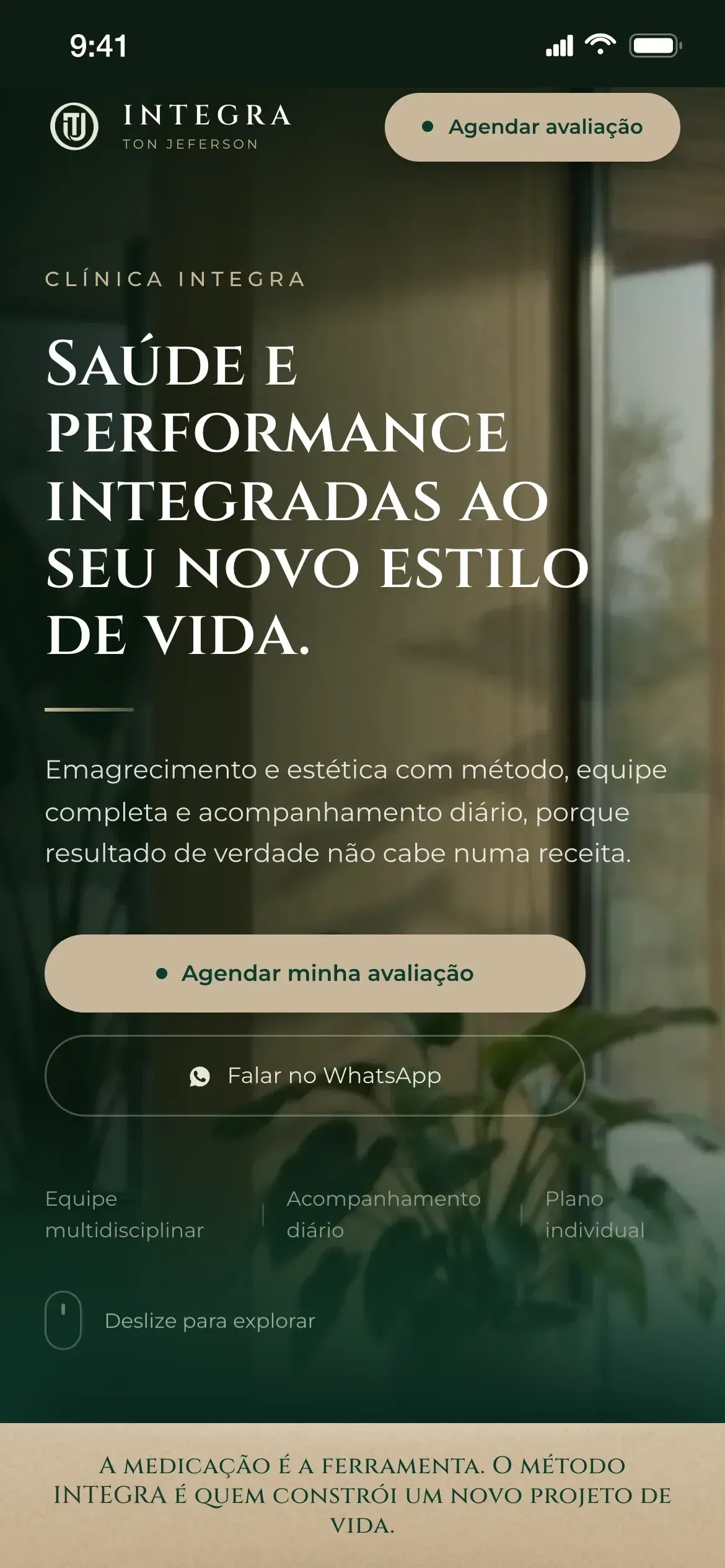
On the live landing page, the hero’s booking buttons open WhatsApp with the booking message already filled in.
The landing page on phones
On phones, the hero buttons sit at thumb height and open WhatsApp.
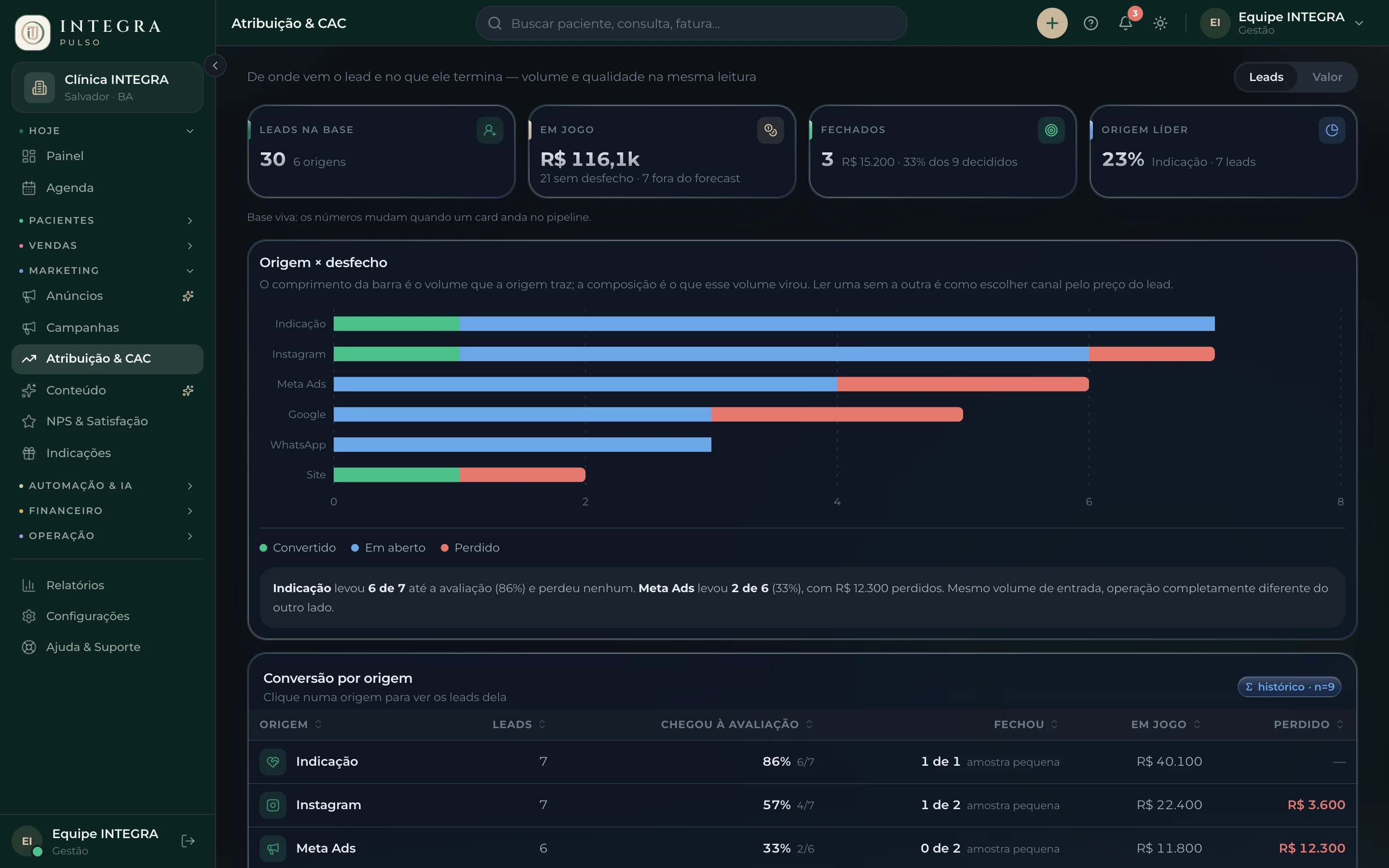
Lead attribution
The Attribution & CAC screen matches every lead source with the volume it brings and its pipeline outcome. The data is fictional.
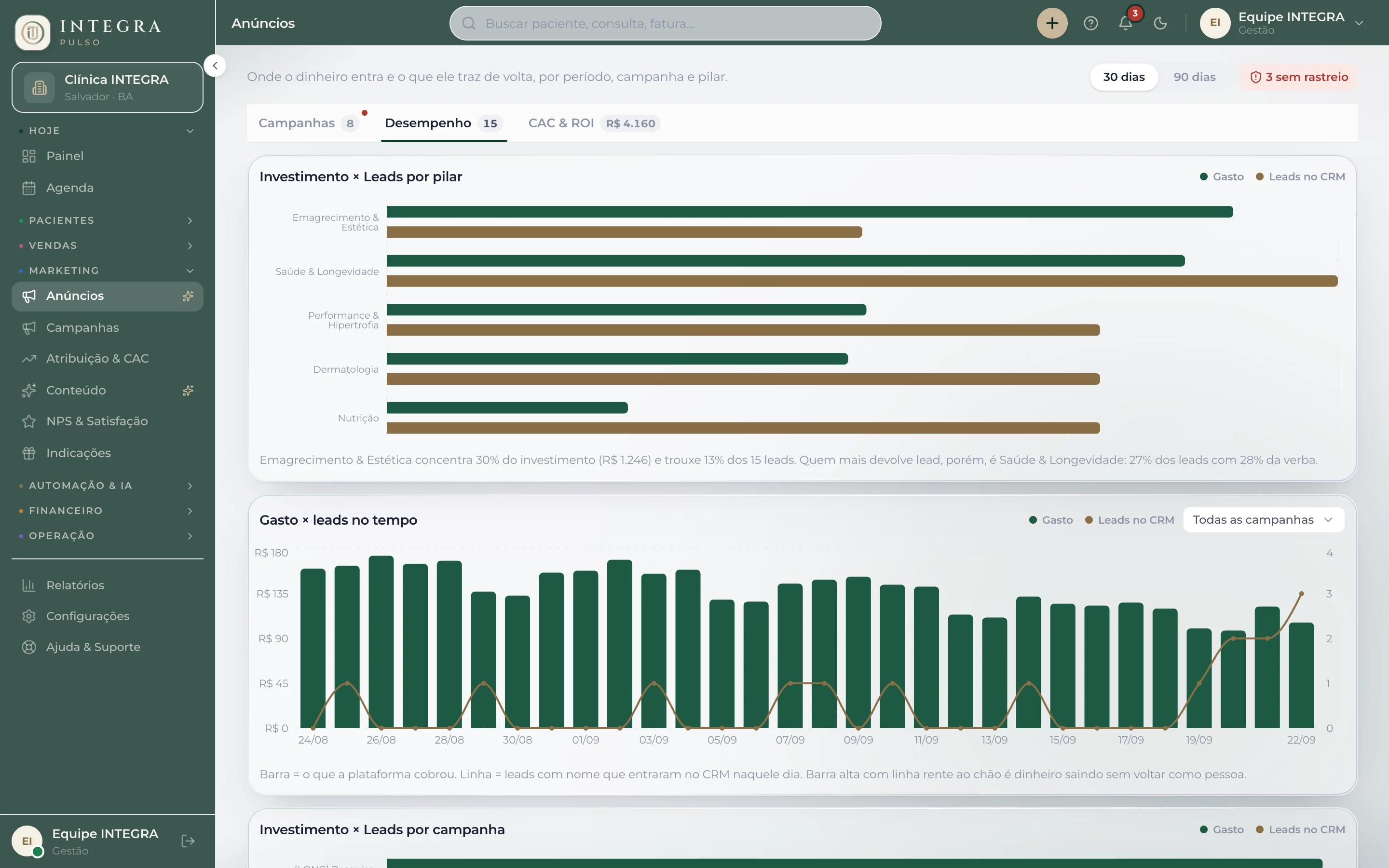
Ads and CAC
The Performance tab compares spend and leads per service line and shows the days when media spend produced no leads in the CRM. The data is fictional.
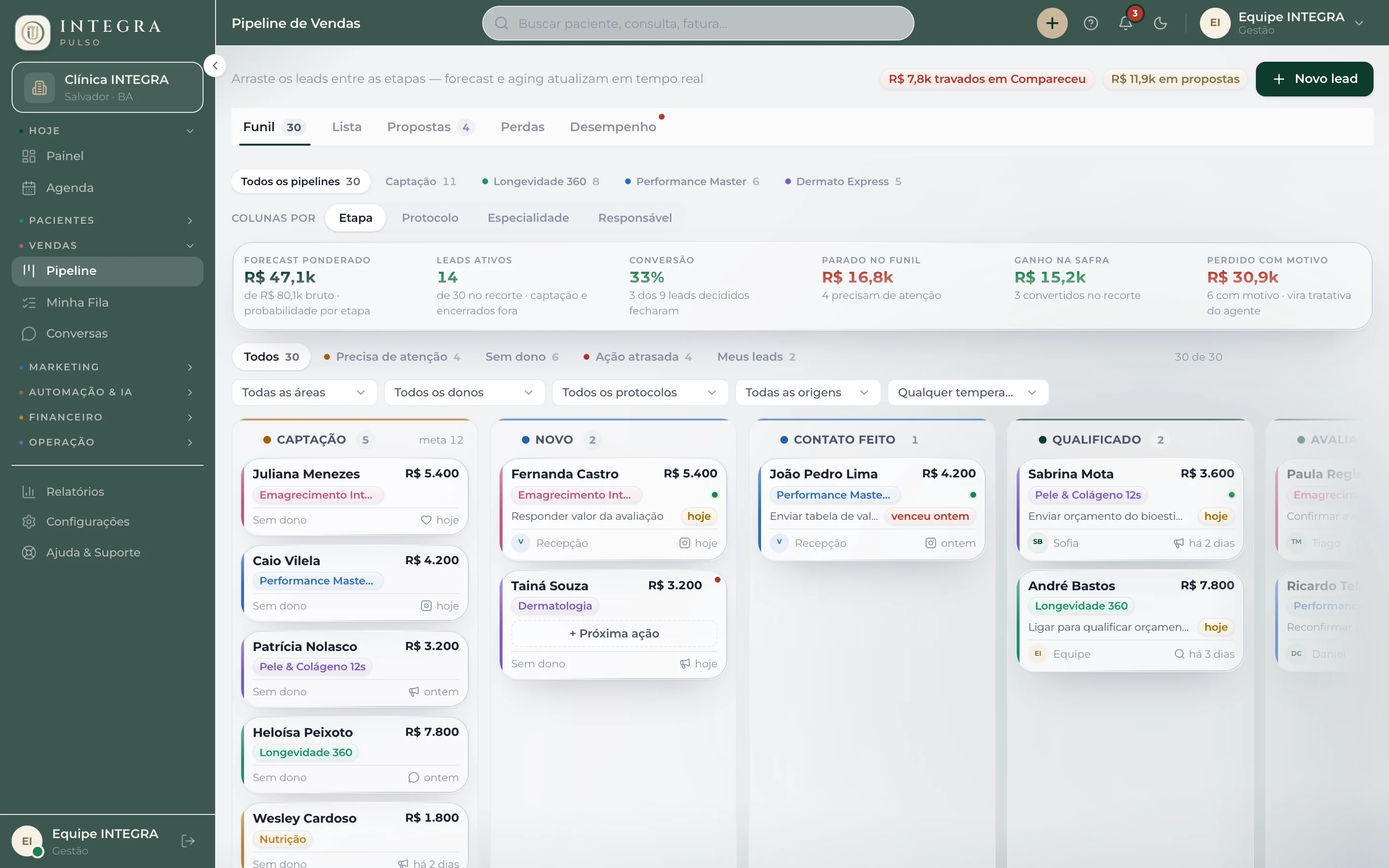
Sales pipeline
The kanban pipeline calculates weighted forecast and time stalled per stage, and each card shows the protocol, the owner and the next action when there is one. The data is fictional.
AI agent on WhatsApp
In the designed WhatsApp inbox flow, the AI agent answers in-scope questions in the patient's language and hands the rest to the team. The data is fictional.
Patient portal
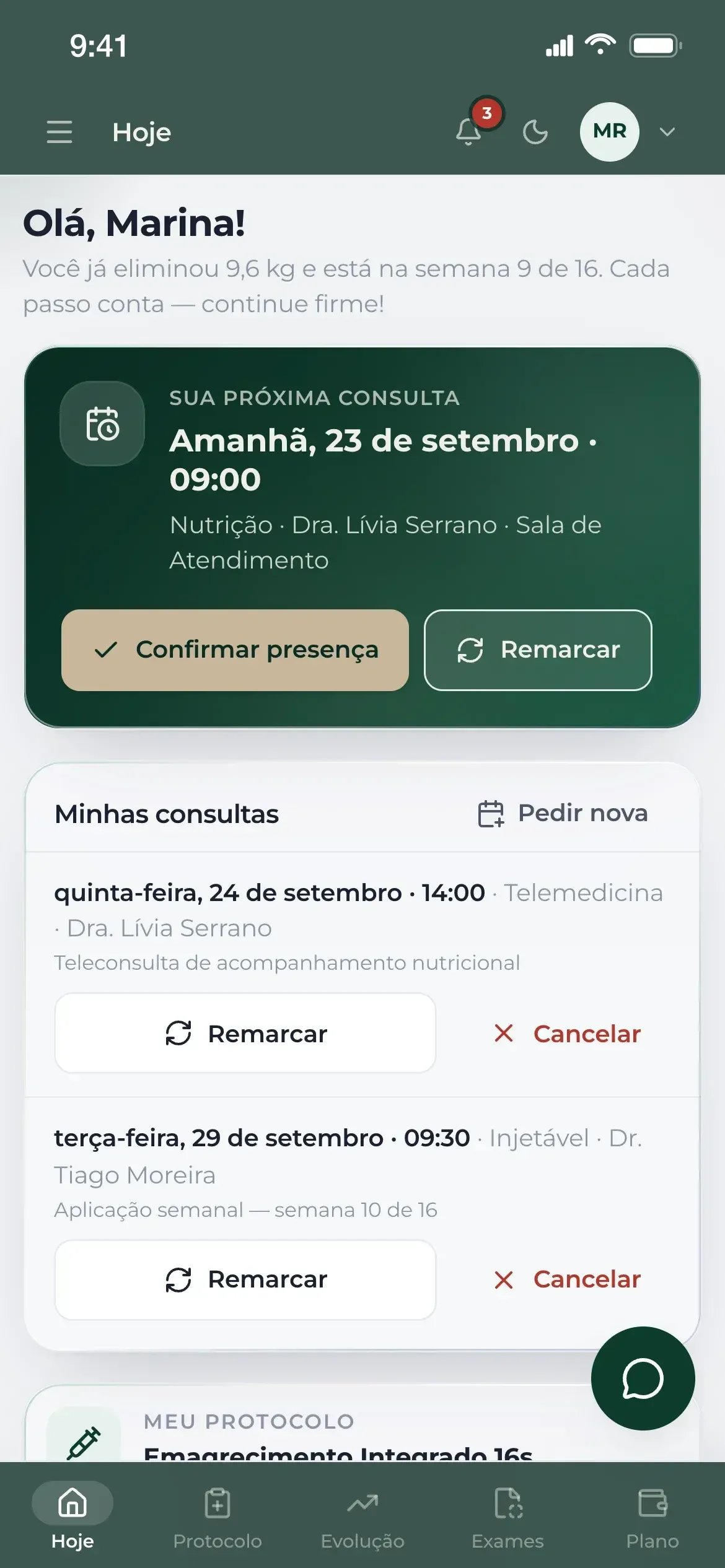
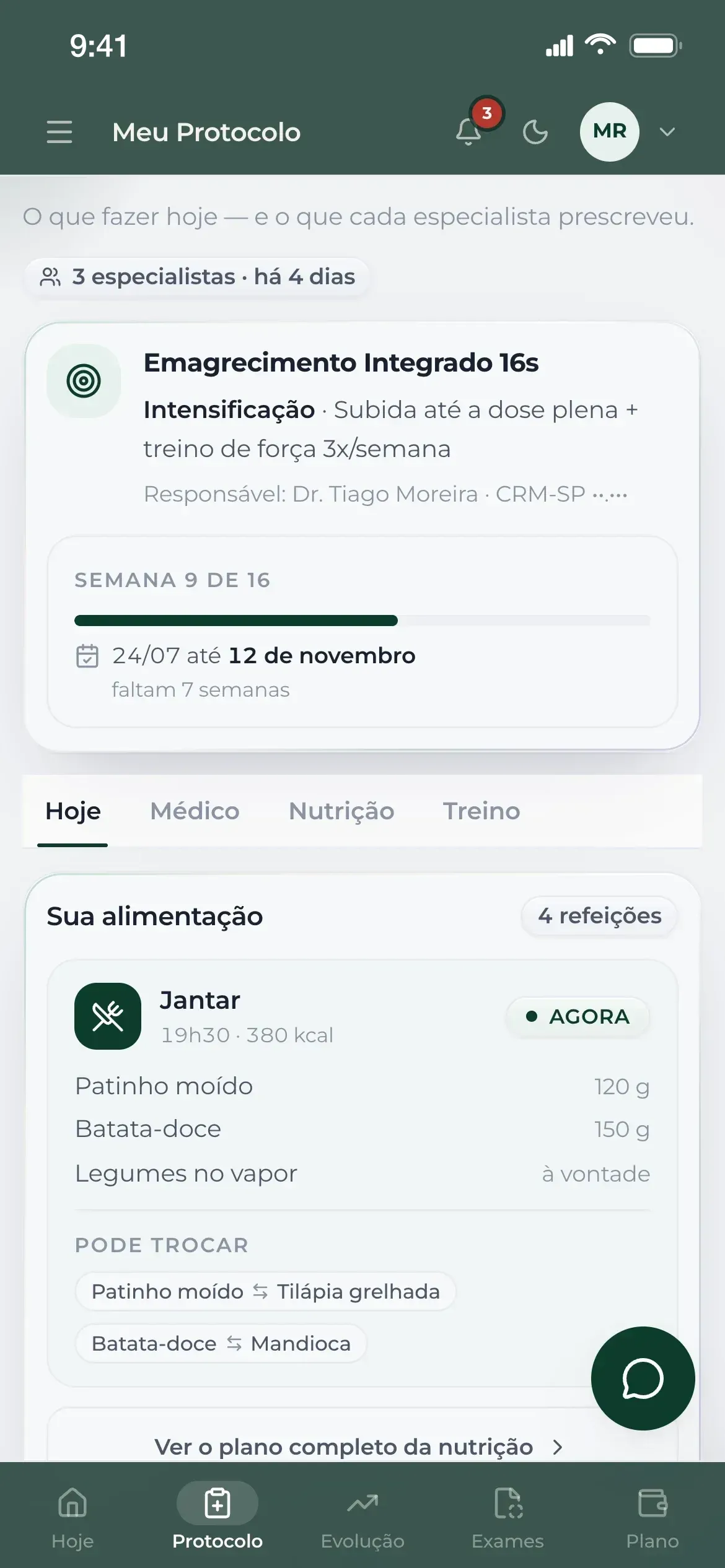
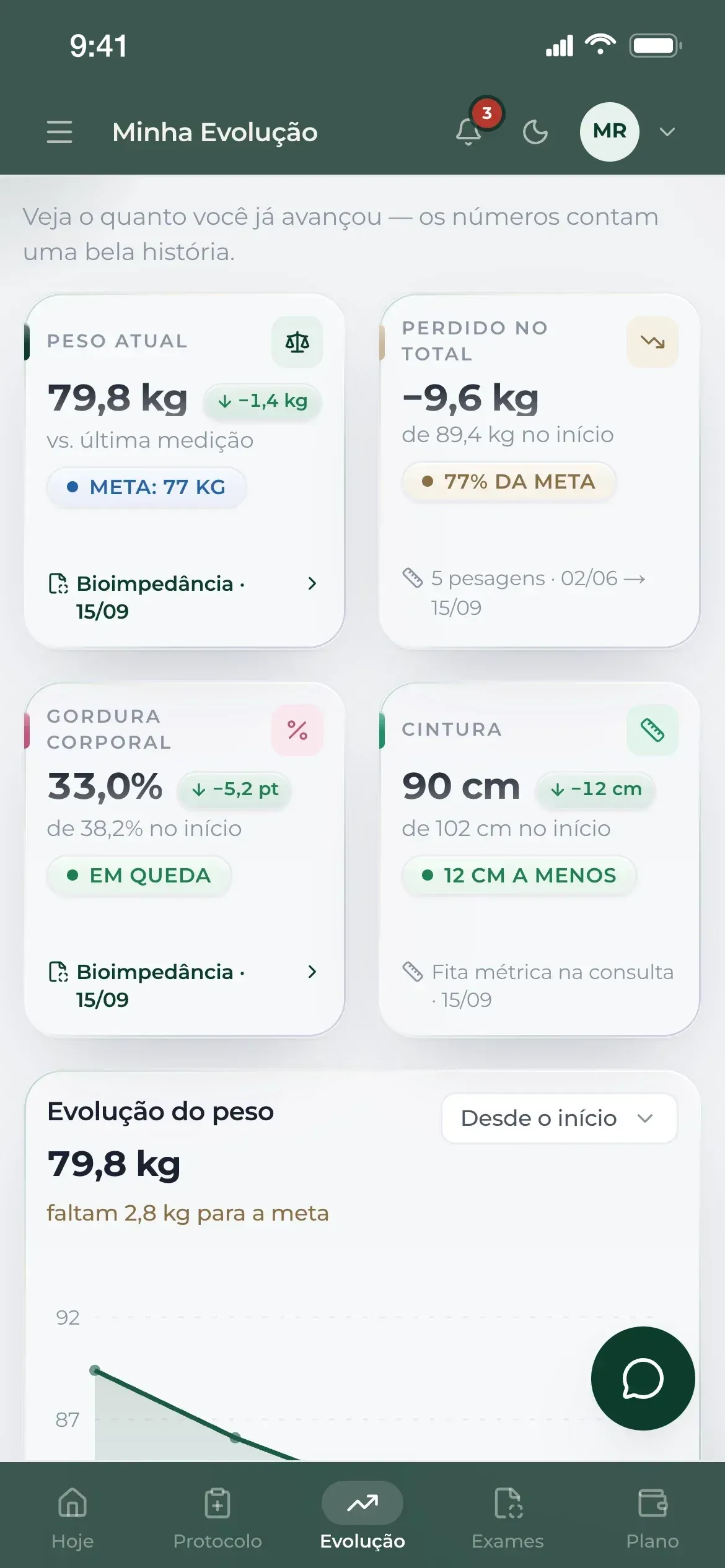
The patient portal lets patients confirm or reschedule the next appointment in one tap. The My Protocol screen shows what to do today, combining each specialist's prescription, and the My Progress screen shows measurements, goals and the weight curve. The data is fictional.
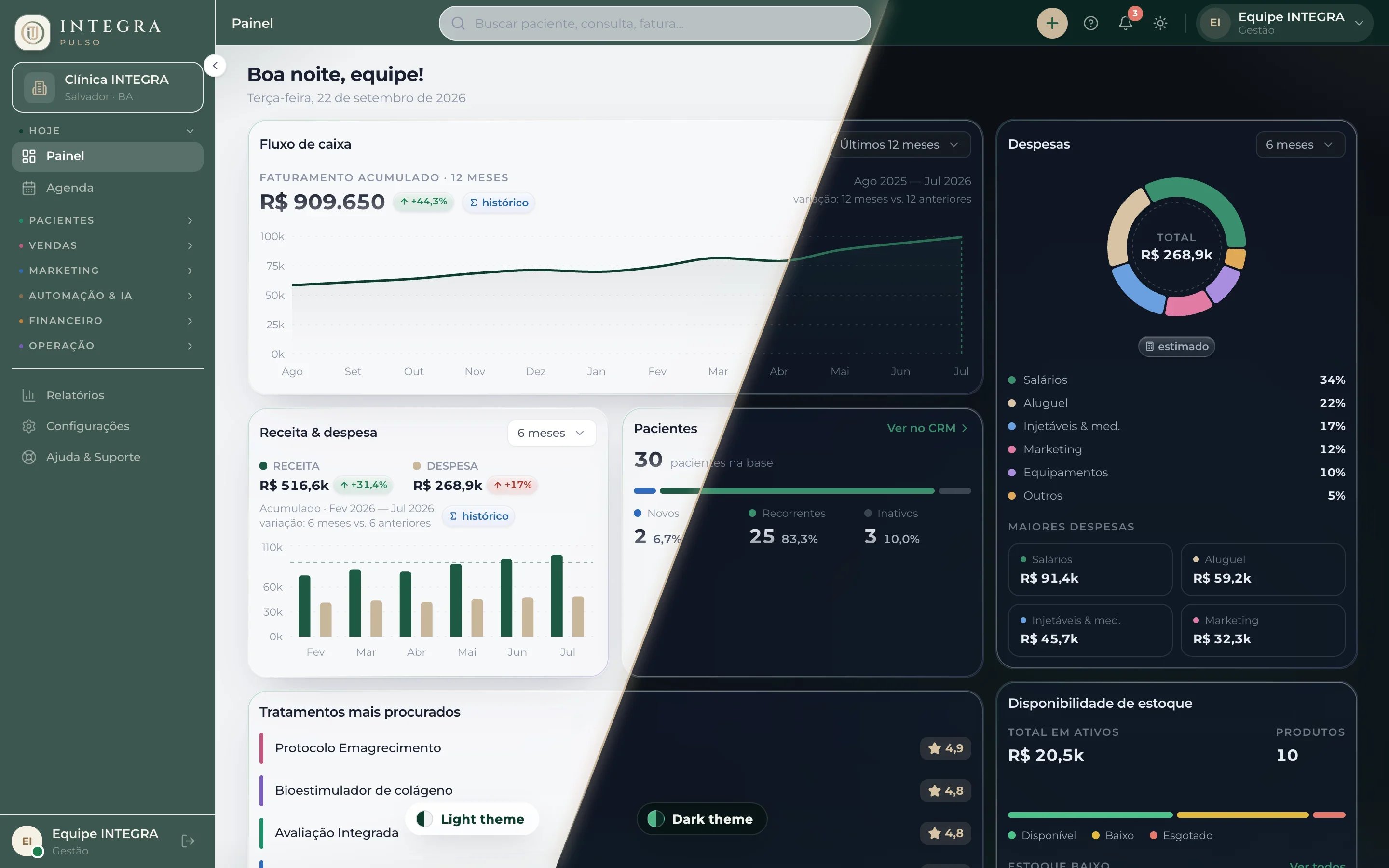
Light and dark themes
The management dashboard is shown in both themes side by side, built from the same components with only the tokens swapped. The data is fictional.
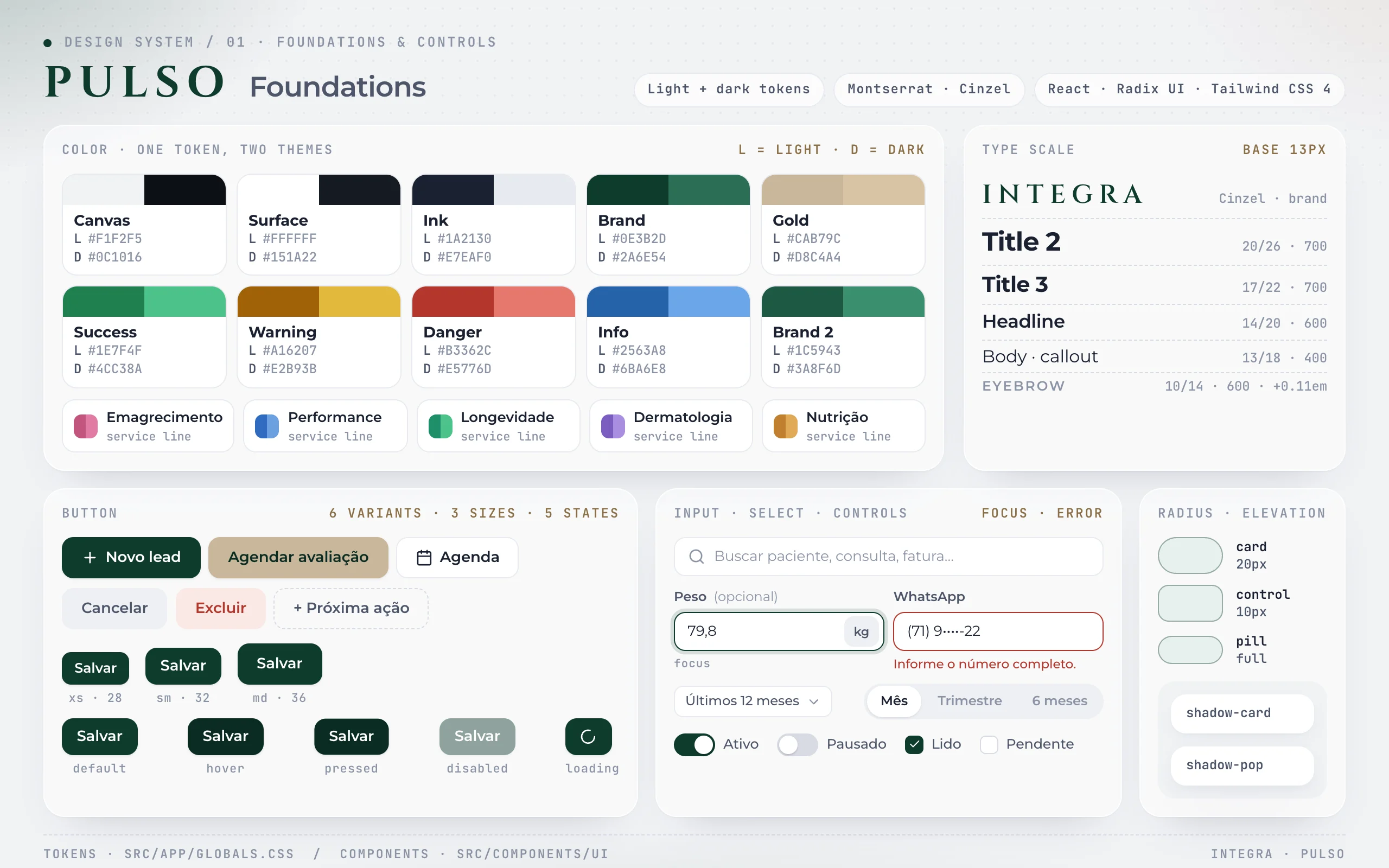
Foundations
The first sheet collects Pulso's color, type, radius and elevation tokens, with light and dark theme values, and the base controls in every state.
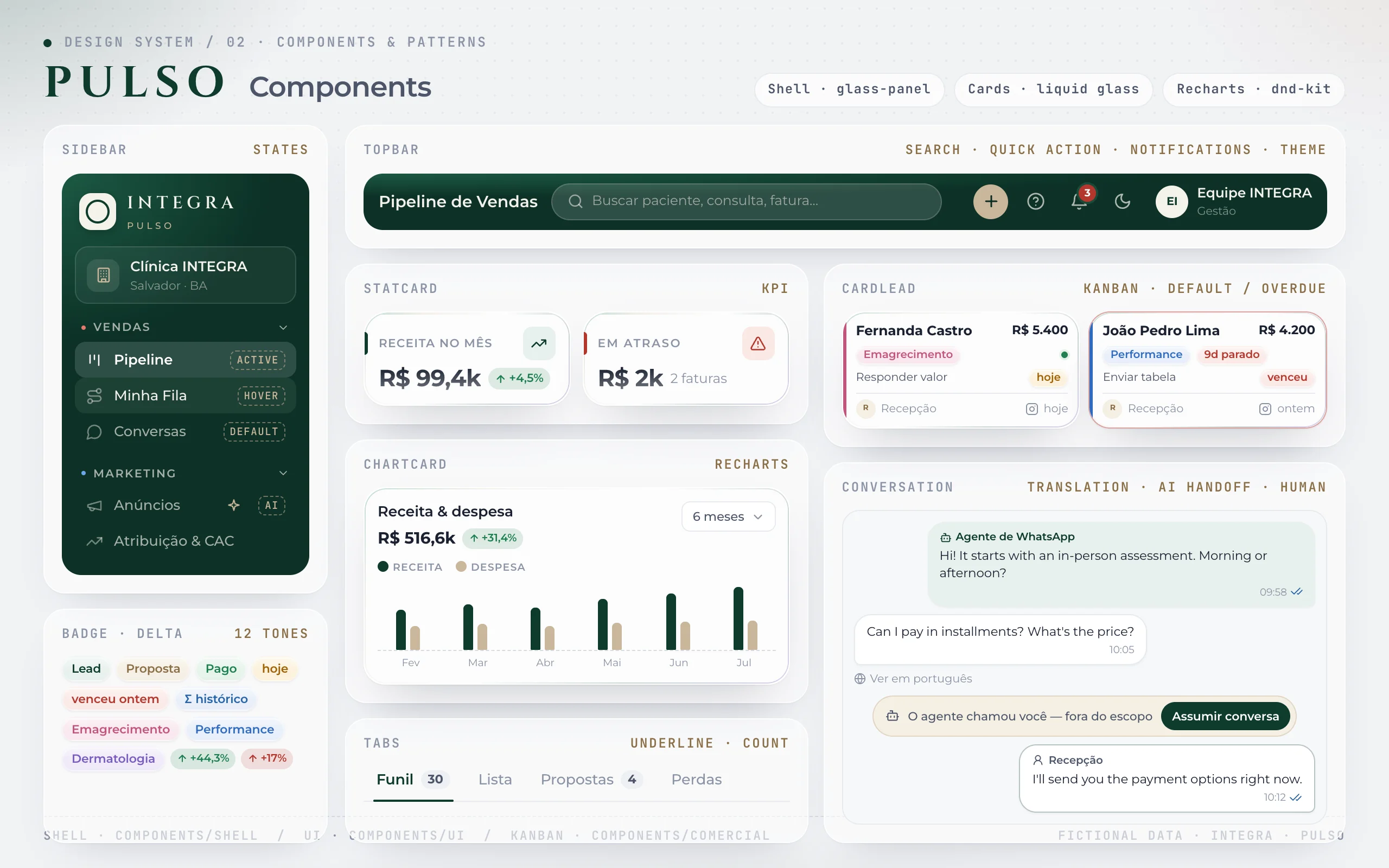
Components
The second sheet shows the navigation, data and conversation components reused across all 40+ Pulso screens. The data is fictional.
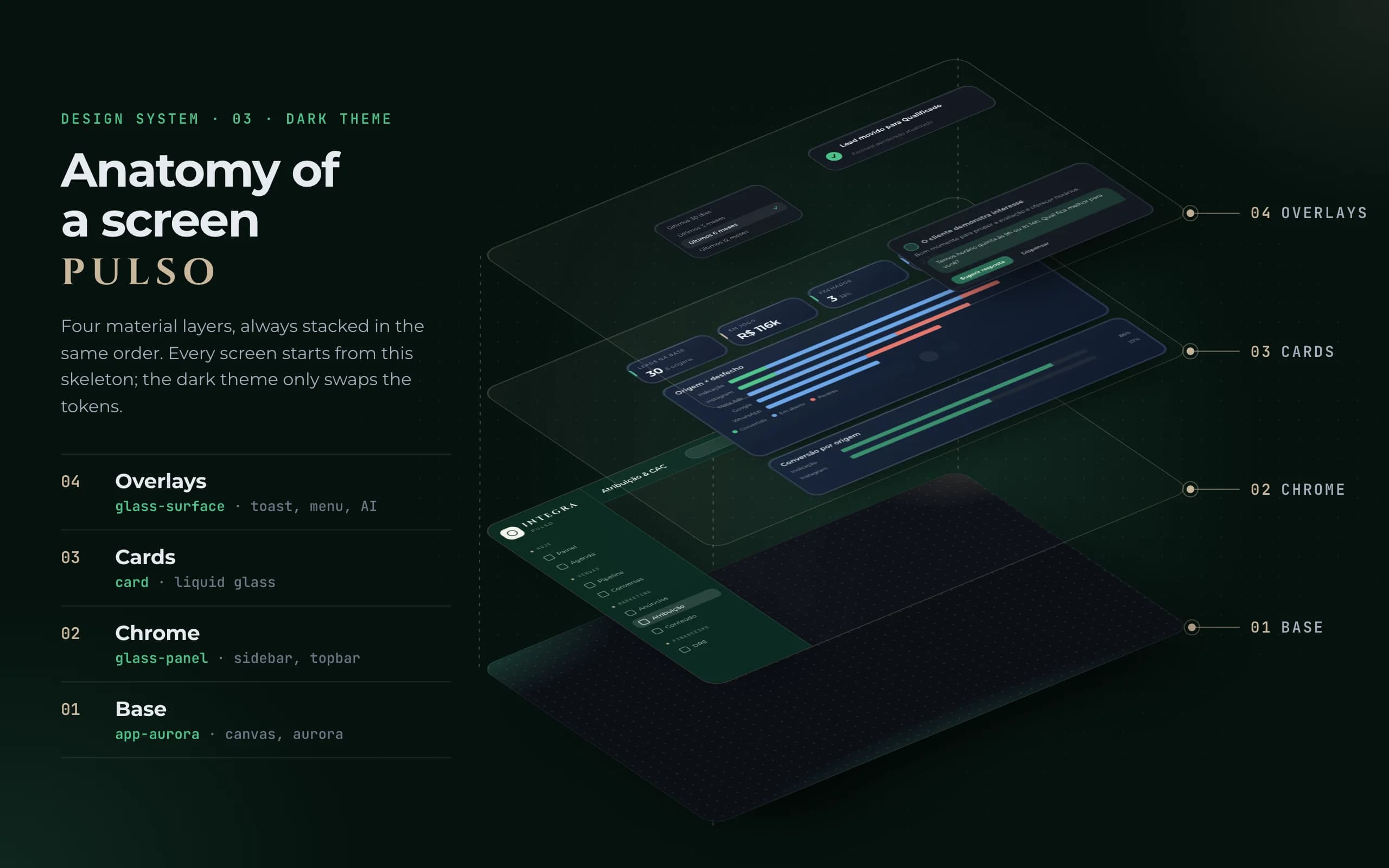
Material layers
Every Pulso screen stacks four material layers, always in the same order: base, chrome, cards and overlays. The data is fictional.
Features and the pains they solve
Every feature was born from a real operational problem.
01
WhatsApp booking on the landing page
- Pain
- With no integrated online scheduling, the clinic books appointments over WhatsApp, and the landing page had to take visitors to that conversation in as few steps as possible.
- Solution
- On the live landing page, every booking button opens the clinic’s WhatsApp with “I want to book my assessment” already typed. The link comes from a single constant, so changing the number or the text updates all 8 buttons at once.
Impact: 8 booking buttons, 3 of them above the fold, open the same prefilled conversation
02
Lead attribution
- Pain
- Instagram lead generation, local and remote, ran unmeasured: the clinic did not know which source brought patients and which only brought volume.
- Solution
- In Pulso, each source becomes one bar with the outcome inside (converted, open, lost): length shows volume and composition shows quality. Cost, CPL and CAC live on the Ads screen.
Impact: 6 sources matched to their outcome, derived from pipeline leads, no hard-coded figures
03
Ads and CAC
- Pain
- The ads manager counts “results”, not patients, and can show a campaign as active while it delivers nothing. On its own, it can’t answer “which campaign brought the last patient?”
- Solution
- In Pulso, the screen separates what the platform reports from what the CRM knows (named lead, assessment, patient, revenue), flags allocation-based figures as “approximate”, lists ads missing a tracking parameter, so the lead’s source isn’t recorded, and shows how many days an active campaign has gone without delivery.
Impact: CAC and ROI by campaign, service line and channel; with no patient, CAC shows “—”, not zero
04
Local SEO on the landing page
- Pain
- A clinic in Salvador has to show up in local search, and a page with a video hero and video testimonials is heavy on phones.
- Solution
- On the live landing page: JSON-LD structured data for a medical clinic with address and service area, canonical tag, sitemap and robots, plus WebP images, re-encoded videos and fonts served from the clinic’s own domain with preload.
Impact: MedicalClinic + LocalBusiness schema, canonical and self-hosted fonts live on the site
05
Sales pipeline
- Pain
- A big-picture view of sales was on the operation’s list of pain points: without asking for a report, management couldn’t see which stage each prospect was in, which protocol they were considering or who owned each stalled deal.
- Solution
- In Pulso, a drag-and-drop kanban (dnd-kit) switches its columns between stage, protocol, specialty and owner, with a forecast weighted by each stage’s probability and a stalled-lead alert based on the time limit set on the column.
Impact: 4 views of the same funnel and 5 tabs: Funnel, List, Proposals, Losses and Performance
06
AI agent on WhatsApp
- Pain
- An AI receptionist without clear boundaries can say what it shouldn’t and get in the way more than it helps, while conversations with patients end up scattered across channels.
- Solution
- In Pulso’s designed flow, the agent handles routine questions in the patient’s language and hands pricing, negotiation or symptoms to the team with a summary; the team takes over and hands back the conversation in the inbox, with reply suggestions and the lead’s card alongside. The same agent is designed to follow up on no-shows, open quotes, protocols about to end and overdue installments, and a monitor shows what it resolved, what is waiting and what it escalated.
Impact: 5 fixed rules declared on the agent, like quiet hours 9 pm–8 am and never negotiating price
07
Automations
- Pain
- Appointment confirmations and post-visit check-ins can’t depend on someone remembering, and an automated flow that stops delivering usually dies silently, with no one noticing.
- Solution
- In Pulso, a trigger → conditions → actions builder runs a dry run before switching on (who would get the message right now, already excluding opt-outs), and a health panel flags flows with chronic errors or no recent success.
Impact: 12 ready-made flows on 16 triggers and 8 actions, including day-before confirmation
08
Billing, cash desk and P&L
- Pain
- The P&L and finance were on the operation’s list of pain points, and a patient saying they paid is not yet verified money.
- Solution
- In Pulso, the cash desk separates pending, overdue and “to verify” invoices (a payment the patient reported, which only becomes paid after the front desk checks it). The P&L shows revenue, costs and net result monthly or year-to-date, with the per-service-line split labeled as an allocation.
Impact: Dashboard, P&L and Reports read the same series, so a month never shows two figures
09
Schedule and waiting list
- Pain
- Managing the schedule was on the operation’s list of pain points, and the front desk books patients across five service lines, each with its own doctors.
- Solution
- In Pulso, the daily grid shows each doctor’s color and the status of every appointment, and the waiting list only releases a patient after finding a free slot, so no one leaves the queue without a booking.
Impact: 8 am–6 pm grid with 5 statuses; slot-finding searches 7 days ahead in 30-minute steps
10
Patient portal
- Pain
- Conversations with patients were scattered, and someone on an integrated protocol follows doctor, nutrition and training prescriptions at the same time.
- Solution
- In Pulso, patients confirm or reschedule the next appointment in one tap, see what to do today in My Protocol with each specialist’s prescription, track measurements and goals in My Progress and find their contract, installments and renewal in My Plan.
Impact: 9 portal screens, with a 5-destination tab bar on phones
11
Regulated inventory
- Pain
- Inventory was on the operation’s list of pain points, including the risk of a health inspection over how much tirzepatide was stored. Tracking only “low stock” lets that risk through.
- Solution
- In Pulso, GLP-1 analogs have a storage cap with the reason recorded, and their status against the cap (within, close, above) is separate from their availability status.
Impact: Restocking never exceeds the cap: it adds only what fits and says when it was limited
12
Access roles
- Pain
- Front desk, doctors, management and patients use the same system for different things, and the operation summed up the current setup as “everything is in a different place”.
- Solution
- In Pulso, there is a single entry point, and each role lands on the screen where their day starts (queue, schedule or dashboard). The medical director switches between the clinical and management views.
Impact: 6 roles; menu, tabs and shortcuts share one map, and anything without a role stays hidden