Financial data analytics · PWA · Data visualization
Cripto Terminal
A crypto terminal that shows whole-portfolio risk and explains every metric it computes
Private project — no public link
- Client
- Personal product
- Role
- Full-stack Software Engineer — independent project
- Year
- 2026
- Technologies
- Next.js 16
- React 19
- TypeScript
- Tailwind CSS 4
- TanStack Query
- Zustand
- Zod
- lightweight-charts
- Recharts
- Radix UI
- Vitest
Context
Mobile-first progressive web app (PWA) for crypto-asset analysis, built with Next.js 16, React 19 and TypeScript on real market data from the CoinGecko and Binance public APIs. Personal use within a closed circle, behind an access code. The interface speaks like an analysis tool: it measures and describes, and does not recommend buying or selling.
Challenge
The free Portuguese-language tools I evaluated show prices and weights but not consolidated portfolio risk, and rarely state the formula, window or source of their indicators. Public market APIs enforce tight rate limits (HTTP 429), which calls for caching, rate control and stale-data signals to keep the interface usable.
Results
- automated tests (Vitest) covering indicators, risk, portfolio and access
- 237
- metrics documented with formula, window and pitfall
- 23
- assets covered by the screener (the Market screen shows the top 100)
- 250
- CoinGecko call per minute per currency for all 250 assets, with a cache shared across screens and users
- 1
Key deliverables
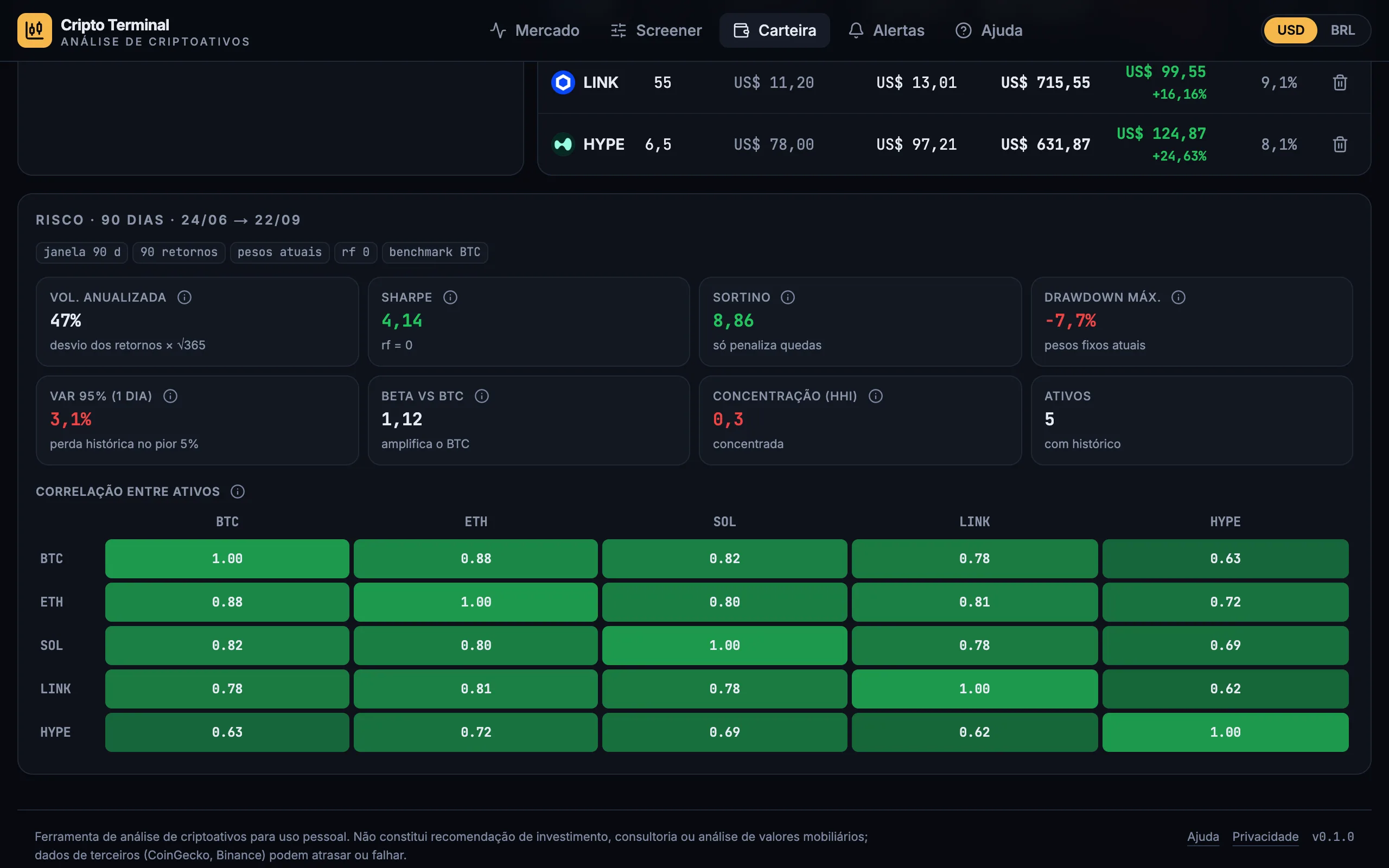
- 01Implemented in plain TypeScript, with Vitest tests, the 90-day portfolio risk panel (annualized volatility, Sharpe, Sortino, max drawdown, 95% VaR, beta relative to BTC, HHI and a correlation matrix), which brings consolidated portfolio risk into a single screen.
- 02Built candlestick charts with lightweight-charts, from 15 minutes to 1 week, with indicators computed in TypeScript (SMA 20, EMA 50, Bollinger Bands, RSI and MACD in panes) and a flagged fallback to CoinGecko daily candles when an asset has no Binance pair.
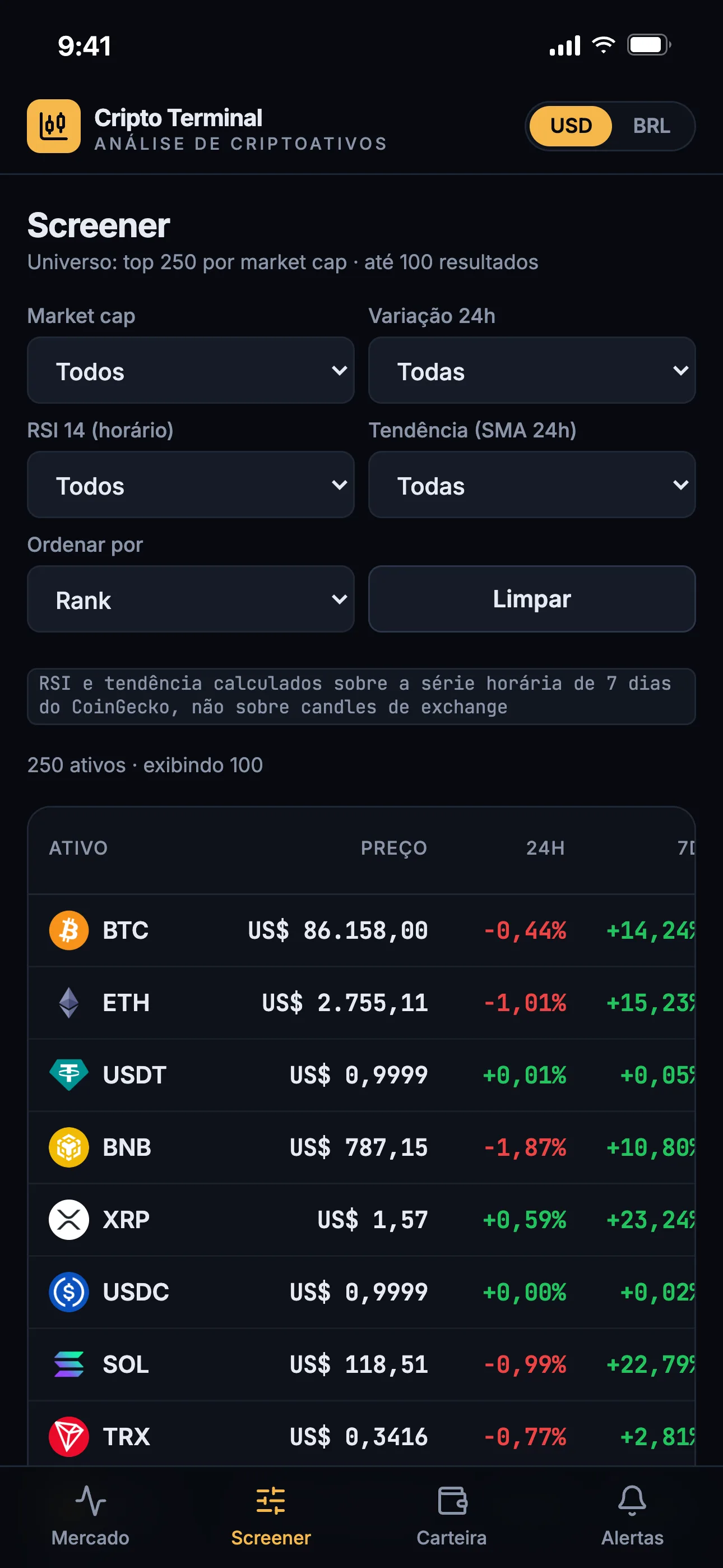
- 03Created a screener over the top 250 by market cap, with filters for market cap, 24h change, hourly RSI and trend, computing the indicators from the CoinGecko hourly sparkline: a single call per minute per currency covers all 250 assets.
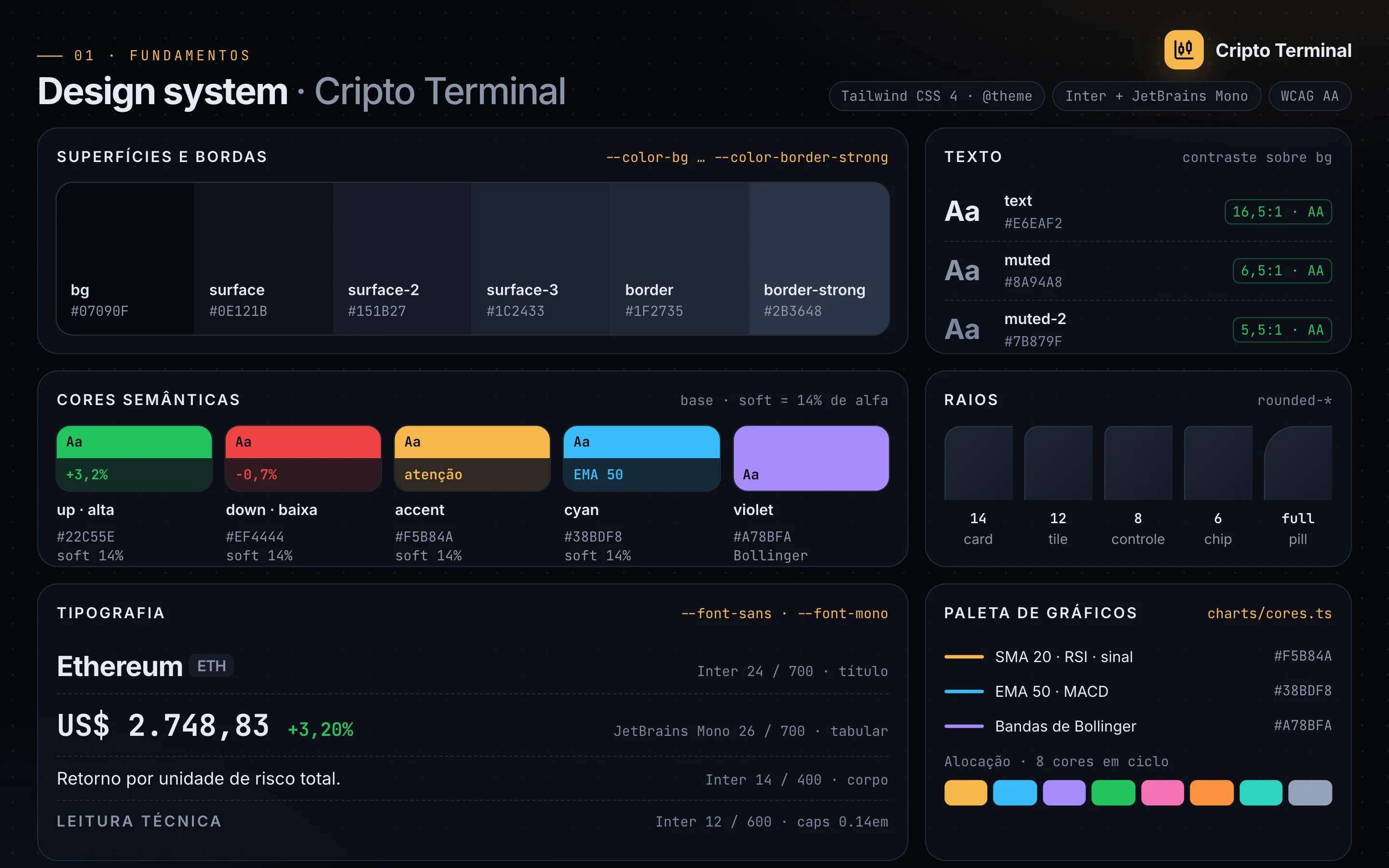
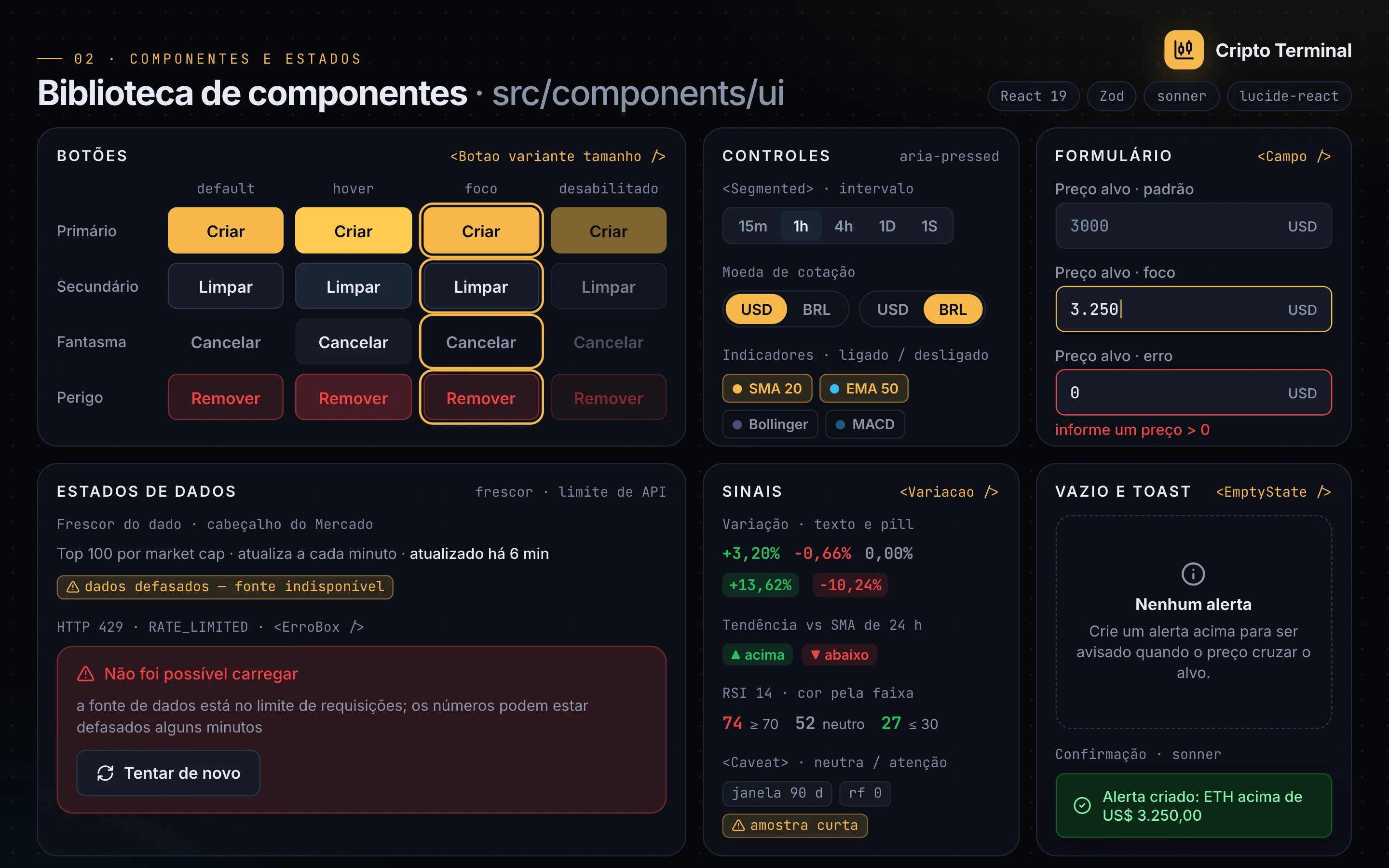
- 04Designed the component library and design system with tokens in the Tailwind CSS 4 @theme, WCAG AA contrast and documented states (focus, error, empty, stale data, HTTP 429), reused across every screen together with Radix UI popovers and Recharts and SVG charts.
- 05Architected the data layer with Next.js Route Handlers, Zod validation, an LRU cache with dedupe and stale-on-error, per-IP rate limiting and HTTP 429 handling without retry storms, showing the data age in the interface.
- 06Secured the app with a per-request nonce CSP and an access-code gate with an HMAC-SHA256 cookie, limited to 5 attempts per IP every 15 minutes, and centralized the methodology of the 23 metrics in a single source that generates the popovers and the help page, with a test that fails after 12 months without review.
Screens and components
Market
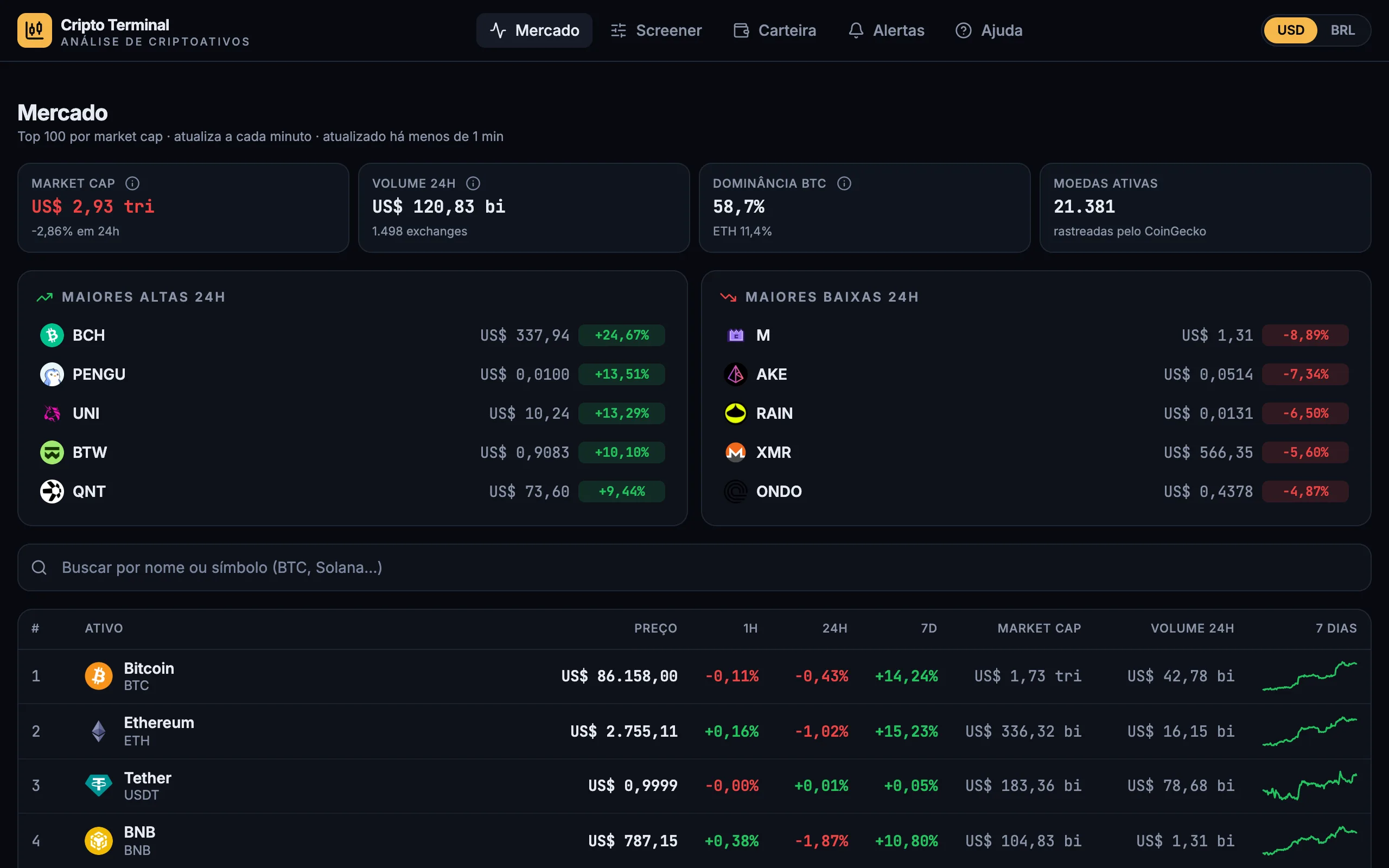
The market screen lists the top 100 by market cap and shows in the header how long ago the data was updated.
Chart with indicators
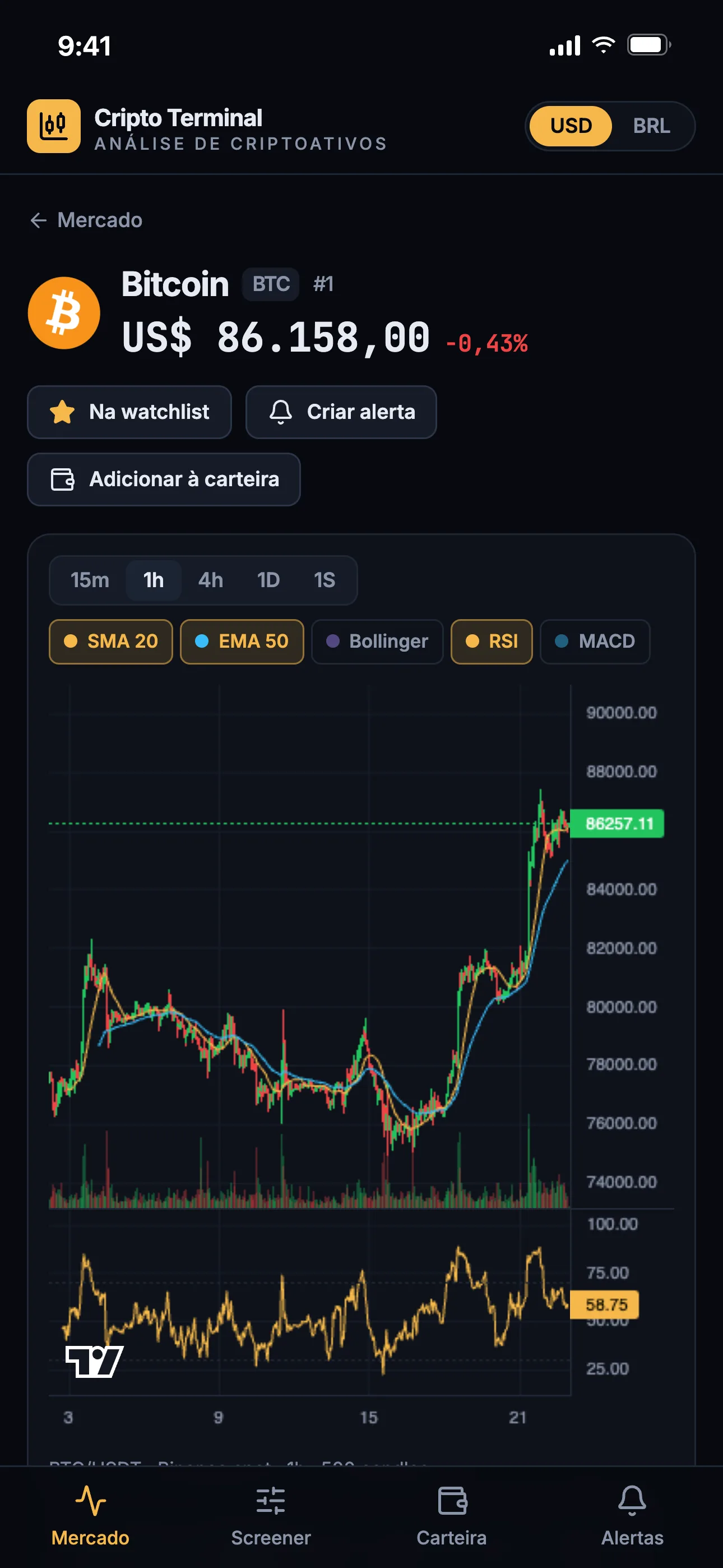
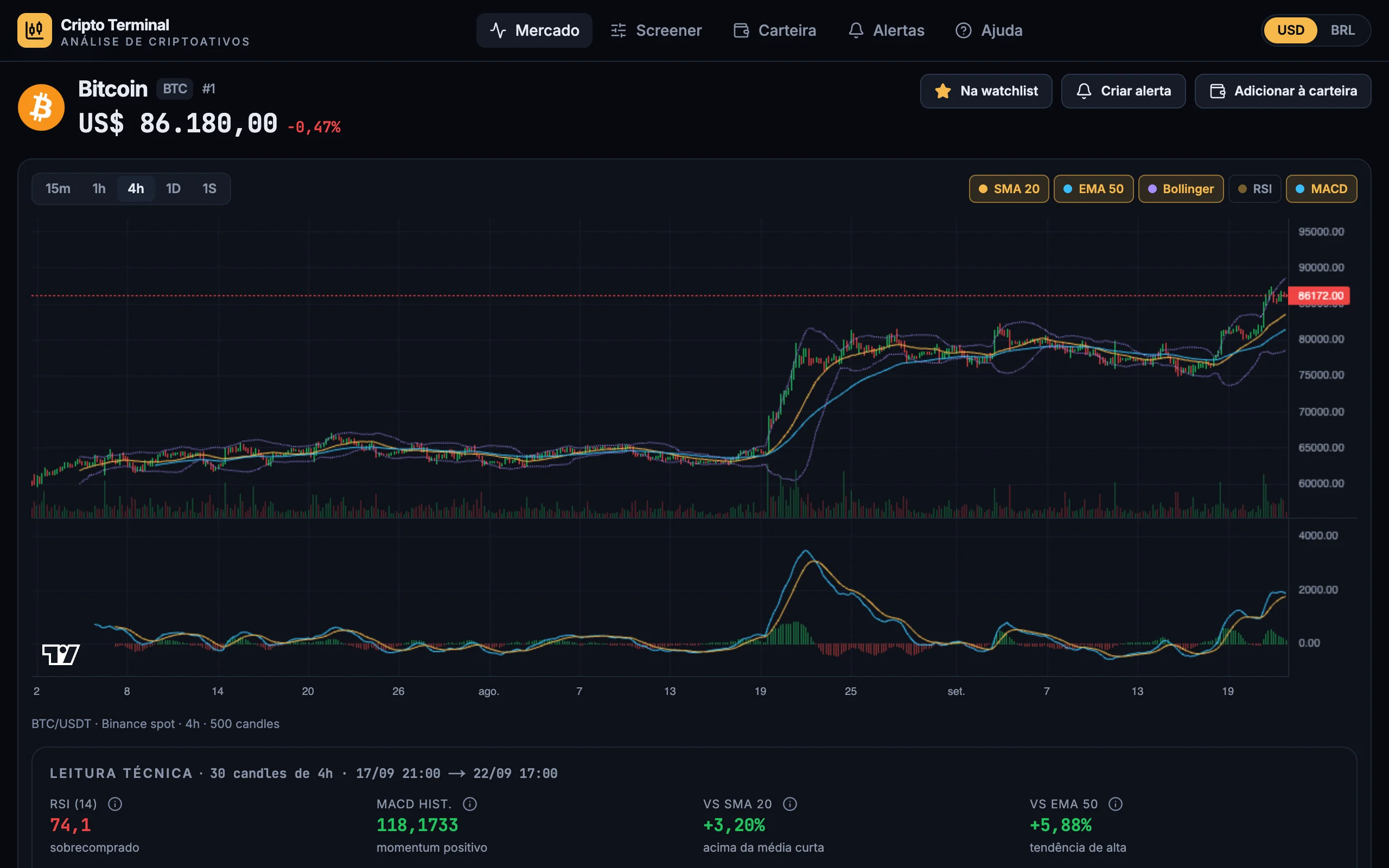
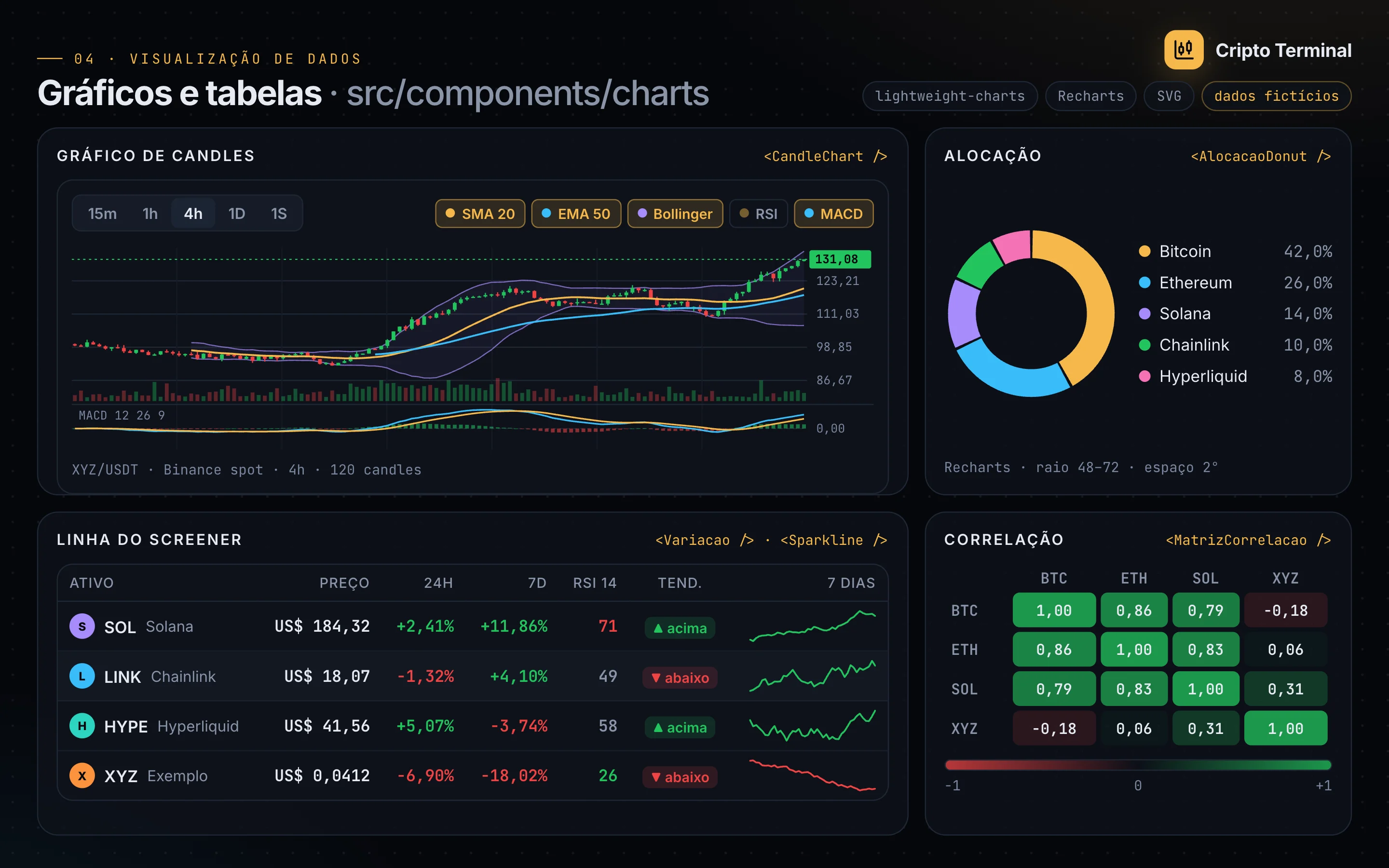
The chart uses Binance candles and overlays SMA, EMA, Bollinger and MACD, computed in TypeScript inside the app.
Portfolio and metrics on mobile
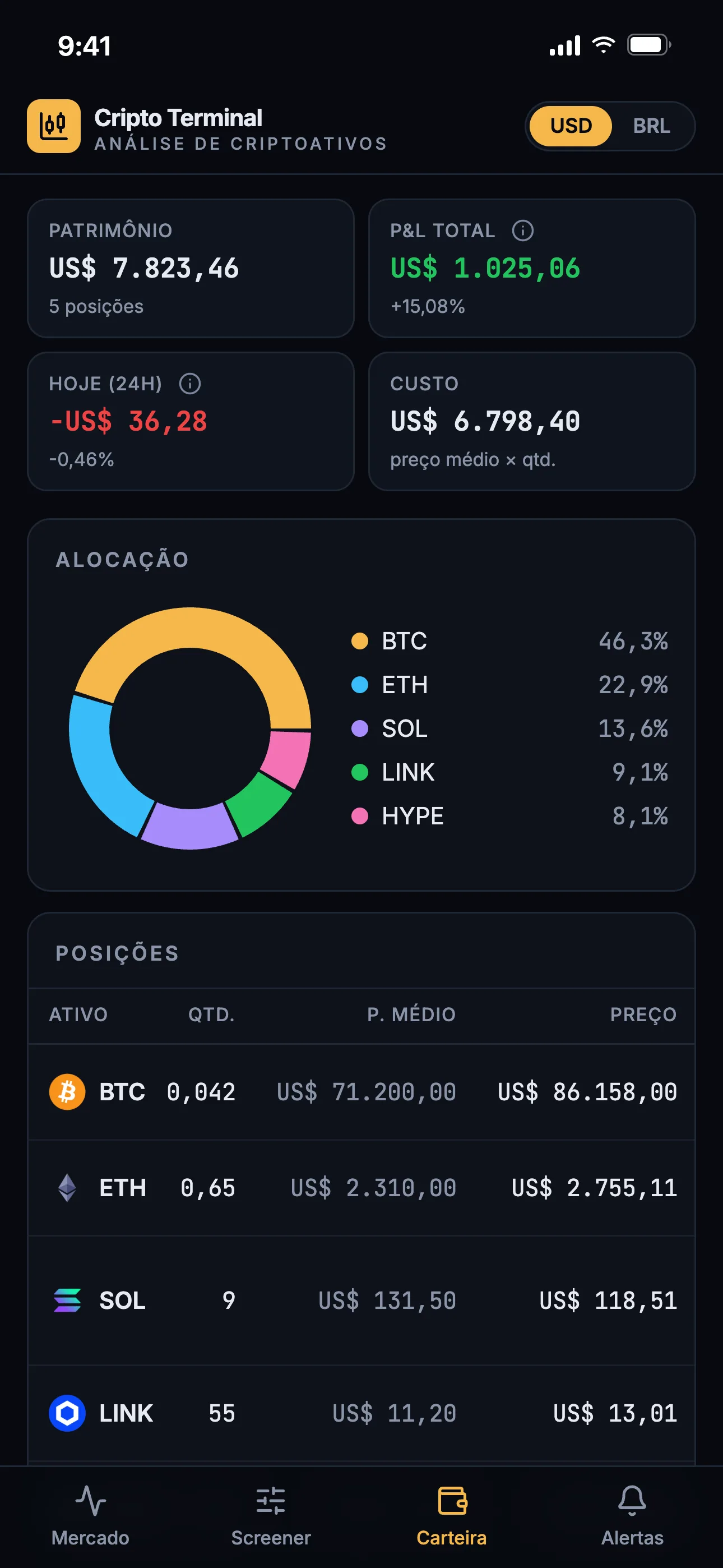
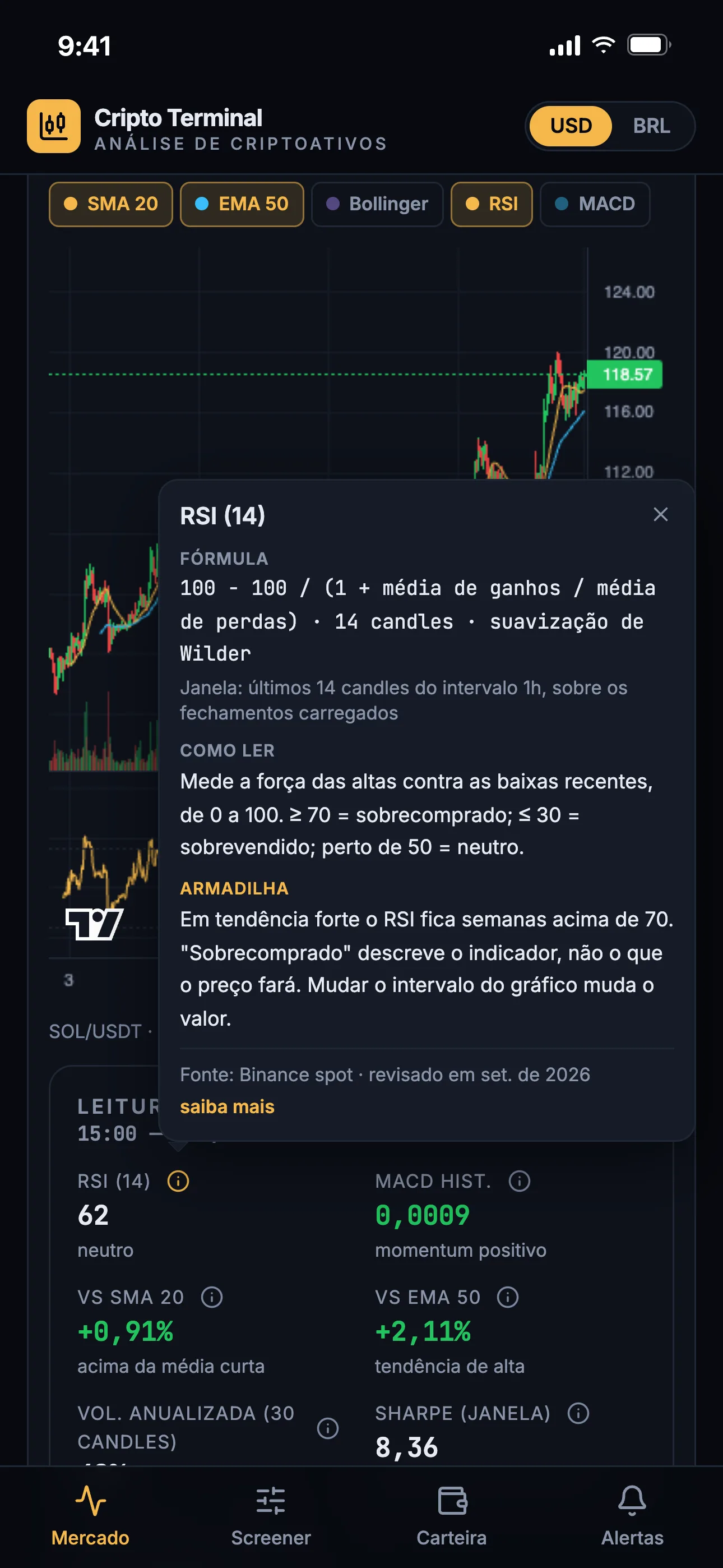
The portfolio shows P&L, cost basis and allocation per asset. On mobile, the candlestick chart keeps the technical indicators, and each metric opens its formula, window and pitfall with one tap.
Portfolio risk
The panel measures whole-portfolio risk, spells out the sample in chips and states that the tool does not recommend trades.
Explained metrics
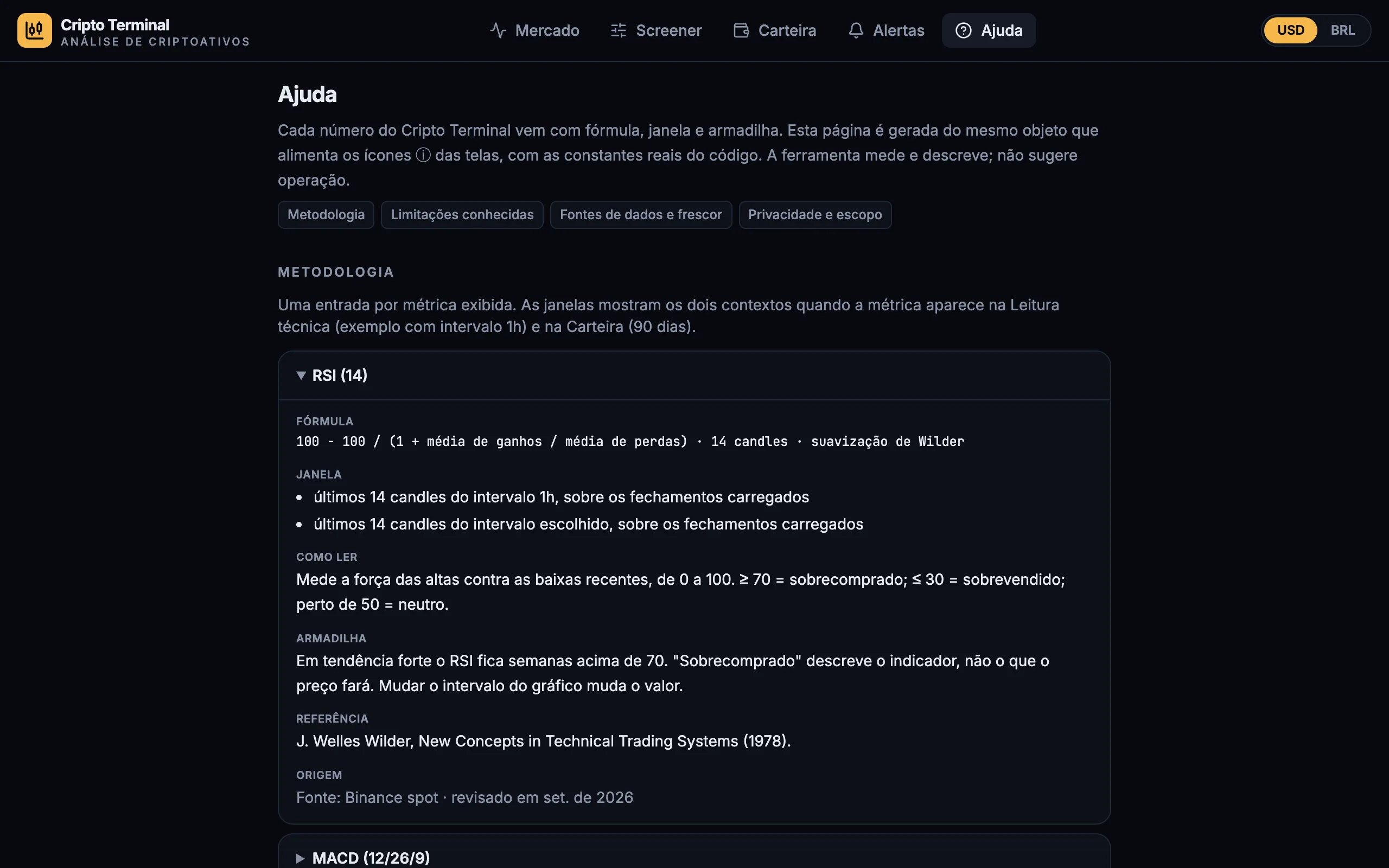
The help page is generated from the same object that feeds the ⓘ icons across the screens.
Watchlist and screener
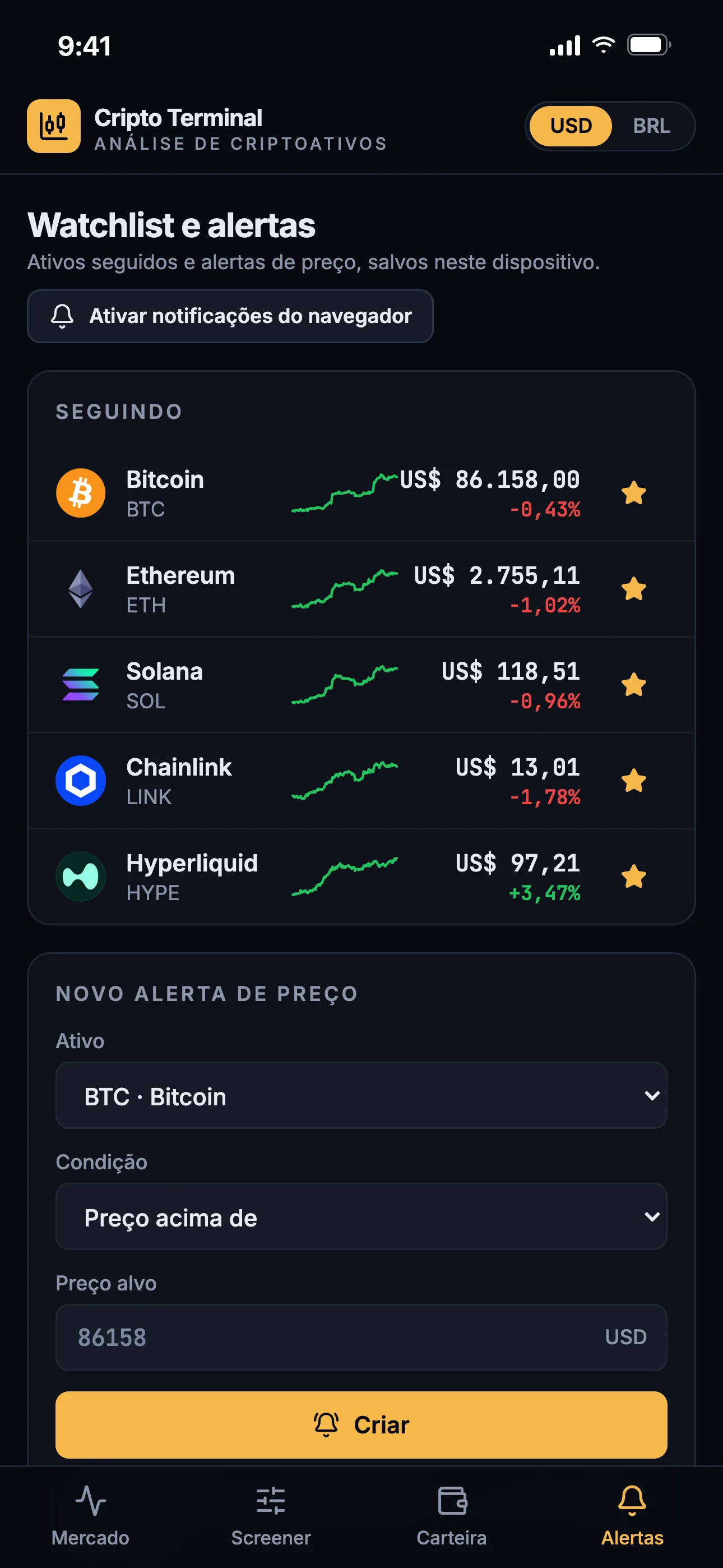
The watchlist tracks assets with sparklines and creates price alerts, and the screener filters 250 assets and states which series feeds the RSI.
Foundations
The foundations sheet gathers the Tailwind CSS 4 @theme tokens: color, contrast, typography, radii and chart palette.
Component library
The component library documents variants and states, including stale data and API rate limits (HTTP 429).
Data visualization
The data visualization components are reused across the coin, portfolio and screener screens.
StatTile anatomy
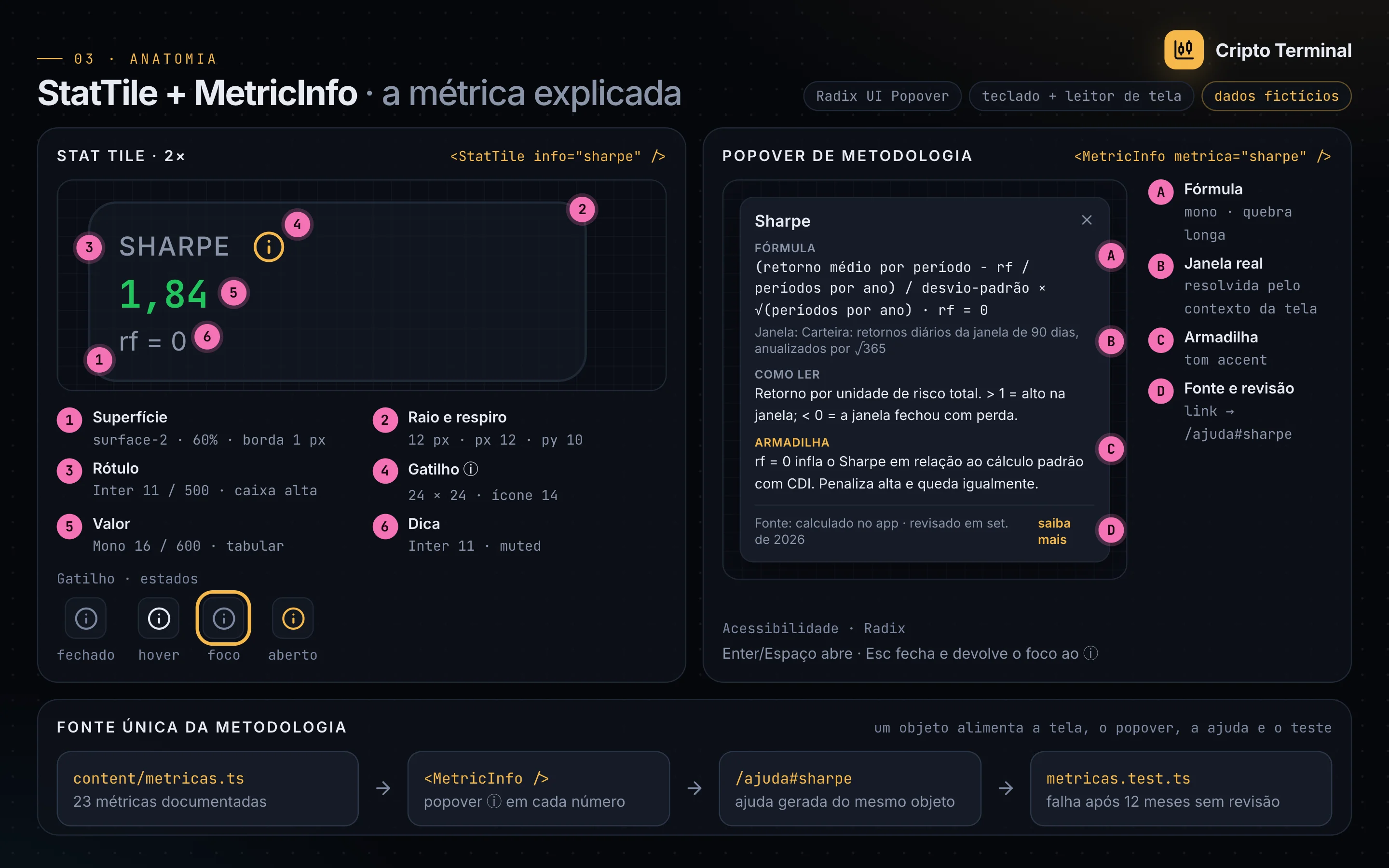
The StatTile and MetricInfo anatomy shows measurements, states and the single source of the methodology.
Architecture
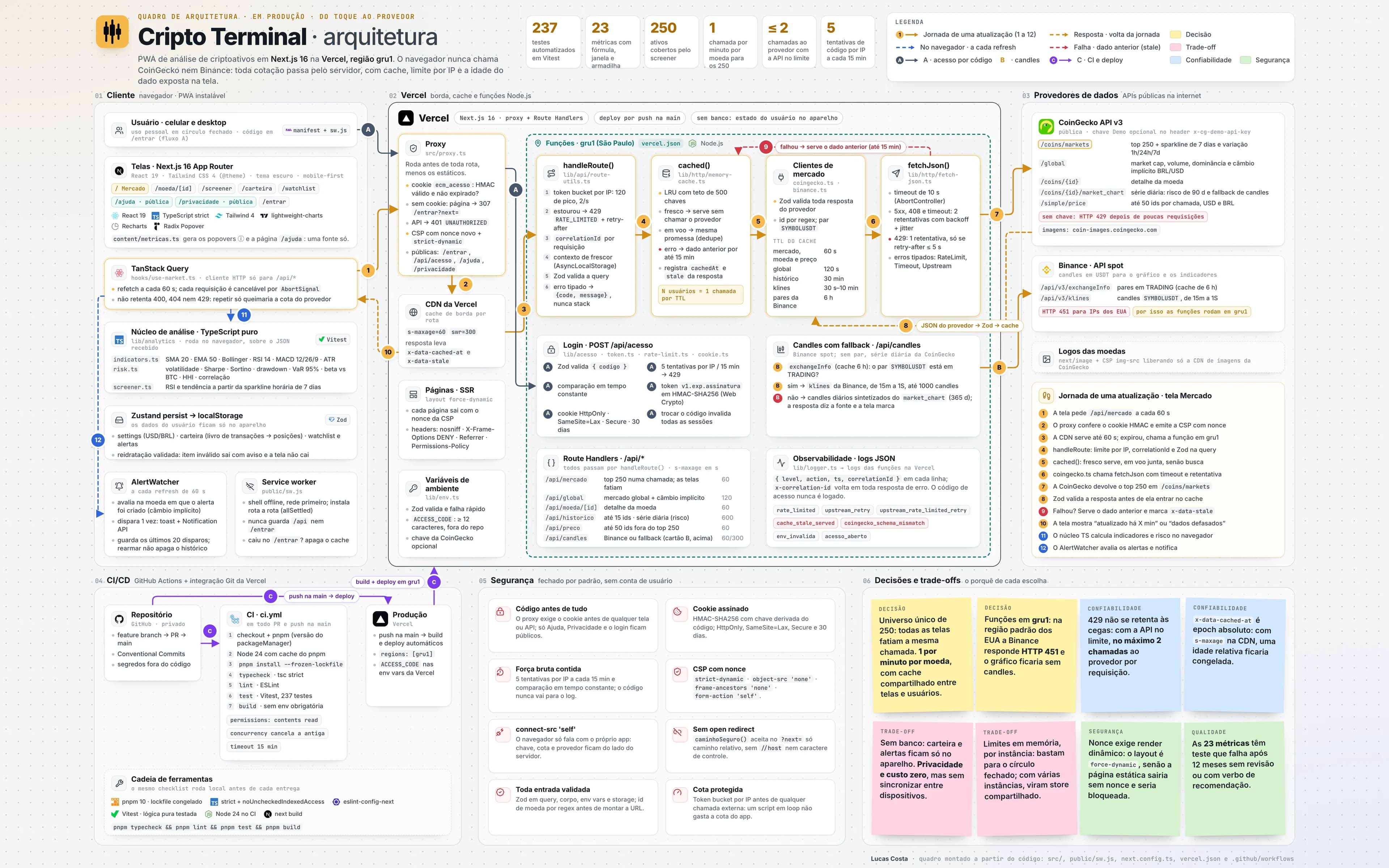
The board follows one Market screen refresh from 1 to 12: the browser never calls CoinGecko or Binance, every quote goes through the functions in the gru1 region, with per-IP limits, a deduplicating cache and the previous data on failure, and the screen shows how old the data is.
Features and the pains they solve
Every feature was born from a real operational problem.
01
Portfolio risk
- Pain
- Crypto investors track their holdings between the exchange app and a spreadsheet, and the free Portuguese-language tools I evaluated show each asset's price and weight but not the risk of the portfolio as a whole.
- Solution
- The panel fetches the 90-day daily series of each position from CoinGecko (up to 14 assets, plus BTC as the benchmark) and computes, in plain, tested TypeScript, annualized volatility, Sharpe, Sortino, max drawdown, 95% VaR, beta relative to BTC, HHI concentration and the correlation matrix. Chips spell out the assumptions, and the sample chip turns yellow below 60 returns.
Impact: 7 measures over 90 days of daily returns, plus HHI concentration
02
Positions and P&L
- Pain
- Without average price and live quotes in one place, P&L, cost basis and allocation depend on manual updates, and in an earlier version of the app an asset outside the top 250 was silently valued at 0.
- Solution
- Each position stores quantity, average price and the currency it was entered in; the screen computes net worth, P&L, today's change and an allocation donut. Assets outside the top 250 are priced separately, and a position without a price is flagged and left out of the risk calculation.
Impact: No sign-up: quantities and average prices stay on the device
03
Explained metrics (ⓘ and Help)
- Pain
- Market tools rarely state the window or the sample behind a number, and the documentation, when it exists, sits outside the chart and in English only.
- Solution
- A single typed file describes each metric (formula, real window, how to read it, pitfall, source, review date), importing the constants from the code itself, and generates the Radix popovers on the screens and the /ajuda help page. Tests fail on entries unreviewed for over 12 months and on recommendation verbs.
Impact: 23 metrics with formula, window and pitfall
04
Candlestick chart with indicators
- Pain
- Technical indicators usually show up without the window they were computed on, and hosted in the default US region the app wouldn't even get candles: Binance answers HTTP 451 to US servers.
- Solution
- Binance candles in lightweight-charts with SMA 20, EMA 50, Bollinger, RSI and MACD computed in TypeScript, and the technical read right below; the functions run in the São Paulo region (gru1). Assets without a Binance pair get daily candles synthesized from CoinGecko, flagged on screen.
Impact: 5 intervals, from 15 minutes to 1 week
05
Screener
- Pain
- Filtering by RSI and trend over the same universe as the portfolio would require candles for hundreds of assets, which would blow through the public API's rate limit.
- Solution
- Filters for market cap, 24h change, hourly RSI 14 and trend against the 24h SMA, with sorting, computed on the 7-day hourly sparkline that already comes with the CoinGecko listing. A note states which series the RSI comes from.
Impact: The top 250 filtered with no extra calls
06
Market
- Pain
- The market overview lives on CoinGecko, while the portfolio and the charts live in other tools.
- Solution
- The home screen brings together global market cap, 24h volume, BTC dominance, the top 24h gainers and losers, search and the top 100 table with 1h, 24h and 7-day change and a 7-day sparkline.
Impact: Top 100 sliced from the same top-250 call
07
Price alerts
- Pain
- Watching for a target price means checking quotes all the time, and a target set in dollars must not change value when the screen switches to reais.
- Solution
- An alert (above or below) stores the currency it was set in and is checked in that currency on every 60-second refresh while the Market or Watchlist screen is open and visible, converting through the exchange rate; without a rate, it is skipped. It fires once with a toast and a browser notification, if allowed, and re-arming keeps its history.
Impact: Stores the last 20 triggers per alert (the screen lists the latest 3)
08
USD and BRL
- Pain
- Crypto quotes come in USD while the portfolio may have been entered in BRL; without storing the original currency, switching the display currency distorts cost basis and P&L.
- Solution
- A USD/BRL toggle, saved on the device, requests CoinGecko quotes already in the chosen currency (Binance candles stay in USDT) and converts average prices through the implied exchange rate (global market cap in BRL ÷ in USD), documented with formula and pitfall on the Help page.
09
Data age and API limits
- Pain
- Without a key, the CoinGecko API returns HTTP 429 after a few requests; the app showed the raw error, and a single refresh while rate-limited could turn into up to 9 calls to the provider.
- Solution
- Every call goes through the server, with a shared LRU cache (identical in-flight requests collapse into one, and the previous data is served on error), a per-IP limit (120 burst, 2 per second) and at most one retry on a 429. The Market screen shows "updated X min ago" and, when needed, the stale-data notice.
Impact: When rate-limited, at most 2 calls to the provider per request
10
Access and security
- Pain
- The tool is for personal use, with no accounts and a zero budget: left open on the internet, any script would burn the API quota, and an injected script could read the positions stored in the browser.
- Solution
- A proxy requires the code before any screen or API (Help and Privacy stay public), validated with Zod, compared in constant time and exchanged for an HttpOnly cookie signed with HMAC-SHA256, valid for 30 days. The same proxy emits a CSP with a per-request nonce and strict-dynamic, plus nosniff, X-Frame-Options and Referrer-Policy.
Impact: 5 attempts per IP every 15 min (per-instance limit)